AI automation terms explained: MCP, agent, context, skill, and secret
Who this is forReaders who keep running into MCP, agent, and context in AI automation guides and want to see how these five terms fit together in one workflow.
Series · AI automation glossary part 5 of 13, expand to see all
- What Is an API? Understanding It with One Snack Bar Order Slip
- What Is a Webhook? Understanding It With a Restaurant Waiting Ticket
- What Is a Server? A Computer That Stays On When Yours Doesn't
- What is a terminal? A plain-English guide to the CLI and shell
- AI automation terms explained: MCP, agent, context, skill, and secret
- Claude terms explained: Projects, Artifacts, Cowork, and scheduled tasks
- What Is a Database? Why Tables Look Alike but Lock Differently
- What Is Supabase? Tables, Auth, and Server Functions in One Place
- Auth and RLS Explained: Keep the Screen Open, Lock the Data
- What Is Google Apps Script? Running Your Code on Google's Servers
- What Is Playwright? Why AI Suddenly Opens a Chrome Window
- What Is Aside? An Agent Browser That Clicks Using Your Own Logins
- What Does AX Mean? AI Transformation vs. DX and 3 Workplace Bottlenecks
TL;DR: Learning AI automation means running into the words MCP, agent, context, skill, and secret all within a few days. But the more you search each one on its own, the more the explanations overlap in different words, and the more confusing it gets. This post puts the five words side by side with a one-line definition and a real-life situation for each, then closes with one diagram showing how the five actually meet inside a single automation.
When you start handing automation work to AI, you run into the words MCP, agent, context, skill, and secret all within a few days. The problem shows up when you search for these five one at a time. Search MCP and you get “an open standard that connects models and tools.” Search agent and you get “an AI that judges for itself.” Both are true, but put side by side, it is not clear how one relates to the other. Trying to understand five unfamiliar words separately, five times, only makes things more confusing.
This first post in the series explained APIs with a single order slip from a Korean snack-food shop (bunsik-jip) (What is an API?). This time, I sort out the five roles that actually move automation along, carrying that same order slip. We go through the five words one by one, and at the end tie them together in a single diagram showing how they connect inside one automation.
Contents
- MCP: One standard channel that connects different tools
- Agent: A loop that repeats on its own until the goal is reached
- Context: The working space you can remember right now
- Skill: Save it once, then call it with one line next time
- Secret: Not written in code, kept in a vault
- Where the five terms meet in one automation
- The five terms at a glance
- Further reading
MCP: One standard channel that connects different tools
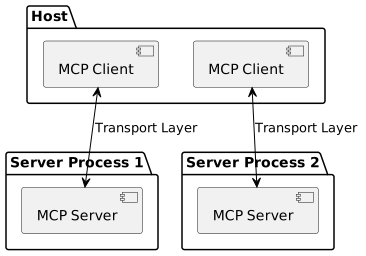
MCP (Model Context Protocol) is the standard channel that connects AI to external tools such as Google Drive, Notion, and GitHub.
The key is the word “standard.” Originally, every time you connected an AI to a new tool, you had to build a connection method specific to that tool. With ten tools, there were ten connection methods. MCP bundles these scattered connections into one spec. If the people who build a tool make a server that follows this spec, the AI only needs to know the spec to connect to any tool the same way.
You have probably had a similar experience in everyday life. Not long ago, to connect an external monitor, a printer, and an external hard drive to a laptop, you needed different shapes of ports and cables for each. Now one USB-C hub connects most of them, because the port shape has been unified. The official introduction document for MCP makes this same comparison: it calls MCP “a USB-C port for AI applications.” If Claude can read your Google Calendar or a Notion page, there is usually this standard channel behind it.
Agent: A loop that repeats on its own until the goal is reached
An agent is a loop that uses tools and repeats until it reaches the goal.
The simplest way to tell them apart is to compare with chat. Chat is a single back-and-forth where one question gets one answer, and a person decides what to do next. An agent is different. Given a goal, it makes its own plan, runs tools, looks at the results, and decides the next step itself based on those results. It repeats this process until a result comes out. In the words of Anthropic’s guide to building agents, an agent is a system that “repeatedly uses tools while watching feedback from the environment.”
It is like handing work to a new employee. Say you ask, “Pull these five reports together and make a table.” Some people ask you at every step, “What should I do next?” Others find the material, organize it, make the table, and bring back only the result. The second is the agent approach. Tools like Claude Cowork go one step further: before an action that is hard to undo, such as deleting a file or sending an email, they are built to wait for a human’s approval before running it.
Context: The working space you can remember right now
Context is the full body of text that AI can refer to when it is creating an answer right now.
It is different from the knowledge AI learned. Learned knowledge is like books kept in a library, and it rarely changes. Context is working memory used only in the chat window that is open right now. The longer the conversation runs, the more this working memory fills up, and once it is full, accuracy starts to drop, beginning with the earlier content. Anthropic’s official documentation calls this phenomenon “context rot.”
As the number of tokens grows, accuracy and recall decline. This phenomenon is called context rot (context rot). So selecting what goes into the context matters as much as the size of the usable space. (Anthropic official documentation, Context windows)
A whiteboard in a meeting room makes this easy to picture. As you keep copying down what is said, the board fills up, and to write something new you have to erase the top part. The erased part is no longer visible, so meeting attendees easily forget it. If you have mixed several project discussions into one chat window and then gotten an answer that suddenly forgets what was decided earlier, the context was probably already filling up. So it is best to keep one task per chat window, and to summarize or open a new conversation before it fills up.
Skill: Save it once, then call it with one line next time
A skill is a feature that saves a repeated work procedure so you can call it back with one line next time.
When you first ask for a new task, you have to explain the context and the steps in detail every time. But once you save that procedure as a skill, from then on a single line like “Do it using this skill” reproduces the same procedure. In the framework this blog uses in its courses, AI automation learning is split into three stages: preparation, starting, and maintenance. A skill represents the last stage, maintenance. A flow you built once becomes a single line next week.
Think of a weekly report you put together every week. At first you have to explain where the data comes from, what order to organize it in, and what format to use for the table, one step at a time. But once that procedure is saved as a skill, from the following week it ends with something close to a single phrase like “organize it the way we did last week.” It is like writing a recipe card for a dish you cook often: next time, you just take out the card and follow it as written.
Secret: Not written in code, kept in a vault
A secret is a GitHub feature that keeps values that must not be exposed, such as passwords and access keys, in a separate vault outside the repository (the code storage).
When you build automation, there comes a moment when a tool like GitHub Actions (a GitHub feature that runs automatically inside a repository) needs a value to communicate with another service, such as a webhook URL or an API key, and that value has to go somewhere in the code. If you write this value directly into a code file, anyone who can view that repository can see it. If the repository is public, it is the same as anyone in the world being able to see it. So GitHub provides a feature for registering these values in a separate vault, apart from the repository code. The code only contains an instruction to “take the value from the vault,” and the actual value does not appear on screen or in logs. The screens for actually registering a value and calling it from code are covered in the post Adding GitHub Actions secrets.
As noted in the terms callout earlier, secret and API key are words at different levels. An API key is the value itself that proves credentials, and a secret is the way that value is kept in a vault instead of being written directly into code. In other words, the answer to “where do you put an API key or a webhook URL” is the secret. Handling such values safely, without writing them into code, matters just as much in other automation tools as it does on GitHub. How to handle Supabase keys is covered with real screens in the post Choosing a Supabase API key.
Where the five terms meet in one automation
So far we have covered the five terms one at a time. When a real automation runs, these five do not work in isolation; they interlock. But they do not all happen in the same place. Judgment happens inside the AI, and credential checks happen on the tool side.
1. Judgment: happens inside the context
2. Reaching for tools: still on the AI side
3. Checking credentials: from here on, it is on the tool side, outside the context
Steps 1 and 2 happen inside the AI's context, and step 3 happens on the tool side. When the context fills up, only steps 1 and 2 become unreliable.
The five terms at a glance
| Term | One-line definition | Everyday analogy | Where the word is used |
|---|---|---|---|
| MCP | A standard channel that connects AI to external tools | A USB-C hub that connects several devices into one | General concept (a public standard shared by multiple AI tools) |
| Agent | A loop that repeats on its own until the goal is reached | A new employee who finds materials and brings back a finished result | General concept (not tied to a particular company) |
| Context | The working memory the AI can refer to right now | A meeting-room whiteboard you have to erase from the top once it fills up | General concept (common to all AI models) |
| Skill | A procedure that can be reproduced with one line once saved | A recipe card you write once and keep pulling out | Name of a feature on the Claude Cowork screen (the meaning this post covers) |
| Secret | A vault where you keep values that must not be exposed | A safe where a key is kept instead of left lying around | Name of a GitHub feature |
Further reading
This post focused on laying the groundwork for the five terms. If you want to dig deeper into each one, Anthropic’s official documentation is a good next step. Both are in Korean and free of charge.
- Connecting Claude Code to tools through MCP A document for people who want to try the development environment called Claude Code directly. It explains what MCP actually makes possible, with examples.
- Context windows Covers in detail how context builds up and what causes context rot. It is a conceptual explanation you can read without a development environment.
Quotes and links in this post were checked directly on August 31, 2026, against the official MCP introduction document (modelcontextprotocol.io), Anthropic’s agent-building guide (anthropic.com/engineering/building-effective-agents), the context windows documentation, and Claude Code’s MCP documentation (all Korean-language editions).
Frequently asked questions
- What is the difference between an AI agent and a regular chat?
- Chat is a single back-and-forth where a person decides each next step. An agent is given a goal, makes its own plan, runs tools, reviews the results, and repeats until the goal is reached.
- What is a GitHub secret, and how is it different from an API key?
- A GitHub secret is a feature that keeps values such as API keys in a vault outside the repository, so they are not written into code. An API key is the value that proves you may make requests to a service.
BuildnWrite helps teams build AI agents that keep running. About BuildnWrite ›