What Is a Server? A Computer That Stays On When Yours Doesn't
Who this is forReaders who were told to put automation on a server by an AI but got stuck on what a server is, or who are unsure whether to buy or rent one.
Series · AI automation glossary part 3 of 13, expand to see all
- What Is an API? Understanding It with One Snack Bar Order Slip
- What Is a Webhook? Understanding It With a Restaurant Waiting Ticket
- What Is a Server? A Computer That Stays On When Yours Doesn't
- What is a terminal? A plain-English guide to the CLI and shell
- AI automation terms explained: MCP, agent, context, skill, and secret
- Claude terms explained: Projects, Artifacts, Cowork, and scheduled tasks
- What Is a Database? Why Tables Look Alike but Lock Differently
- What Is Supabase? Tables, Auth, and Server Functions in One Place
- Auth and RLS Explained: Keep the Screen Open, Lock the Data
- What Is Google Apps Script? Running Your Code on Google's Servers
- What Is Playwright? Why AI Suddenly Opens a Chrome Window
- What Is Aside? An Agent Browser That Clicks Using Your Own Logins
- What Does AX Mean? AI Transformation vs. DX and 3 Workplace Bottlenecks
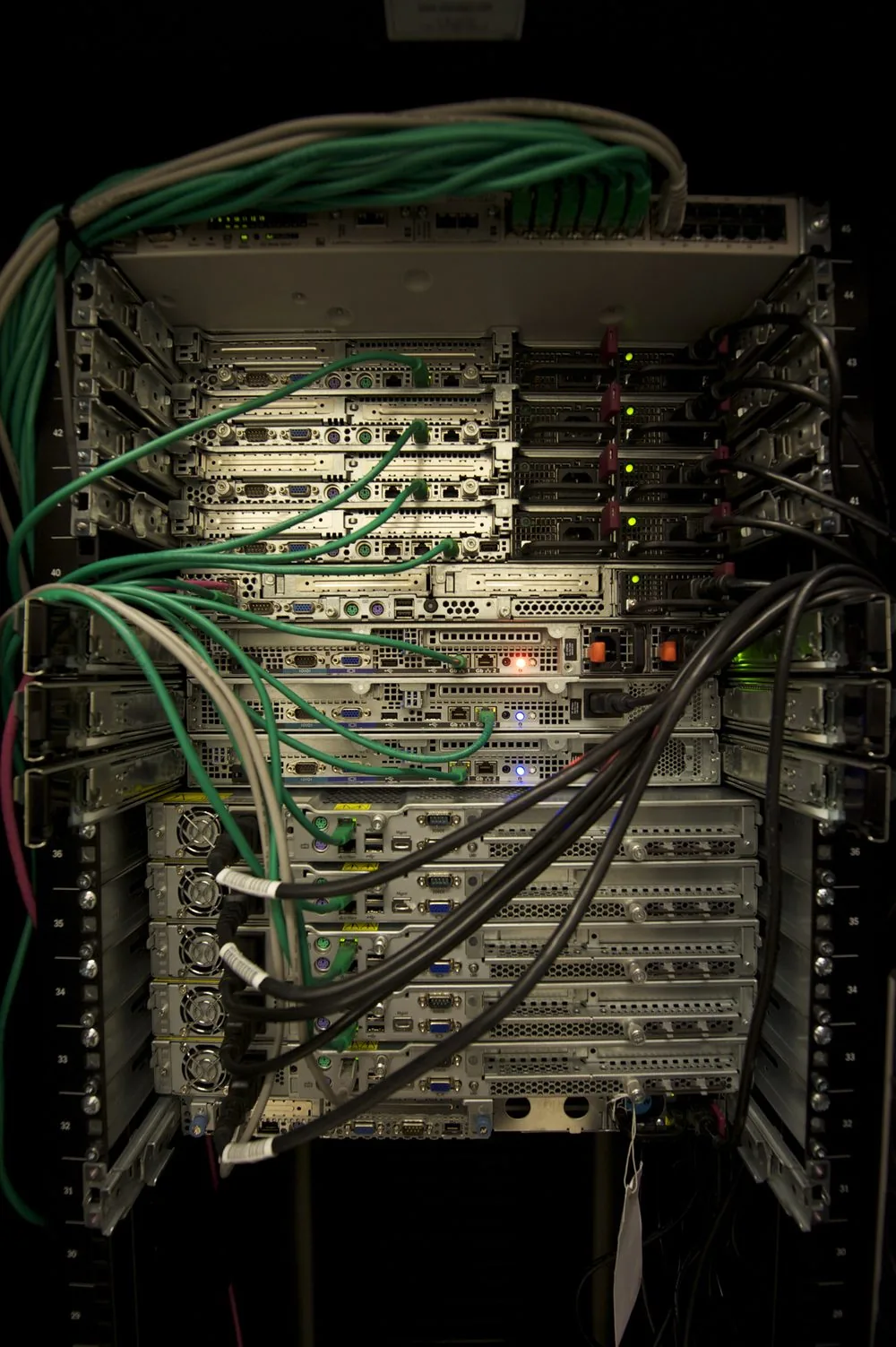
TL;DR: A server is not a special machine. It is a computer that isn’t yours and stays on for you all the time. Because it keeps running even when you step away or close your laptop, it keeps doing the job it was set up to do. This article confirms that by having you run your own computer as a server for a moment, and by looking at a photo of a real server rack.
When you ask AI to build an automation, you often hear, “This needs to go on a server to keep running.” That’s where people get stuck. Ask what a server is and you’ll hear “a computer that handles requests,” but then the words “request” and “handle” are unfamiliar too. In the end, the single word “server” becomes a wall that keeps you from starting.
This article gets past that wall not with an analogy but with direct verification. A server isn’t a concept that exists only in computer science textbooks. Your laptop can briefly become one too. After reading, you’ll know exactly what “put it on a server” means, and you’ll have turned a server on and off yourself.
Contents
- A Server Is Not a Kind of Machine, but a Machine That Stays On
- This Is What One Looks Like
- Why the Word “Server” Is Confusing
- Let’s Briefly Turn Your Computer Into a Server
- Two Ways to Use a Server
- If You Want to Read More
A Server Is Not a Kind of Machine, but a Machine That Stays On
Whether it’s a laptop or a desktop, a computer is just a computer. It’s easy to mistake a server for a different kind of machine, but what separates a server from an ordinary computer isn’t its appearance. It’s whether it stays on.
If you run automation on your own computer, that automation lives only as long as the computer is on. Close the laptop or restart it, and the automation stops at that moment. But if you want automation to keep working at dawn or while you’re asleep, something has to stay on. The computer that takes on that role, staying on for you, is called a server. You can use your own computer as a server, but usually you rent a computer in someone else’s data center. When usage is low, many services let you rent one for free.
When you run automation on your own computer
- Now Your laptop is on The automation runs normally
- A little later You close the lid or shut it down The power takes the automation with it
- Result The automation stops too It resumes only when you turn it back on
Your computer's power is the automation's power
When you run automation on a server
- Now The server is on It stays on, separate from your computer
- A little later You close the lid or shut down your laptop That has nothing to do with the server's power
- Result The automation keeps running It runs as scheduled even when you're away
Your power and the automation's power are separated
This Is What One Looks Like
Servers feel abstract because you can’t see them. The word “cloud” sounds like something without substance, but behind it is a machine that is really plugged in and running. Below is a photo, taken from behind, of a rack with several servers stacked inside a data center.
Why the Word “Server” Is Confusing
The same word can point to different things depending on the sentence, which makes it confusing. You only need to tell apart three meanings.
| Where you see “server” in a sentence | What it actually refers to | Covered in this article? |
|---|---|---|
| “Put it on a server and it keeps running” | A computer that is always on and not yours | This is the meaning this article covers |
| “The server handles that request” | A role that receives requests and returns responses | Covered in What Is an API? |
| “Create a Discord server” | A name for grouping chat rooms | It’s a separate word, not a computer |
The first and second are actually the same computer viewed from different angles. Looked at by what it does, it’s the role of handling requests. Looked at by where it is, it’s a computer that stays on. This article covers the “where” side.
Let’s Briefly Turn Your Computer Into a Server
If terminals are new to you, read What Is a Terminal? first. This experiment is for macOS. Windows uses different commands and steps, so this article doesn’t cover it. Even if you only read along, you can still understand the idea that “it disappears when you turn it off.”
You don’t need Python installed beforehand. On a Mac, typing just python3 in the terminal often brings up an install prompt. Follow it to install Python, then continue from there.
- Open Terminal and move to any empty folder. For example, to create a new folder on the desktop and enter it, type
mkdir ~/Desktop/server-test && cd ~/Desktop/server-test. - Create a short page file inside this folder.
Without the first line, the Korean text breaks. The server you’re about to start does not tell the browser which character encoding (the text format) the file was written in, so the file itself has to declare upfront that it is UTF-8.echo '<meta charset="utf-8">' > index.html echo '<h1>내가 만든 페이지</h1>' >> index.html - In the same terminal, type
python3 -m http.serverand press Enter. The cursor may look stuck, but that’s normal. This computer has just become a server, and it is now waiting for requests while staying on. - Open a browser and type
http://localhost:8000in the address bar.localhostis the address that means “this computer itself,” and the8000after it is a port number, which keeps multiple programs inside one computer from getting confused. The heading you just wrote appears with its text intact. Refresh and the same screen appears each time, because the computer running in the terminal responds to every refresh. - When you’re done checking, return to the terminal and press
Ctrl + C(hold the Control key and press C; it’s a common shortcut that immediately stops whatever program is running) to shut down the server you just started. - Refresh the browser again. This time the page that loaded fine won’t appear, and you’ll see an error saying the connection can’t be made. The wording varies by browser, but they all say essentially the same thing: the connection failed.
Two Ways to Use a Server
When people say they “upload” something to a server, what they actually do falls into two kinds. One is running code each time a request comes in and producing the result. The other is simply leaving a prepared file open as it is.
| Type | What the server does | Example |
|---|---|---|
| Runs code | Runs the set code each time a request comes in and handles it | Deploying a Supabase Edge Function |
| Publishes files | Keeps a prepared file open as it is. It doesn’t process anything, it just shows it | Opening a Site with GitHub Pages |
Calling publishing “processing” is inaccurate. A file uploaded to GitHub Pages always returns the same content to whoever asks, without calculating anything differently per request. The reason you still need a server is the same, though. The file has to live on some computer, so that even when you turn off your computer or step away, that address stays open.
Within the runs-code type there are differences too. Some options, like Supabase Edge Functions, wake up only briefly when a request arrives (serverless). Others stay always on and wait. Either way, the core fact is the same: the computer is not your own.
When people think of a server, they tend to picture a company’s IT room or a monthly fee first, but that’s not necessarily the case. There are already servers you can use for free with just a Google account, and the GitHub Pages and Supabase Edge Functions covered in this article are free at low usage. However, free limits differ by service and change over time, so the most accurate way to check before you use one is the pricing page of each service.
If You Want to Read More
This article focused on pinning down what a server is. If you want to look into choosing an actual cloud server, here are two resources. Both are in Korean and free to read.
- AWS “What Is a Cloud Server?” (Korean-language page) https://aws.amazon.com/ko/what-is/cloud-server/ Covers the definition and how cloud servers work, and how they differ from physical servers.
- Samsung SDS Cloud Glossary: “What Is a Cloud Server?” (Samsung SDS is a large South Korean IT services company.) Gives a short summary of the concept of cloud servers and their advantages over traditional servers.
Frequently asked questions
- What makes a server different from an ordinary computer?
- A server is a computer that isn't yours and stays on for you all the time. What separates it from an ordinary computer is whether it stays on, not its appearance.
- Why does my automation stop when I close my laptop?
- Automation on your own computer runs only while that computer is on, so closing the lid or shutting it down stops it. Running it on a server keeps it going because the server's power is separate from yours.
Want the full system? The Claude Code & Codex Skills guidebook collects the skills and subagents behind this blog, from $19.
BuildnWrite helps teams build AI agents that keep running. About BuildnWrite ›