Don't Just Use Obsidian for Claude Memory: Split It into Four Layers First
Who this is forSolo operators who want AI agents to remember their context, and practitioners who run several agents directly.
TL;DR: Providers set the model’s prices and limits. To be able to switch at any time, keep memory outside the model, split it into four layers (short-term memory, facts, understanding, and raw data), and use Obsidian only as a viewer.
Contents
- We Don’t Have Sovereignty Over the Model
- What Happens When You Put Everything in One md File
- My Memory Has Four Layers
- So Where Does Obsidian Go?
- Three Rules to Keep the Layers Apart
- If You Start Today
1. We Don’t Have Sovereignty Over the Model
AI pricing announcements have been coming up often lately. Anthropic said it would remove Fable from subscriptions starting July 7. Then on July 20, it kept Fable only in the higher-tier plans (Max, Team Premium) and moved the plans below those to usage credits priced at API rates.12 OpenAI said it would cut usage on the $200 GPT Pro plan from 20x to 10x, then reversed that plan on October 29.34 In just a few months, how much you can use and how much you pay has changed several times.
When these notices arrive, users have no say. We are the ones using the models, but the providers set the prices and limits. In other words, we don’t have sovereignty over the model. That leaves one thing to do: prepare so you can switch whenever a better or cheaper model appears.
I work this way in practice. I hand conversations where I’m watching the screen to Opus, overnight tasks that run on their own to Fable, and repetitive work to Haiku. On days I’d used up my Claude usage, I switched to Codex and continued what I was doing. There’s a reason work didn’t stop when the model changed.
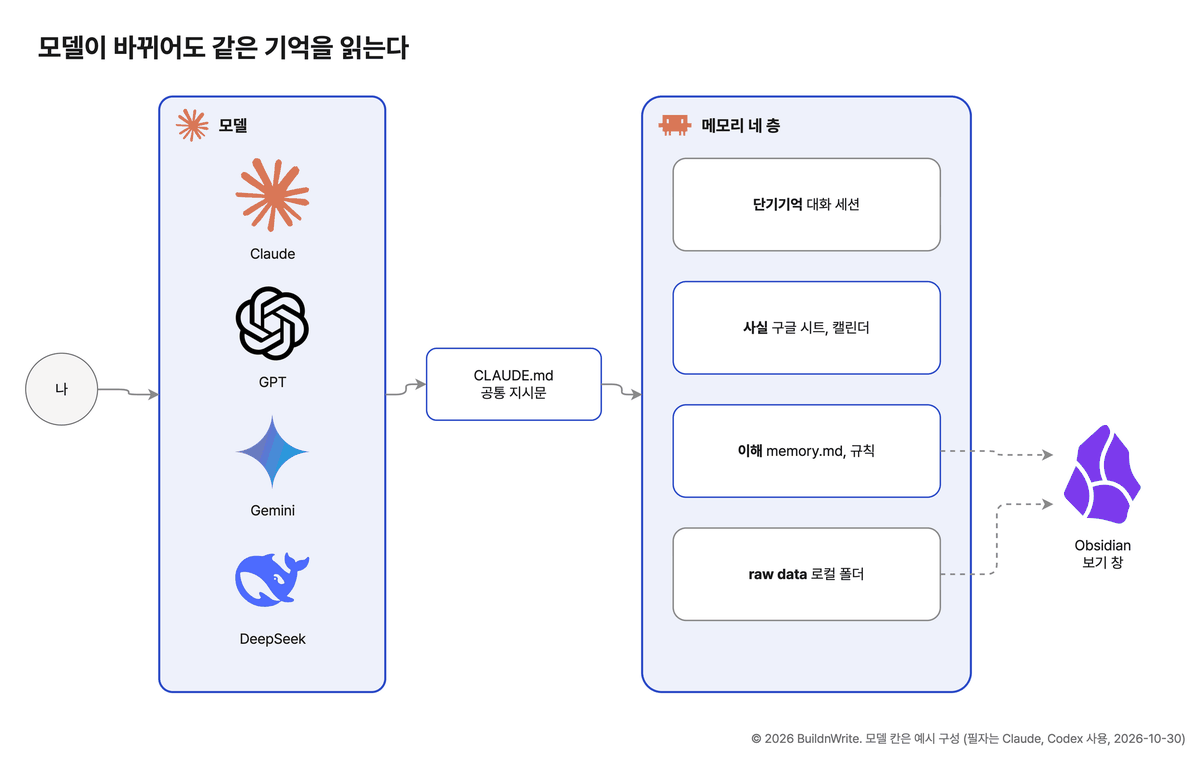
First, I didn’t tie my instructions to one agent. My working rules live in CLAUDE.md, which Claude Code reads, and I set up Codex to read the same file with one line of configuration. Even when the agent changes, it sees the same rules.
Second, I kept memory outside the model. Client names, sentences I dislike, and where I made a mistake last week aren’t stored in the model’s head. They live in files and sheets, and any model reads them from day one. But if you move everything into one tool like Obsidian to gather memory in one place, this setup gets tied to that one tool again.
2. What Happens When You Put Everything in One md File
Everyone agrees memory matters. The question is what comes next: where do you put it? If you think of memory as one md file the agent reads, you end up writing everything worth remembering into that file. Client contacts, this month’s unit prices, the tone I like, and last meeting’s notes all get mixed into one file.
Mixing them like this breaks two things:
- Accuracy. When a unit price changes, the sentence in the file has to be updated too. People miss numbers buried in sentences, and the agent reading the file trusts the old value.
- Judgment. When raw data such as meeting transcripts sits among preference notes, the agent skims the long record and misses the one line saying “this person dislikes this.”
A Google Cloud Tech video on agent memory, published October 28,5 points to the same issue. It’s 12 minutes long and worth watching once.
There are two kinds of memory. Facts that must be exact go in a database, and understanding that carries meaning goes in a store that finds similar memories by meaning. Raw data such as camera footage or audio isn’t memory; it’s a separate storage problem. (Main points of the Google Cloud Tech video, translated by the author)
The video also points out a common mistake: putting everything, including facts, into a semantic search store. For a question like “What did I buy?” that needs an exact answer, getting a similar memory back is risky. It also splits timing. Facts are saved as soon as they happen, while understanding is saved after enough context has built up to know what’s worth keeping.
Companies build this with Cloud SQL (Google’s table-style database) and a vector database (a store that finds texts with similar meaning). But the video also says a vector store is a category, not a specific product. All it has to do is find things by meaning. In my setup, the model reads a file list (an index file) and picks out the files it needs, which plays that role. A solo operator can build the same structure with tools they already use.
| Component in the video | Solo operator equivalent |
|---|---|
| Structured DB (Cloud SQL, Postgres) | Google Sheets, Google Calendar |
| Vector store | md files + an index file |
| Managed memory extraction (Memory Bank, a Google service that pulls out what to remember from conversations) | Memory-writing rules + a weekly wiki cleanup |
| Raw media storage | Local folder |
3. My Memory Has Four Layers
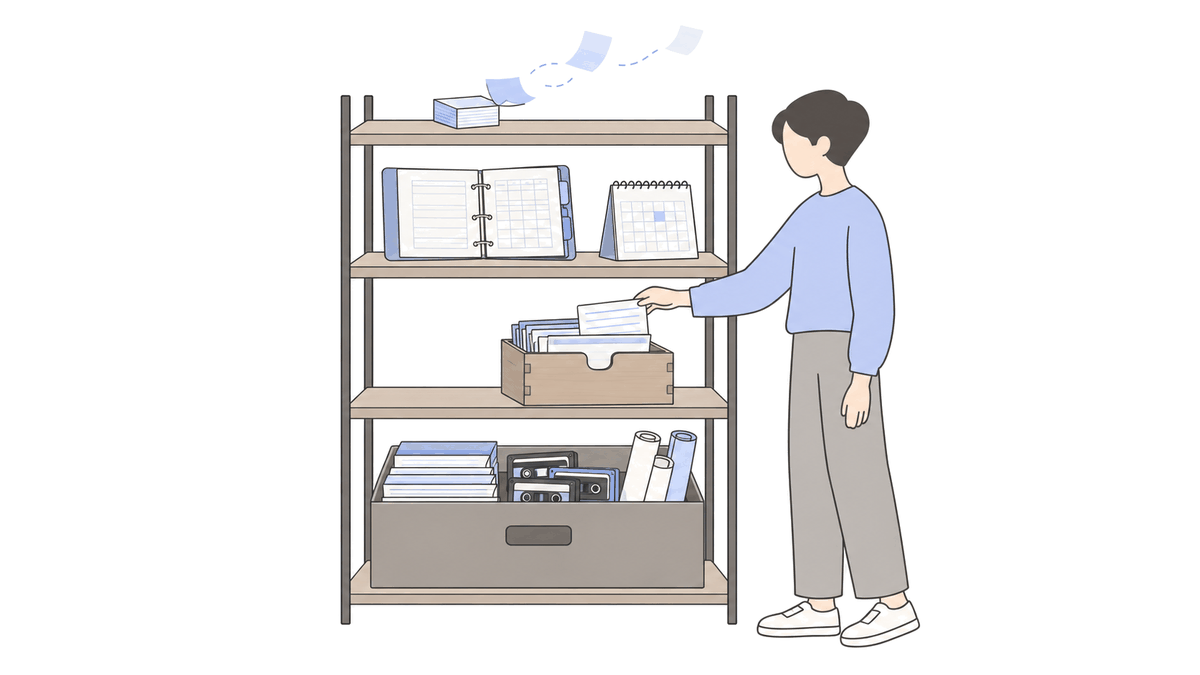
The first layer is short-term memory, meaning the conversation session. The conversation you’re having with the agent right now is short-term memory. Like a computer’s RAM, it’s only useful while you’re working, and it doesn’t carry over to the next conversation when the session ends. So the question to ask in each session isn’t “Can I save everything?” but “What is worth passing to the next session?” The Google video raises this question too.
The second layer is facts. Keep facts as facts. Tasks waiting on a reply, client contacts, and the price list live in Google Sheets, and schedules live in Google Calendar. The agent doesn’t memorize these values; it opens them when needed. If I ask, “Am I free to set up a meeting next week?”, it reads the actual events on my calendar instead of recalling something similar.
The third layer is understanding. Preferences and judgments go in memory.md. Claude Code keeps a separate memory folder for each project, and in my setup each file records only one thing. Examples: “Don’t add disclaimers to blog posts” and “Write LinkedIn everyday posts with vivid scenes.” I write each one down right when I correct the agent or confirm that it got something right. MEMORY.md, the index file that lists the memory files one line each, is read automatically at the start of a session in my Claude environment. I currently have 621 memory files like this.
Understanding has one more branch. Memory is split by project folder, so what I learn in the blog project is unknown to the course project. So principles that hold in every project go into a separate rules file that I maintain, and research I gather gets organized into the wiki once a week. This filtered route matches what the video described as “saving after context has built up.”
The fourth layer is raw data. Meeting recordings, transcripts, source texts saved during research, and the full logs of conversations with agents all go here. They stay as-is in a local folder. Each time a conversation ends, a script saves the session record as a file, and so far 1,031 have accumulated.
The video said to keep raw data outside memory. I keep those originals as one more layer, for retrospectives. The four layers are my interpretation layered on top of the video’s two distinctions. There’s a reason to keep raw data separate. Agents usually search shallowly. My system’s default scan covers sessions from only the last 30 days. That’s enough for everyday work. But it falls short when I’m writing an annual review or trying to find why something was decided on a project that ended months ago. That’s when I open the raw data folder.
| Layer | What goes here | When it’s written | When it’s read |
|---|---|---|---|
| Short-term memory | Context for what you’re doing now | While talking | Only within that session |
| Facts | Schedules, contacts, prices | Right when it happens | Looked up when needed |
| Understanding | Preferences, corrections, working style | When you correct or confirm something | Via the index at session start |
| Raw data | Conversation logs, recordings, source texts | Saved automatically when a session ends | For retrospectives and finding past projects |
4. So Where Does Obsidian Go?
Once I’ve covered this, one question always comes up: “So you’re saying to gather everything in Obsidian?” If you use Obsidian as the memory store, you end up moving memory, meeting notes, and materials all into the vault. Then the layers I just separated get mixed together in one place again.
I never used Obsidian as the storage in the first place. When I open my vault, I see three folders: memory, sessions, and wiki. These three aren’t real folders. They’re shortcuts (symbolic links) that point to folders in their original locations. memory points to the shared memory folder Claude Code uses, and sessions and wiki point to the conversation log folder and the organized knowledge folder, both in iCloud. The agents write to those original folders, and the vault I’m looking at just points to them. I didn’t move a single file.
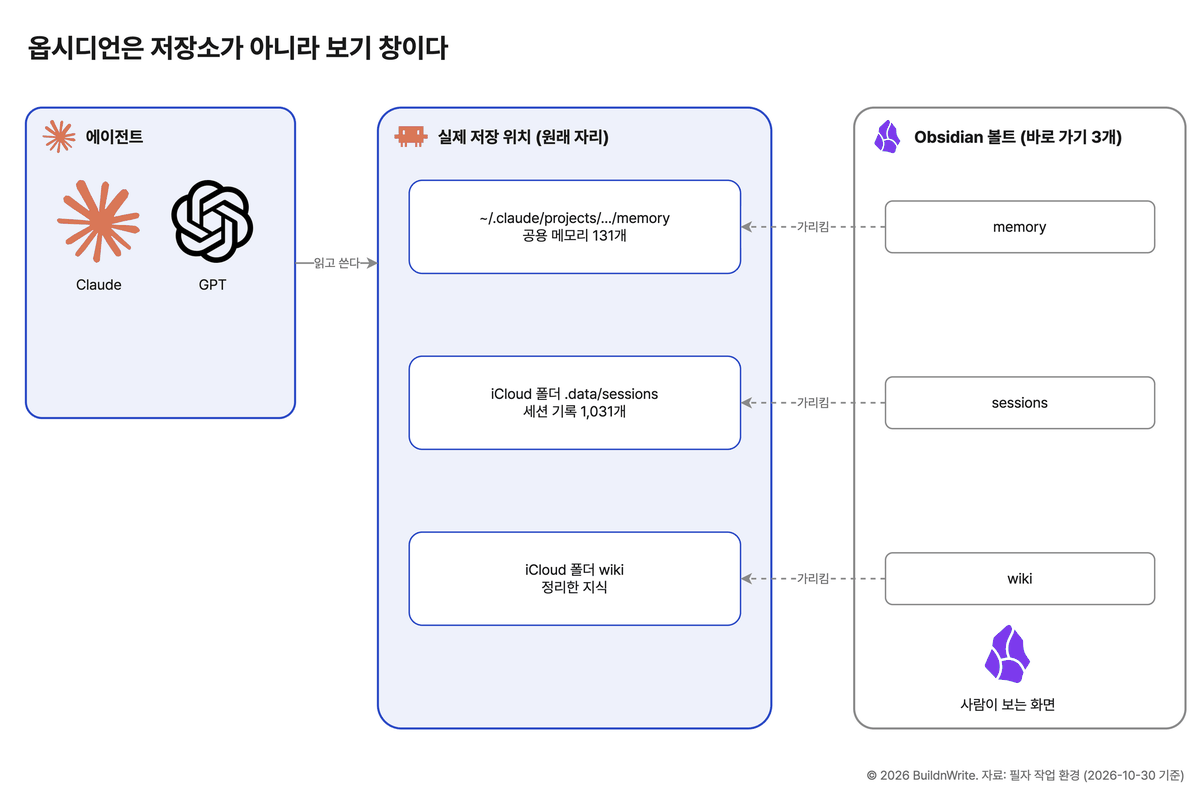
Obsidian is a view, not a store. It’s a window that shows the directories you already have in a form that’s easy for people to read. Agents read and write in their original locations, and I see the results on one screen in Obsidian. Keeping it this way has some benefits:
- Agents’ paths don’t change, so nothing breaks.
- If I switch from Obsidian to another tool, the data stays right where it was.
- I still get Obsidian’s strengths, such as links, search, and graph view.
Just as you need to be able to swap models, you need to be able to swap the viewing tool too.
5. Three Rules to Keep the Layers Apart
Even with the layers separated, the boundaries blur over time. I guard against that with the rules below.
A value should exist in only one place so that when it changes, you only fix it in one place. If “This client replies slowly” has been written in the sheet three times, it’s no longer a value; it’s a judgment.
6. If You Start Today
You can start without a separate search database or a memory service.
- Put your instructions in one file that multiple agents read together.
- Keep values that must be exact (schedules, contacts, prices) in Google Sheets or Calendar.
- When you correct an agent, write it down right then, one thing per memory file.
- Let recordings, source texts, and conversation logs accumulate in a local folder as they are.
- If you use Obsidian, don’t move the files. Create shortcuts from the vault to those folders. On a Mac, run
ln -s original-folder vault/namein Terminal; on Windows, runmklink /D vault\name original-folderin Command Prompt.
Next month, another pricing notice will come. When it does, how long it takes you to switch to a new model will depend on how you split your memory. Whichever agent you use now, it’s worth checking where your memory lives first.
5 references
- PCWorld, Fable will stay in Claude plans, but not for everyone ↩
- BleepingComputer, Claude Fable 5 isn't permanently leaving subscriptions, Anthropic says ↩
- OpenAI, ChatGPT Release Notes (2026-10-29) ↩
- XenoSpectrum, ChatGPT Pro Doubles Work and Codex Usage Limits as OpenAI Reverses Pro 200 Cut ↩
- Google Cloud Tech, AI Agent Memory Architecture: Structured SQL, Semantic Vector Search & Memory Bank (YouTube, 2026-10-28) ↩
Frequently asked questions
- Can I just put all my Claude memory in one md file?
- At first, yes. But when values that change, like unit prices, preference notes, and meeting records share one file, you end up trusting old values or missing key lines. Keep exact values in a sheet, preferences and judgments in a memory file, and raw records in a folder.
- Do I have to move all my files into Obsidian?
- No. If you create a shortcut (symbolic link) from the vault to the original folder, agents read and write in the original location, and you view everything on one screen in Obsidian.
BuildnWrite helps teams build AI agents that keep running. About BuildnWrite ›