GitHub Actions secrets: why secrets fail in an if condition
Who this is forAnyone who added a secret to GitHub Actions, saw the workflow fail in 0 seconds, and is trying to figure out why secrets aren't readable in an if condition.
TL;DR: Adding a secret to GitHub Actions is easy. Where people get stuck is the next step, when using conditional steps. If you use a secret directly inside an
if:condition, the workflow fails in 0 seconds. The official docs state this restriction, and the workaround is one line. This post covers this trap before the setup steps.
Contents
- This is how it breaks in conditional steps
- Why you put the secret here instead of in code
- The setup steps: three clicks in Settings
- Log masking does not always protect you
- Secrets are not passed to pull requests from forks
- Workaround: receive it once in a job-level env
- Schedule triggers may not show up right after you register them
- Storing it does not make it safe
This is how it breaks in conditional steps
A step that decides whether to run based on a condition, such as “if the secret exists, send the email, otherwise skip this step,” is something non-developers building automation often end up using. This is exactly where the first push of the workflow file dies.
Here is the error I actually hit. The first time I pushed the workflow file, it failed in 0 seconds.
Invalid workflow file: .github/workflows/briefing.yml#L1 (Line: 41, Col: 13): Unrecognized named-value: ‘secrets’. Located at position 1 within expression: secrets.GMAIL_APP_PASSWORD != ‘’
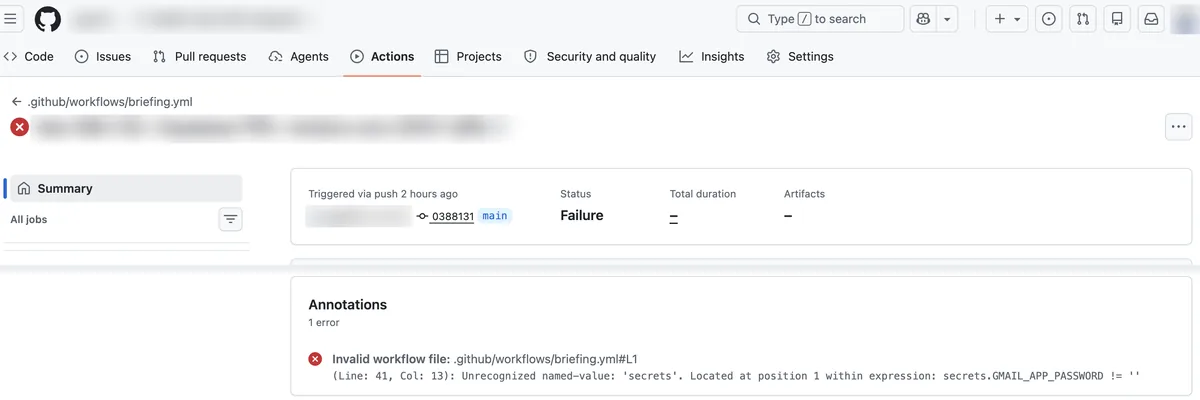
This run created no jobs at all (a job is a unit of execution inside a workflow). That means it died while reading the workflow file, before the runner even started. That is why it is “fails in 0 seconds.” The code content was not wrong. I put the secret in a spot where the syntax does not allow it at all.
GitHub’s official docs context table states this restriction directly. In the allowed list of the table, the if slot of a step (a line-by-line action that runs in order within a job) does not include secrets.
| Where used | secrets | env |
|---|---|---|
jobs.<job_id>.env (job level) |
Available | N/A |
jobs.<job_id>.steps.env (step level) |
Available | Available |
jobs.<job_id>.steps.run (step run) |
Available | Available |
jobs.<job_id>.steps.if (step condition) |
Not available | Available |
jobs.<job_id>.if (job condition) |
Not available | Not available |
Look closely at the last row. The job-level if (jobs.<job_id>.if) cannot use secrets or env. If you move from a step-level if to a job-level if because of this, you hit the same wall. The workaround this post covers is the first row, job-level env. (GitHub official docs, Contexts, checked August 24, 2026)
Why you put the secret here instead of in code
AI-generated code usually has a slot for an API key or a password. If you enter the real value there and push to GitHub, the value stays in the history even if the repository is private. That means anyone who gets access to the repository later can see it. Secrets move this value out of the code, into a place GitHub stores encrypted, and the workflow only loads it while it runs. Only the name stays in the code. The app password that automation uses to send Gmail is a typical value that goes here.
The setup steps: three clicks in Settings
The setup itself is short.
| Step | Screen | What to do |
|---|---|---|
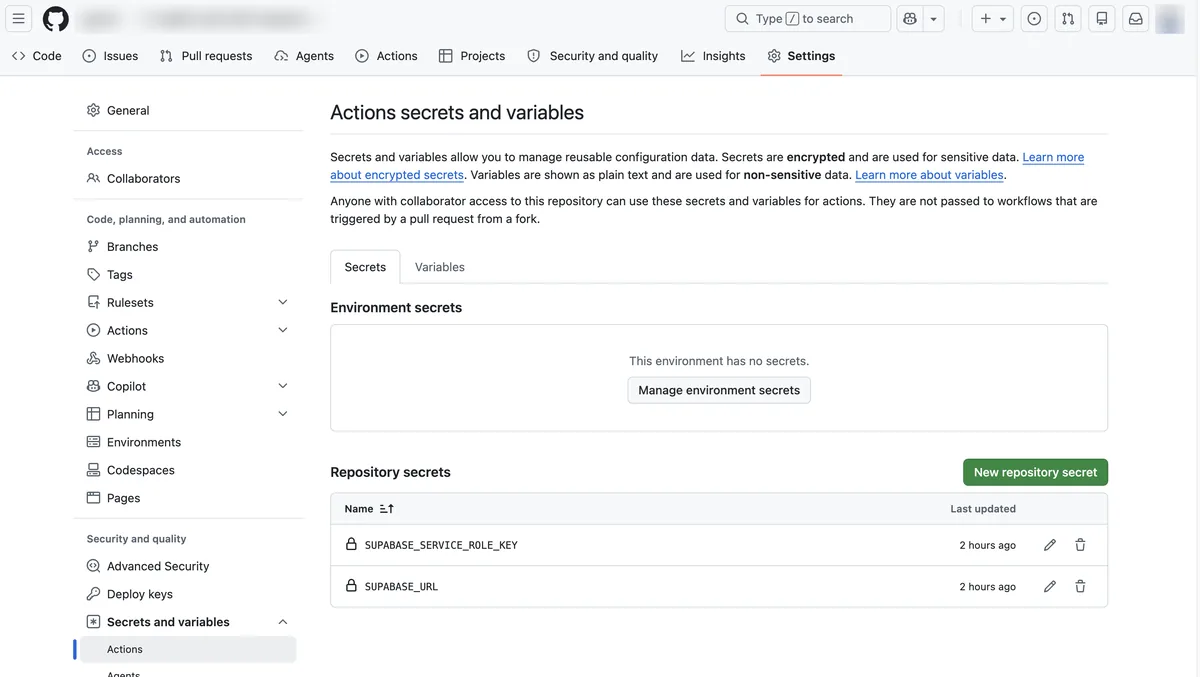
| 1 | Repository Settings > Secrets and variables > Actions | Go to this path |
| 2 | Green New repository secret button at the top right | Opens the new secret form |
| 3 | Enter Name and Secret, then click Add secret | Match the name exactly to the name your code calls |
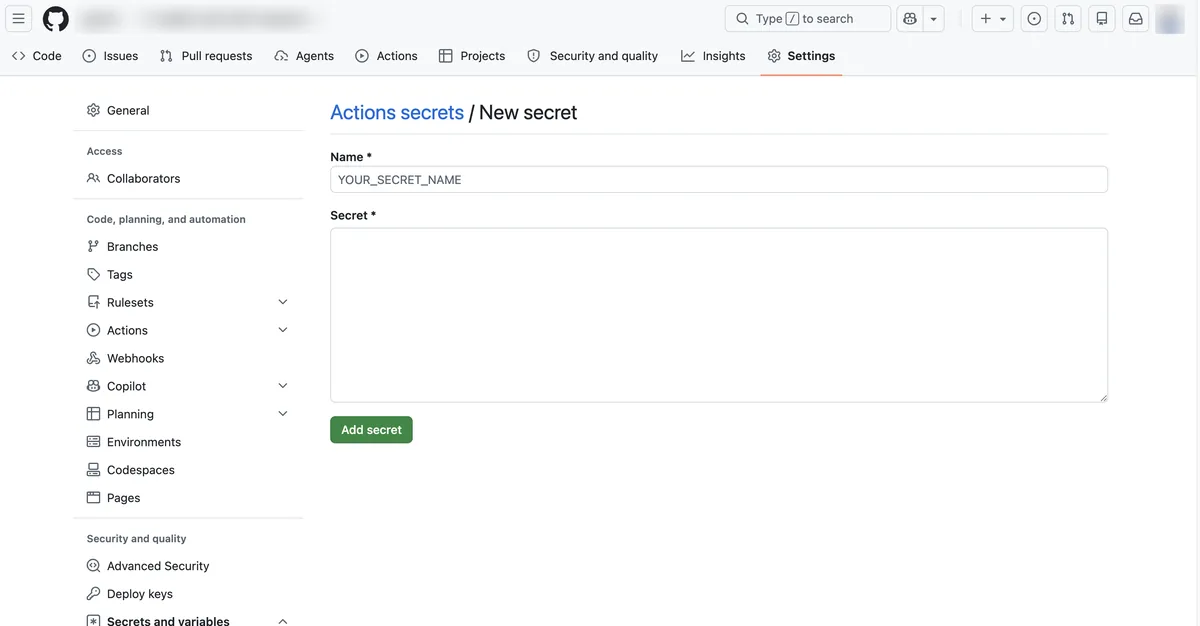
The Name field does not accept just any characters. GitHub has rules for names.
| Name rule | Details |
|---|---|
| Allowed characters | Letters, numbers, and underscores (_) only. No spaces |
| Starting character | Cannot start with a number. Cannot start with GITHUB_ (reserved by GitHub) |
| Case | Not case-sensitive. GitHub stores it internally in uppercase |
| Uniqueness scope | Names cannot repeat within the same repository (or organization, enterprise) |
If your code calls it as secrets.GMAIL_APP_PASSWORD, the Name field must be exactly GMAIL_APP_PASSWORD. Writing a different case does not break it, but the screen always shows uppercase.
As the capture above shows, the Secret field is not a single-line input but a wide box that takes multiple lines. When you copy and paste a value from a chat window or a notepad, blank lines or spaces tend to come along with it. After pasting, it is safe to check that no line break or space was added at the start or end of the value.
Log masking does not always protect you
The conditional-step trap is not the only one. There is one more point that people new to secrets actually get confused about. In workflow run logs, secret values appear masked as ***. The official docs state that GitHub automatically hides sensitive information in workflow logs.
The catch is that this automatic masking only applies to values you registered as secrets in Settings. If you write a value directly into the workflow file without registering it as a secret, or move it into another variable and print it, the value is not hidden and stays in the log as-is.
| Value printed to the log | Masked? |
|---|---|
| Secret registered in Settings | Automatically replaced with *** |
| Value not registered as a secret (hardcoded, for example) | Not masked. Stays in the log as-is |
So if you print a value to the log to check whether the workflow received it correctly and only see ***, that is not a failure. It means masking is working normally. Conversely, if the value appears as plain text, it was either not registered as a secret or it is leaking through another path.
Secrets are not passed to pull requests from forks
Look at the Settings screen capture from earlier again. There was a notice above the table.
Anyone with collaborator access to this repository can use these secrets and variables for actions. They are not passed to workflows that are triggered by a pull request from a fork.
Even if a pull request from a fork (a copy of my repository that someone else made) runs my workflow, secrets from my repository are not passed to that run. The only exception is one special value called GITHUB_TOKEN. The official docs state the same thing: all other secrets are blocked.
If the repository is public, anyone can fork it and send a pull request. Even when that pull request runs my workflow, the secrets arrive empty. If a conditional step is simply skipped, or a step that calls an external API fails, the file is not broken. GitHub intentionally did not give it the secret. This is a safety mechanism that keeps someone else’s pull request from stealing secrets registered in my repository.
Workaround: receive it once in a job-level env
The solution is in the first row of the table above. Instead of reading the secret directly in the step’s if, receive it once through the job-level env and have the if read that env.
Using secrets directly in steps.if (fails)
- Where it's written jobs.<job_id>.steps.if if: secrets.GMAIL_APP_PASSWORD != ''
- Table allowed list steps.if does not include secrets The syntax does not allow that slot
- Result Dies at the parsing stage No job is created; fails in 0 seconds
Unrecognized named-value: 'secrets'
Receiving it via jobs.env and using it (succeeds)
- Where it's written jobs.<job_id>.env GMAIL_APP_PASSWORD: ${{ secrets.GMAIL_APP_PASSWORD }}
- Table allowed list jobs.env includes secrets You can receive the value once here
- Result if: env.GMAIL_APP_PASSWORD != '' Runs normally
Passes once it goes through the env step
Here is the part of a workflow that actually succeeded, limited to the parts related to the conditional step. (Excerpted from a real file that has other steps before and after.)
name: weekly-briefing
on:
  schedule:
    - cron: '*/5 * * * *'
  workflow_dispatch:

jobs:
  brief:
    runs-on: ubuntu-latest
    env:
      GMAIL_USER: ${{ secrets.GMAIL_USER }}
      GMAIL_APP_PASSWORD: ${{ secrets.GMAIL_APP_PASSWORD }}
      MAIL_TO: ${{ secrets.MAIL_TO }}
    steps:
      - name: Send email
        if: env.GMAIL_APP_PASSWORD != ''
        run: python send_mail.py
This file still has a note I left after running into this trap. Right above the env: block, it says:
The secrets context cannot be used in a step’s if. Receive it once as a job env.
Schedule triggers may not show up right after you register them
A scheduled run (schedule) may not come right after you register it. In this repository, the run history did not show up at first, and later it ran normally.
Storing it does not make it safe
Secrets are protected by GitHub’s encryption only while they are stored in Settings. While the workflow runs, the value is decrypted and used on the runner. If the workflow contains code that prints the value to a log, saves it to a file and uploads it as an artifact, or passes it outward as-is, it leaks at that moment. The official docs also separately warn you to take care that secret values are not printed during a workflow run.
If you plan to change the repository’s visibility, check one more thing. GitHub’s docs explain that changing a private repository to public also makes all of its past Actions run history and logs public.
If a secret was ever printed to a log in any past run, changing the repository to public makes that record public too. Registering a secret means you did not write it in code. It does not mean the value is safe no matter how you handle it.
I checked the screens and error messages in this post on August 24, 2026. GitHub’s screen layout and docs may change. If the actual behavior differs, check the latest table in the Contexts official docs.
Frequently asked questions
- Why does a GitHub Actions workflow fail in 0 seconds when a step if uses secrets?
- Because the steps.if slot does not allow the secrets context, GitHub rejects the file with 'Unrecognized named-value' at parse time, so no job is created. Receive the secret in jobs.<job_id>.env and check env in the if instead.
- Why are secrets empty in workflows triggered by pull requests from forks?
- GitHub does not pass repository secrets to workflows triggered by a pull request from a fork, except the GITHUB_TOKEN value. This keeps someone else's pull request from stealing your secrets.
Want the full system? The Claude Code & Codex Skills guidebook collects the skills and subagents behind this blog, from $19.
BuildnWrite helps teams build AI agents that keep running. About BuildnWrite ›