What Is an API? Understanding It with One Snack Bar Order Slip
Who this is forReaders who were told 'just connect an API' by an AI and stalled there, and who want one analogy that makes APIs click.
Series · AI automation glossary part 1 of 13, expand to see all
- What Is an API? Understanding It with One Snack Bar Order Slip
- What Is a Webhook? Understanding It With a Restaurant Waiting Ticket
- What Is a Server? A Computer That Stays On When Yours Doesn't
- What is a terminal? A plain-English guide to the CLI and shell
- AI automation terms explained: MCP, agent, context, skill, and secret
- Claude terms explained: Projects, Artifacts, Cowork, and scheduled tasks
- What Is a Database? Why Tables Look Alike but Lock Differently
- What Is Supabase? Tables, Auth, and Server Functions in One Place
- Auth and RLS Explained: Keep the Screen Open, Lock the Data
- What Is Google Apps Script? Running Your Code on Google's Servers
- What Is Playwright? Why AI Suddenly Opens a Chrome Window
- What Is Aside? An Agent Browser That Clicks Using Your Own Logins
- What Does AX Mean? AI Transformation vs. DX and 3 Workplace Bottlenecks
TL;DR: An API is the fixed order form programs use to exchange data. Like an order slip at a snack bar, it is agreed in advance that “send it to this address, filled out in this format, and you get this result back.” This article traces how that agreement works through one analogy, and at the end you call a real API using nothing but your browser’s address bar.
If you’ve ever asked an AI to “make me an exchange rate alert” or “summarize the news and send it to me,” you’ve probably run into a sentence in the answer like “just connect the API.” If you’ve never done any development, that’s where you get stuck. Searching only gives you “Application Programming Interface,” so you go looking for what an interface is, and the loop begins.
This article breaks that loop with a single snack bar order slip. By the end, you’ll know what the AI means when it says “just connect the API,” and you’ll have called a real API once from your browser.
Contents
- Spoken orders get garbled, but order slips don’t
- Translating the snack bar terms into computer terms
- Call it yourself from the browser address bar
- You can’t just slip in any order slip
- If you want to read more
Spoken orders get garbled, but order slips don’t
You sit down at a snack bar (bunsik-jip, a Korean snack-food restaurant) and find an order slip and a pen. You mark the designated boxes and hand it over, and the kitchen makes what’s written. When orders go back and forth by voice, “less spicy, please” can come out as “not spicy,” but with a form, that doesn’t happen.
That’s exactly what an API is. For different programs to exchange data, they need to understand each other, but programs can’t pick up on what’s meant. So you decide in advance: “send it to this address, in this format, and you get this data back.” The name of that agreement is API (Application Programming Interface).
What happens at the snack bar = what happens in an API call
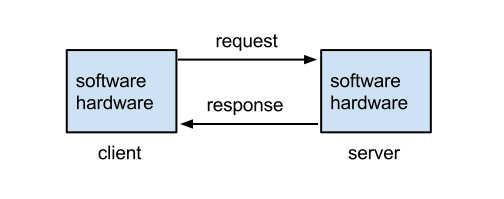
The same picture, drawn the way a computer science textbook would draw it, is below. It is a standard diagram from the client-server model article on Korean Wikipedia (the Korean-language edition of Wikipedia). Only the labels are in English, but it’s the same picture as the snack bar above: the client is the customer, the request is submitting the order slip, the server is the kitchen, and the response is the food served.
Translating the snack bar terms into computer terms
The order slip analogy doesn’t stop at one scene. Every unfamiliar word you’ll meet in API docs has a place inside this snack bar.
| Snack bar | Computer term | Meaning |
|---|---|---|
| Customer | Client | The side making the request |
| Kitchen | Server | The side that processes requests |
| Order slip format | API | The agreement on requests and responses |
| Window address for submitting slips | Endpoint | The internet address where requests are sent |
| “No cucumber, please” | Parameter | Detailed options for a request |
| “Show me the menu” / “I’ll order this” | Method (GET / POST) | Whether it’s a lookup or a creation; the type of ordering action |
| Food that comes out | Response | The data that comes back |
| “Here it is” / “We don’t have that item” | Status code (200 / 404) | The kitchen’s answer |
You don’t need to memorize the right-hand terms. When you run into one of these words in code an AI wrote or in an error message, it’s enough to translate it back to the left-hand column. “404 showed up” means “the kitchen answered that there’s no such menu item,” and “try changing the parameter” means “try changing the order options.”
Call it yourself from the browser address bar
You feel that an API isn’t something only developers touch once you call one yourself. All you need is a browser. Paste the address below straight into the address bar. It’s the window address for Frankfurter, a free exchange-rate API.
https://api.frankfurter.dev/v1/latest?base=USD&symbols=KRWLook at the address and it’s exactly the order slip. Everything up to api.frankfurter.dev/v1/latest is the window address for submitting the slip, and base=USD&symbols=KRW after the ? is the order options. It’s the equivalent of writing “use US dollars as the base currency, and show me the Korean won rate.”
Response actually returned (measured as of August 28, 2026)
The address line is the request, and the text that appeared on screen is the response. You just called an API.
This experience matters for a reason. The thing you just did in the browser is something an automation tool can do for you every morning. It calls the same address daily, reads the number in the response, and sends an email if it meets a condition. That’s exactly what the AI means when it says “connect the exchange-rate API.”
You can’t just slip in any order slip
The exchange-rate API you just called is open for anyone to use. But an API that handles data in your own account doesn’t accept just any order slip. Imagine if anyone could call the API that reads your Gmail. That would be a big problem.
So when you make a request, you send along a value that proves who you are. That’s the API key. Think of it as a shop that takes orders only after you show your membership card. You sign up for the service, get a key issued, and attach it to the request you send.
Once you’re dealing with keys, security comes along. Just as orders pile up under your name if you lend your membership card to someone else, if your API key leaks, someone else can send requests to your account. For practical steps on getting a key issued and storing it safely, the Choosing Supabase API keys post covers it with real screens. Also, Gmail requires a separate value called an app password only when a program connects directly to the sending server to send mail. You can check when it’s needed and when it isn’t in the boundary chart in Getting a Gmail app password.
If you want to read more
This article focused on building the skeleton with an analogy. Once the skeleton is in place, the two resources below are good for adding flesh. Both are in Korean and free.
- AWS “What Is an API?” A standard explanation written by a cloud company. It starts with an example of a weather app fetching data from the Korea Meteorological Administration (South Korea’s national weather agency) and covers the wider types of APIs.
- Toss Payments Developer Center “API” Toss Payments is a South Korean online payment service. This page walks through, step by step, how APIs run behind the scenes when an online card payment happens. It’s a real-world example, so it’s easy to relate to.
Frequently asked questions
- What is an API key and why does a service require one?
- An API key is a value that proves you are allowed to make a request. Services may call it a key, a token, or something similar, but the role is the same.
- What do the client and server mean in an API call?
- The client is the side making the request, such as your automation or app. The server is the side that receives requests, processes them, and hands back the requested data.
Want the full system? The Claude Code & Codex Skills guidebook collects the skills and subagents behind this blog, from $19.
BuildnWrite helps teams build AI agents that keep running. About BuildnWrite ›