ChatGPT GPT-6 update: Intelligent UI and which free plans get it
Who this is forReaders who use ChatGPT on the free or Plus plan and want to know how GPT-6 changes its answers and when their plan gets it.
TL;DR: Starting October 7, 2026, GPT-6 in ChatGPT’s chat tab mixes images, charts, buttons, input fields, and calculators into its answers depending on the question, and it starts answering before it finishes thinking. Plus, Pro, Business, and Enterprise get it on October 7, and Free and Go get it from October 8, rolled out in stages. If you use ChatGPT for free or on Plus, this is a change you will receive in order.
Contents
- What changed
- Models by plan and rollout timing
- Answers the Intelligent UI builds
- Answering while still thinking
- Safety evaluations
- What the announcement doesn’t cover
On October 7, 2026, OpenAI announced GPT-6 and Intelligent UI for everyone. The information below is based on that announcement, the ChatGPT release notes updated the same day, and the system card.
1. What changed
Last month OpenAI released its first GPT-6 model to paying customers. This time it said it is releasing a new GPT-6 model for more than 1.2 billion people who use ChatGPT every week. The release notes list GPT-6 Astra on September 3, and GPT-6 Sol and Luna for Work and Codex (tools for work and coding outside the chat tab) on September 22. The GPT-6.1 Sol rollout for Work and Codex also began with Pro on September 29.
This announcement brings two changes.
- Intelligent UI: Depending on the question, it mixes text, images, buttons to press, input forms, charts, and tools you can use right in the conversation.
- Answering while thinking: It starts answering while it is still thinking or using tools, not after it finishes. It also adds what it has found without being asked again.
The system card says this model replaces GPT-5.6 Sol and GPT-5.6 Luna inside ChatGPT.
2. Models by plan and rollout timing
For every plan, the target is the chat tab in ChatGPT.
| Plan | Model | Rollout start | Condition |
|---|---|---|---|
| Plus, Pro, Business, Enterprise | GPT-6 Sol | October 7 | Enterprise depends on workspace admin settings |
| Free, Go | GPT-6 Luna | October 8 | Not separately mentioned in the announcement |
- The announcement says both Sol and Luna were tuned for everyday conversation.
- The dates convert “today” and “the next day” relative to the announcement’s publication date, October 7. No time zone is stated. Rollout happens in stages worldwide, so accounts may still not see the feature after the rollout date. The announcement does not list a schedule by country.
- The release notes say Intelligent UI can be used from the Instant level up to Extra High. Which levels each plan can select is not covered in this announcement.
- Earlier release notes say Extra High was Pro-only as of June 10, that a slider for choosing how much to think came to Plus and Pro on August 6, and that Free and Go got a Think button the following week. The announcement does not say whether it changed this setup.
3. Answers the Intelligent UI builds
The announcement says GPT-6 reads the question and picks the format. For comparisons it may place things side by side, for explanations it may use a diagram you can manipulate directly, and when text is the most useful format, it answers with text only. The announcement lists three uses.
- Making everyday questions visual: a cooking timeline next to a recipe, or travel stops and notes on a map
- Learning hard topics: the central limit theorem, GDP, drone photography, and the Monty Hall problem
- Building tools on the spot: a savings calculator, a bill splitter, and a retro game you play inside the conversation
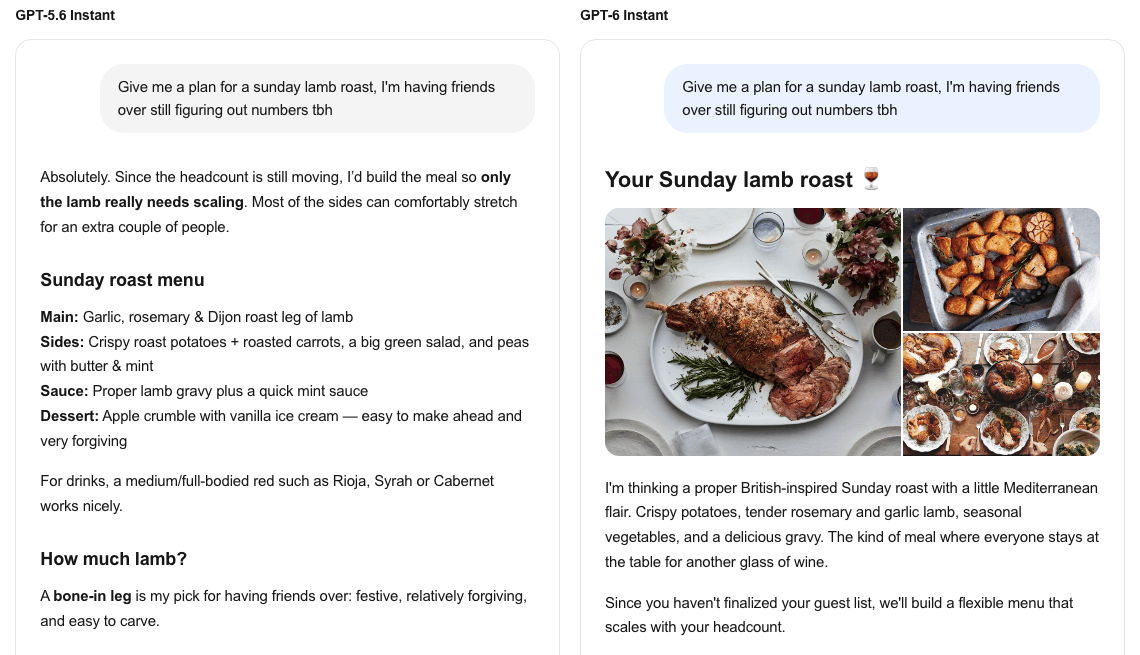
In this example from the announcement, the GPT-6 answer continues below with an input field that recalculates how much to buy when you change the number of people, a button to copy the shopping list, and a cooking checklist by time. For the same question, GPT-5.6 Instant wrote per-person amounts in a table.
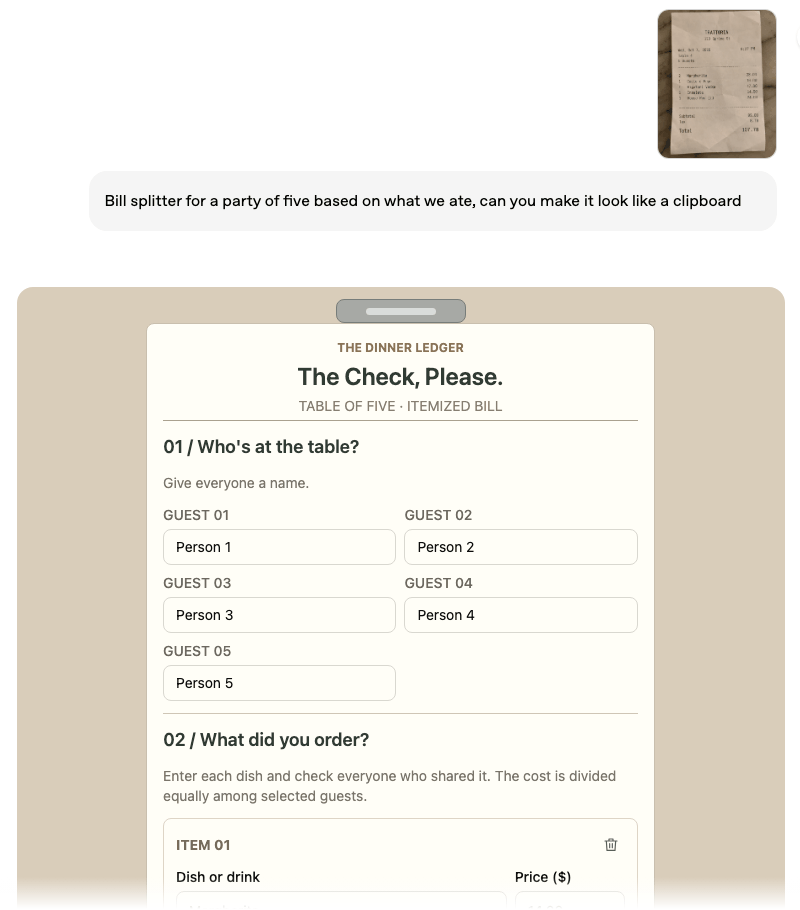
The announcement describes two ways this works.
- Component library: It uses prebuilt screen parts that look familiar on the web and on mobile, and the model decides how to arrange them.
- Compiler: While the model writes the answer, it draws the screen piece by piece, so you don’t have to wait until the answer is finished.
According to the announcement, during training the screens the model generated were evaluated for clarity, usefulness, and polish. It also says there is still room to refine design judgment.
4. Answering while still thinking
Reasoning models that think before they answer made it possible to take on harder problems, but users had to wait until the thinking finished. The announcement says GPT-6 was trained to take users’ waiting time into account and to build its answer in several passes, using what it has found so far.
The announcement gives three comparisons. OpenAI’s internal evaluations cover the first and third.
| Comparison | What the announcement says |
|---|---|
| GPT-6 Extra High vs. GPT-5.6 | Time to start answering is similar to GPT-5.6 Medium, and the overall score is higher than GPT-5.6 Extra High (an everyday-task evaluation where the model handles multiple steps on its own) |
| Questions that need web search | GPT-6 Instant starts answering 44% faster on average than GPT-5.6 Instant |
| Hard problems | Addresses the core of the question properly more often than GPT-5.6 |
- The evaluation questions and their scores are not published in the announcement.
- The announcement says it also improved at deciding when to search and at finding information to support an answer.
5. Safety evaluations
The safety information in the announcement and system card includes both improved and regressed items. Where no other comparison is given, the comparison is GPT-5.6.
Improved
- It holds up more strongly against attacks that try to bypass safeguards across multiple turns of conversation (multi-turn jailbreaks). Compared with Sol and Luna, which came out first in September for Work and Codex, the scores are slightly lower, but the margins of error mostly overlap.
- Dishonest answers, answers that deceive the user, and behavior that gets around safeguards went down, and factual errors decreased on nearly every evaluation metric.
- The announcement says it is better at recognizing and telling users the limits of its own abilities, such as when it lacks the information or tools needed to answer.
Regressed
- In general evaluations, Sol regressed on self-harm. Luna regressed on self-harm, graphic violence, and sexual content, at levels that are statistically significant, meaning hard to attribute to chance.
- In youth evaluations, both models regressed on age-restricted content, sexual content, and emotional dependence, and Luna also regressed on graphic violence. In image-input evaluations, extremism items regressed.
- OpenAI says that when it reviewed the violating responses, most were low in severity. It attributes the emotional-dependence regression to the evaluation being overly sensitive to harmless nicknames like “bro.” For youth responses that could include self-harm, sexual content, or graphic violence, it added another block using an automatic classifier, and it says this effect is not reflected in the evaluation numbers.
Under OpenAI’s Preparedness Framework, which checks high-risk capabilities before release, this Sol and Luna are treated as High in cybersecurity and in biology and chemistry, and the same safeguards as GPT-5.6 were applied. The system card defines High cybersecurity as a level that can remove the bottleneck that had limited the scale of cyberattacks. Examples include end-to-end attacks against well-defended targets, or automating the discovery and exploitation of practically useful vulnerabilities.
6. What the announcement doesn’t cover
The announcement, release notes, and system card do not say anything about the following.
- How much the answer quality of Sol and Luna differs in everyday conversation
- Whether there is a setting to turn Intelligent UI on or off
- Whether the same screen elements appear in Korean-language answers
- How to save or share a calculator or game built inside a conversation outside of it
- Whether the same feature is available through the API that developers use to call models from programs
- A marker on screen that shows whether the feature has been applied to your account
Frequently asked questions
- Which GPT-6 model do Plus, Pro, Business, and Enterprise get in ChatGPT, and when?
- Plus, Pro, Business, and Enterprise get GPT-6 Sol starting October 7, 2026. Free and Go get GPT-6 Luna starting October 8. Rollout is staged, and Enterprise depends on workspace admin settings.
- What is Intelligent UI in ChatGPT's GPT-6 update?
- Intelligent UI lets GPT-6 choose images, charts, buttons, and input fields to build the answer screen itself, not just text. It depends on the question. The Pro reasoning option does not support it.
Want the full system? The Claude Code & Codex Skills guidebook collects the skills and subagents behind this blog, from $19.
BuildnWrite helps teams build AI agents that keep running. About BuildnWrite ›