Why n8n Won't Connect to Gmail: Five Checks Before You Recreate the Credential
Who this is forAnyone whose Gmail connection in n8n keeps failing and who wants to find the cause of errors like redirect_uri_mismatch.
TL;DR: In n8n, most Gmail connection failures come down to a callback URL mismatch, not your account or permissions. Before you delete and recreate the credential, check the five items below in order. Most problems are resolved within the first two. Check 5 applies only to people using a custom domain, and it is the slowest to find because its symptoms look exactly like token expiration.
Contents
- First, know where it breaks
- Check 1. Look at the callback URL n8n actually sends
- Check 2. Is that exact address in the authorized redirect URIs?
- Check 3. Do the client ID and secret belong to the same project?
- Check 4. Is the Gmail API enabled, and is my account a test user?
- Check 5. Using a custom domain, but n8n calls back to the default domain?
- Tracing back from the error message
First, know where it breaks
When the Gmail node stops working, the screen often shows only one line: Unauthorized. That makes it look like an account problem, so you switch accounts, delete the credential, and create it again. The actual break, however, happens earlier in the process.
If n8n is new to you, start with n8n first automation walkthrough. This post covers the OAuth connection that logs in with a Google account. If you need an app password with no login button, check the decision chart in how to issue a Gmail app password.
When the connection works
- 1. n8n Sends a Google login request Includes the return address
- 2. Google Compares it with the registered address Address n8n sent = address I registered
- 3. n8n Receives the token, connection complete Account connected
Comparison passes → the Gmail node works
When the connection breaks (the most common failure)
- 1. n8n Sends a Google login request Address actually sent: the platform's default domain
- 2. Google Finds a mismatch with the registered address Address registered: my custom domain
- 3. Browser Authentication stops redirect_uri_mismatch or Unauthorized
Comparison fails → changing accounts or recreating the credential gives the same result
Check 1. Look at the callback URL n8n actually sends
The starting point for diagnosis is not the address you registered but the address n8n sends. The fact that these two can differ is the whole problem.
At the bottom of the n8n credential settings screen is a field called OAuth Redirect URL. The value shown there is the address n8n says it will send to Google.
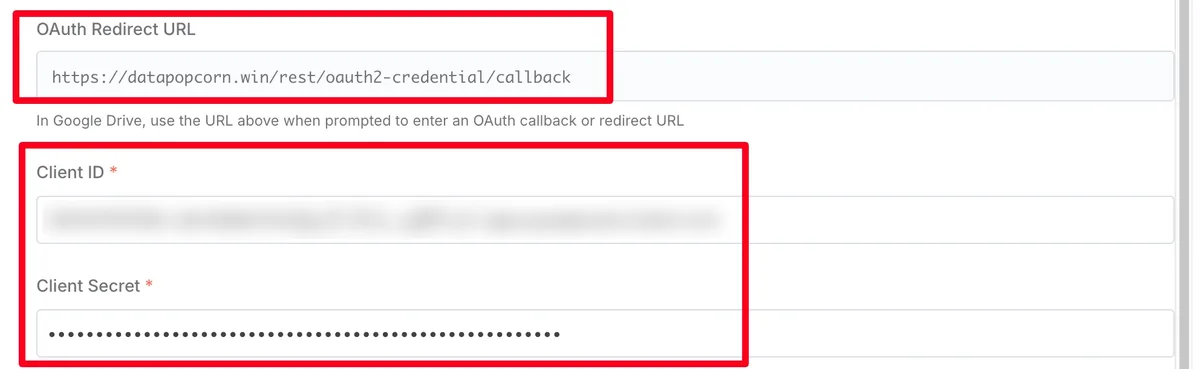
https://your-domain/rest/oauth2-credential/callback (source: my Korean-language n8n guidebook)Don’t stop there. You can check one step further. Keep the browser developer tools Network tab open and click Sign in with Google. The request going to Google shows the redirect_uri parameter as it was actually sent. The value shown on screen and the value actually sent can differ, so if you can’t find the cause, this check is the fastest route.
Check 2. Is that exact address in the authorized redirect URIs?
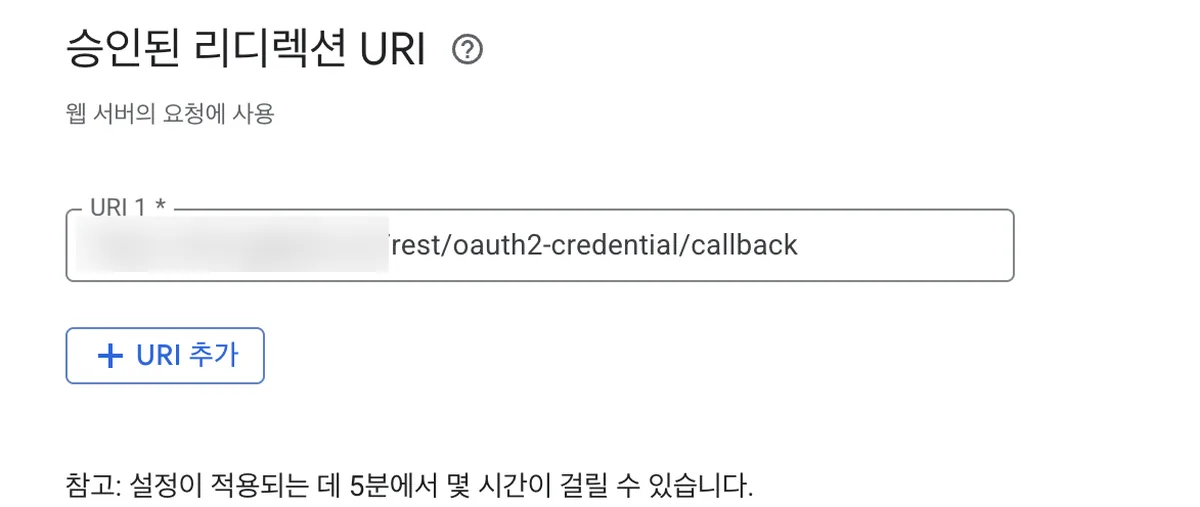
Register the address you confirmed in Check 1 in Google Cloud Console. The location is APIs & Services > Credentials > edit the relevant OAuth client > Authorized redirect URIs.
| Commonly mismatched point | Result |
|---|---|
| Trailing slash differs | Treated as a mismatch |
http and https differ |
Treated as a mismatch |
Subdomain differs (including whether www is present) |
Treated as a mismatch |
| Trying immediately after saving | It can take a few minutes to take effect |
If the error at this stage is redirect_uri_mismatch, the cause is effectively confirmed, which is actually good news.
Check 3. Do the client ID and secret belong to the same project?
The invalid_client error occurs when the client ID or secret was entered incorrectly. It is common to create several projects and paste a value from the wrong one.
| Error message | Cause | What to check |
|---|---|---|
invalid_client |
ID or secret mismatch | Are the project where you copied the values and the project where you enabled the API the same? |
access_denied |
Permission was not granted | Is the scope you requested set up on the consent screen? |
insufficient_scope |
Permissions needed for the operation are missing | Does the credential’s scope include a Gmail entry? |
Check 4. Is the Gmail API enabled, and is my account a test user?
Google requires each service’s API to be enabled separately. If you attach a credential created for Sheets or Drive to Gmail as-is, the credential itself is fine, but Gmail alone fails.
If the consent screen is in testing mode, one more condition applies. Your account must be in the test user list, and refresh tokens issued in this mode expire after a few days.
Check 5. Using a custom domain, but n8n calls back to the default domain?
This is the part that the setup guides rarely cover. It happens only when you self-host n8n and have connected a custom domain.
n8n builds the callback URL from server environment variables, not from the address in the browser’s address bar. So even if you access n8n through your custom domain, if the environment variables still point to the platform’s default domain, the callback goes to the default domain.
Address actually sent:        https://xxxx.up.railway.app/rest/oauth2-credential/callback
Address registered at Google: https://n8n.your-domain.com/rest/oauth2-credential/callback
There are two ways to fix this.
- Set the base URL explicitly to your custom domain in the hosting environment variables. Set
N8N_EDITOR_BASE_URLandWEBHOOK_URLtogether so they match. - Alternatively, add the platform’s default-domain address to the authorized redirect URIs on the Google side.
Tracing back from the error message
| What appears on screen | Check first |
|---|---|
redirect_uri_mismatch |
Check 2 |
invalid_client |
Check 3 |
access_denied, insufficient_scope |
Check 3, Check 4 |
Only the single line Unauthorized |
Start with Check 1 to see the actual address sent, then Check 4 and Check 5 |
Frequently asked questions
- Why does my n8n Gmail credential show only 'Unauthorized'?
- Most Gmail connection failures in n8n come from a callback URL mismatch, not the account or permissions. Compare the OAuth Redirect URL on the credential screen with the authorized redirect URIs in Google Cloud Console.
- Why does n8n send the default domain as the Gmail callback URL?
- n8n builds the callback URL from server environment variables, not from the browser address. Set N8N_EDITOR_BASE_URL and WEBHOOK_URL to your custom domain so they match.
Want the full system? The Claude Code & Codex Skills guidebook collects the skills and subagents behind this blog, from $19.
Some links are affiliate links. If you sign up through them, BuildnWrite may earn a commission at no extra cost to you.
BuildnWrite helps teams build AI agents that keep running. About BuildnWrite ›