Cloudflare Tutorial: Deploy a Vibe-Coded App on the Free Tier, Step by Step
Who this is forNon-developers and beginner developers who built an app with vibe coding but aren't sure where to host its address and data.
TL;DR: To ship a vibe-coded app, you need three things: an address, a data store, and a backup. This post walks through the order: buy a domain on Cloudflare, deploy with Pages and connect the domain, store data in D1, and back it up to R2, with free-tier limits along the way. It’s for anyone who built an app but hasn’t decided where to put it.
Contents
- Three things that get stuck when you ship a vibe-coded app
- Buy the domain first
- Cloudflare products and what they do
- Deployment order
- Asking AI to run it through the CLI
- When the free tier runs short
- When you get stuck
- What to keep after deploying
Ask an AI to build an app and the screens come together quickly. The next questions are where things get stuck: what address will the app open at, where do you keep the data users leave behind, and what do you restore it from if it disappears? I once wrote this in a Threads post:
If you want to vibe-code, remember Cloudflare. Database, domain, backup, connection, and so on: the free tier is already enough.
(Threads post by @buildnwrite, September 10, 2026)
This post walks through that idea step by step. I checked the limits and menu names against the official docs on October 5, 2026.
1. Three things that get stuck when you ship a vibe-coded app
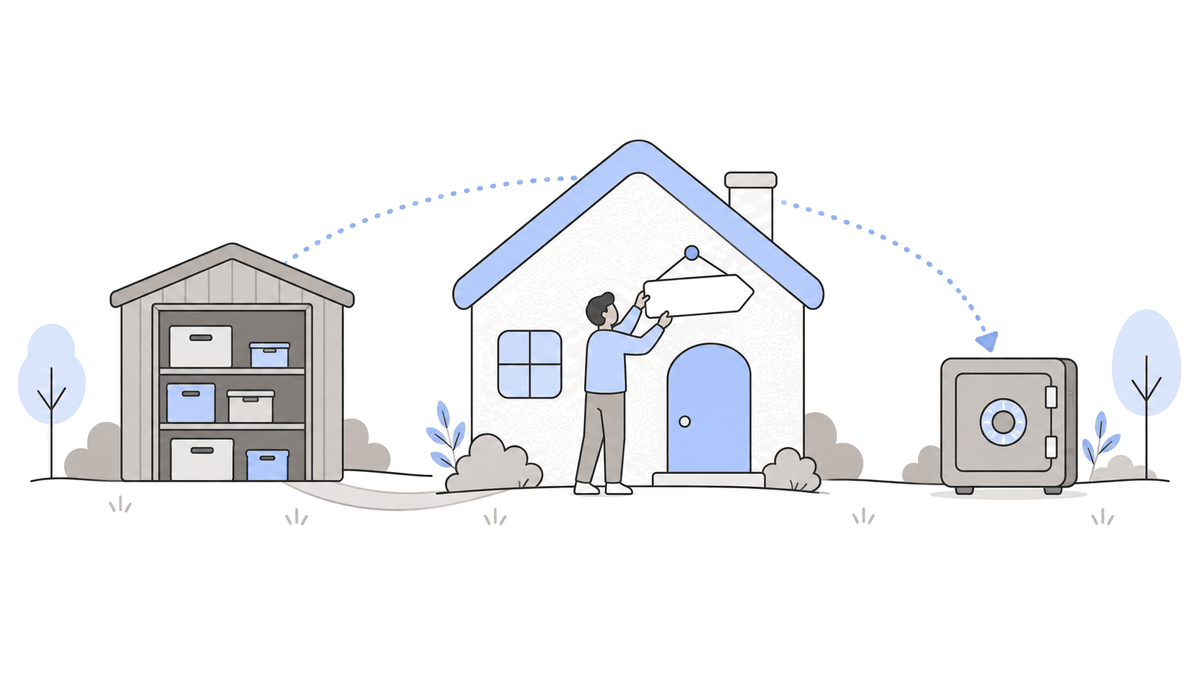
To let other people use an app that only runs on your computer, three things need to be added.
| What you need | What happens without it | Cloudflare product |
|---|---|---|
| Address | No link to share with others | Registrar (domains), Pages |
| Data storage | Nowhere to keep user input | D1 |
| Backup | No way to recover if data is deleted | R2 |
On Cloudflare, you can attach all three within one account. I have one experience with the backup row. My home server is a single Mac mini, and Claude suggested R2 because I needed a backup server. I was a bit uneasy about my backup strategy, and that suggestion made me feel more secure.
2. Buy the domain first
The first step in the deployment order is buying a domain. Here is the original Threads post:
For anyone deploying what they vibe-coded, I want to strongly recommend not using a Vercel domain and buying one domain for KRW 10,000/year instead!
(Threads post by @buildnwrite, September 8, 2026)
Registrar is the Cloudflare product where you buy domains. The Registrar product page says Cloudflare charges only the amount that the registry and ICANN collect, with no markup.
- Prices vary by domain extension, so check them on the purchase screen.
- Check which extensions you can buy from Cloudflare in the supported domain list docs first. The docs say extensions that don’t appear in search results can’t be registered.
- To attach the root domain itself (
example.com) to Pages, you have to move that domain’s nameservers to Cloudflare. If you only attach a subdomain likeapp.example.com, you don’t need to move them.
3. Cloudflare products and what they do
I use Cloudflare for my other infrastructure too, and the free tier is more than enough for me. Five products come into play when shipping one vibe-coded app. Free limits are based on the official docs.
| Product | What it does | Free limits (October 5, 2026) | Official docs |
|---|---|---|---|
| Registrar | Buy and renew domains | Not free; sold at cost | Registrar |
| Pages | Deploy the UI (static files) | Unlimited static file requests, 500 builds per month | Pages limits |
| Workers | Run server code | 100,000 requests per day | Workers pricing |
| D1 | Database | 500MB per database, 5GB per account, 5 million rows read per day, 100,000 rows written per day | D1 limits |
| R2 | File storage (backup) | 10GB storage per month, free egress | R2 pricing |
When you open the Pages limits doc, the build limits are at the top.
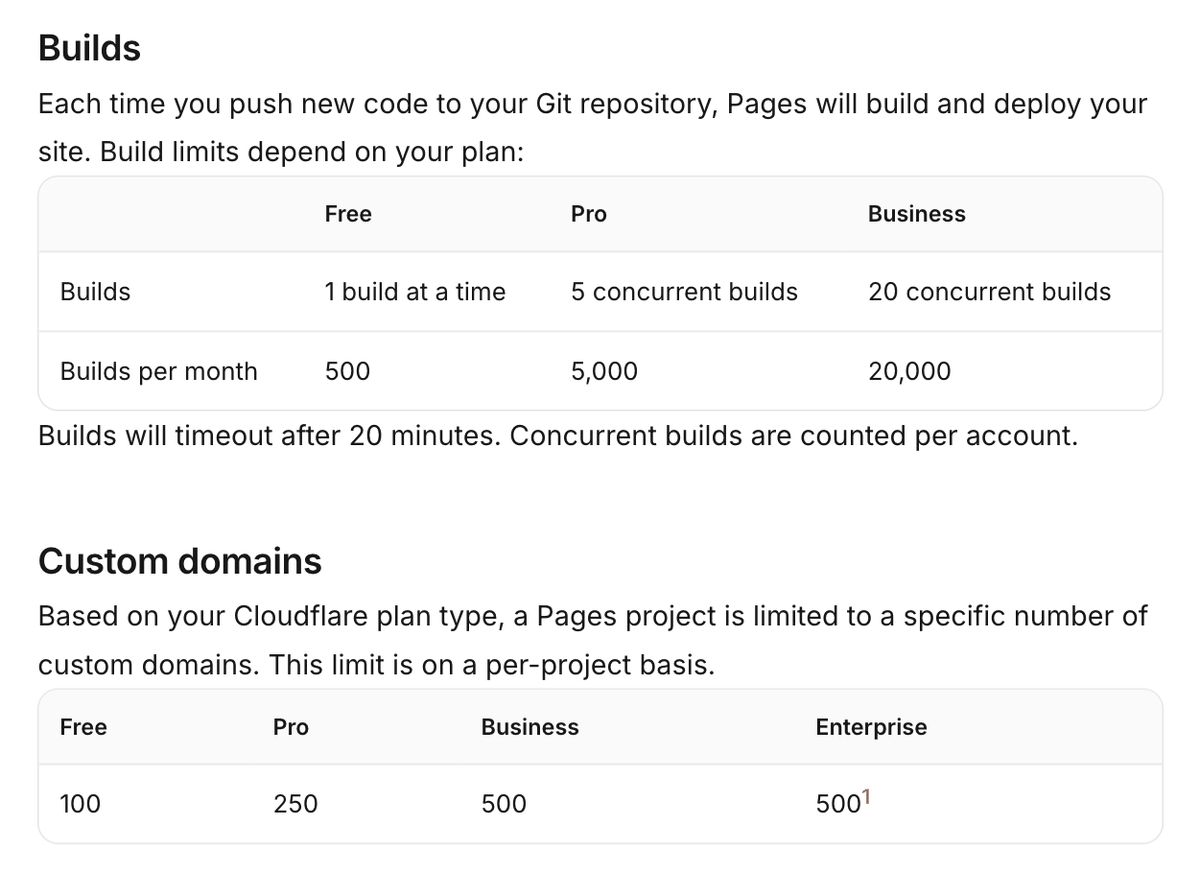
- Builds run one at a time and stop with a timeout after 20 minutes. Concurrent builds are counted per account.
- Pages rebuilds every time you push new code to the Git repository. Frequent commits use up your build count quickly.
- You can attach up to 100 domains to a single project.
4. Deployment order
Connect the five pieces in this order. Connecting a domain requires an existing Pages project, so it comes after deployment.
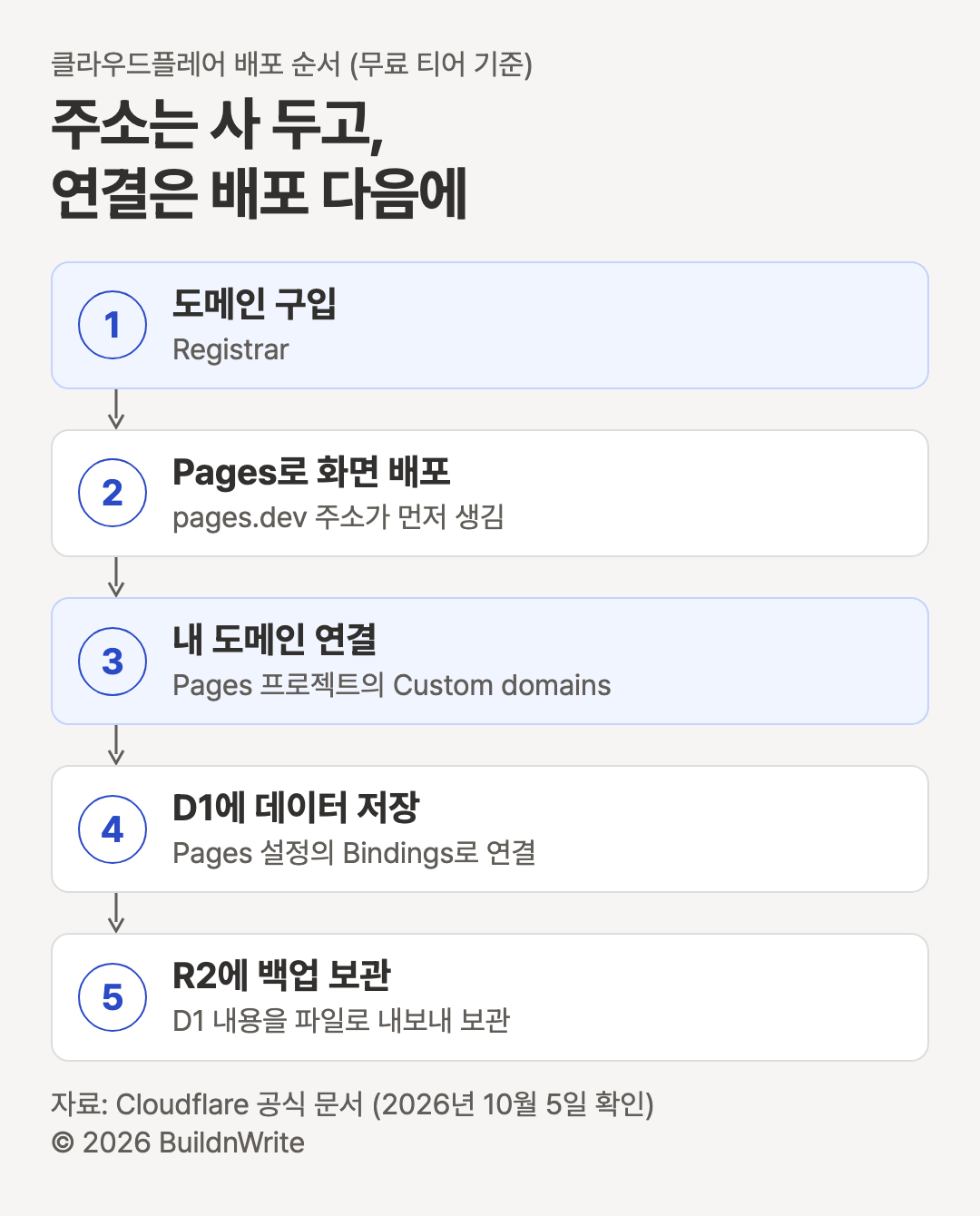
Here are the menus you click at each step.
- Buy the domain. Buy it from Registrar. At this stage, just purchase it.
- Deploy to Pages. Upload your app’s build output folder (usually
dist) and aproject-name.pages.devaddress is created. If you connect a Git repository, it redeploys automatically every time you push code. - Connect the domain. In the dashboard, open Workers & Pages, select the project, and click Custom domains > Set up a domain (official docs). The pages.dev address keeps working after you connect your domain.
- Connect D1. After creating the database, link it in the Pages project under Settings > Bindings > Add > D1 database bindings. After linking, you have to redeploy for the change to take effect (official docs).
- Back up to R2. Export the D1 contents to a file and upload it to an R2 bucket. The commands are in section 5.
5. Asking AI to run it through the CLI
You can click through the steps above one at a time in the dashboard. An easier route is to install wrangler and have an AI coding tool run the commands. The official docs describe wrangler as the CLI for Cloudflare’s developer platform.
To install, run npm i -D wrangler@latest in your app folder, then confirm with npx wrangler --version (install docs). The step-by-step commands are below. Replace the text inside angle brackets with your own names.
npx wrangler login                                            # First time only: connect your account in the browser
npx wrangler pages project create <project-name>              # Create a Pages project
npx wrangler pages deploy dist --project-name=<project-name>  # Upload the build folder
npx wrangler d1 create <database>                             # Create a D1 database
npx wrangler d1 export <database> --remote --output=backup.sql
npx wrangler r2 bucket create <bucket>                        # Create a backup bucket
npx wrangler r2 object put <bucket>/backup.sql --file=backup.sql --remote
You can ask the AI something like this: “Deploy this app to Pages using wrangler, create a D1 database, and connect it. Show me every command you run.” Including that last sentence lets you check which commands the AI actually ran.
6. When the free tier runs short
Here are the free and paid limits from the official docs side by side. Workers Paid and Cloudflare Pro are separate paid products.
| Item | Free | Paid |
|---|---|---|
| Server code requests | 100,000 per day, resets at 9 a.m. Korea time (UTC midnight) | Workers Paid (minimum $5/month per account): 10 million requests per month included; beyond that, $0.30 per 1 million requests |
| D1 storage | 500MB per database, 5GB per account | Workers Paid: 10GB per database |
| D1 restore | Last 7 days | Workers Paid: last 30 days |
| Pages builds | 500 per month, one at a time | Cloudflare Pro plan: 5,000 per month |
- Requests for static files are unlimited, but server code requests in Pages count toward the Workers limit of 100,000 per day (official docs). Code that calls D1 falls into this bucket.
- On the free plan, D1’s restore feature (Time Travel) can’t roll back further than 7 days (official docs). To keep history longer than that, back up separately to R2.
- Workers Paid minimum fees and request pricing are based on the Workers pricing docs. D1 capacity is based on the D1 limits docs.
7. When you get stuck
I’ve only listed symptoms that the official docs describe.
| Symptom | Cause | What to do |
|---|---|---|
| 522 error when opening your domain | A record pointing to the Pages address was added manually in the domain settings before connecting the domain in Pages | Connect the domain from Custom domains first |
example.com won’t connect |
The nameservers are not Cloudflare’s | Change the nameservers where you bought the domain |
| 1027 error page | Workers daily request limit exceeded (when configured to show an error once the limit is passed) | Wait for the UTC midnight reset, or upgrade to a paid plan |
| Data save fails, limit-exceeded error | D1 daily read or write limit exceeded | Wait until the next day, or upgrade to a paid plan |
| Cannot insert data | D1 storage limit reached (500MB per database, 5GB per account) | Delete data you don’t need |
- Sources: domain connection docs, Workers limits docs, D1 pricing docs, D1 limits docs
- The domain connection docs also say that if you remove a domain connection from Pages and add it back, activation will be slower.
8. What to keep after deploying
In a Threads post listing five reasons vibe-coded apps don’t make money, I wrote points 1 and 5 like this:
Telling people is a million times harder than building. / Once you deploy, keep one of three things: experience, data, or money. Each one is harder than the last.
(Threads post by @buildnwrite, September 20, 2026)
Once you’ve deployed, do these two things:
- Send your domain address to one person and ask them to confirm it actually opens.
- Use the export command from section 5 to make a D1 backup file and leave it uploaded to R2.
If the next step is adding login to your app, see the vibe-coding Supabase login guide. If Supabase keys confuse you, see the Supabase keys guide. If the word “server” is unfamiliar, read what is a server first.
Free limits, menu names, and commands are based on Cloudflare’s official docs as of October 5, 2026. Before paying, check each product’s pricing docs again.
Frequently asked questions
- Can I use Cloudflare for free indefinitely?
- Free tier limits are usage-based. Pages serves static file requests free and unlimited. D1 allows 500MB per database, 5GB per account, and 100,000 rows written per day. R2 includes 10GB of storage free. Limits can change, so check each product's pricing docs (confirmed October 5, 2026).
- Do I have to buy a domain?
- No. Pages projects get a pages.dev address automatically. The author recommends not using a Vercel domain and buying your own domain instead. Cloudflare Registrar says it charges no markup on what registries and ICANN collect.
- Can I deploy without knowing the commands?
- Install wrangler, Cloudflare's CLI, and you can deploy to Pages, create a D1 database, and upload files to R2 with one command each. Ask an AI coding tool like Claude Code to run these commands. The first time, a person has to connect the account with wrangler login.
Want the full system? The Claude Code & Codex Skills guidebook collects the skills and subagents behind this blog, from $19.
BuildnWrite helps teams build AI agents that keep running. About BuildnWrite ›