Discord grading bot for an n8n challenge: from submissions to similarity scoring
Who this is forOperators who must collect and give feedback on submissions, such as Inflearn challenges or internal automation contests, and past n8n challenge participants who used the grading bot.
TL;DR: The advanced missions of the n8n six-week book-finishing challenge were collected by a Discord bot. The bot discarded 27 submitted workflows without saving them, and I only realized this the day before the live broadcast. The bot’s structure is simple. Participants upload a JSON file with a slash command, and the bot measures similarity to the book’s original. If the workflow is identical to the original, it only certifies completion. If it is slightly changed, it adds an AI comment. If it is heavily changed, it adds an AI comment plus a call to the operator. This post is a record of how I built the bot and what I got wrong.
Contents
- Why the challenge needed a grading bot
- The first design was scrapped: from a website to a Discord bot
- The whole structure on one page
- Grading method: measuring similarity to the book’s originals
- How people reacted
- The incident: submitted workflows were not saved
- If I build something similar next time
1. Why the challenge needed a grading bot
The structure of the challenge covered in the earlier post is as follows. Each week, basic and advanced missions are released to match the book’s progress. Basic missions are completed by following the book and certifying on your blog, and the Inflearn challenge page (Inflearn is a Korean online course platform) manages attendance and completion. Advanced missions apply the same framework to your own daily life, and they had two problems:
| Problem | Situation |
|---|---|
| Copy-paste submissions | The book’s example workflows are public on GitHub, so submitting them unchanged leaves no trace |
| Limits of two authors | 319 applicants. On the Discord bot alone in week 1, 19 people submitted 21 workflows. There was no time to open each JSON |
| Delayed feedback | If a human reviews it, the reply comes days later. People who tried to adapt the material need an immediate response even more |
So the goals I set at first were three. AI would post first-pass feedback immediately on submission. It would distinguish between submitting the book’s original and applying it yourself. And the authors would spend their time only on people who adapted it. I started the design on April 17, 2026 with these three lines.
2. The first design was scrapped: from a website to a Discord bot
I first built a submission website. You got a login link by email, entered, and uploaded a JSON file and a screenshot. Five serverless functions were responsible for storage, AI feedback, email sending, and an admin screen. It reached a working state on April 21.
Then, a week later, I scrapped the whole thing.
v1. Submission website (started April 17, archived April 28)
A separate system that also handled attendance. Inflearn already does this
v2. Discord bot (switched April 28, passed testing the same day)
Attendance stays with Inflearn, feedback goes to Discord. The bot only handles feedback
3. The whole structure on one page
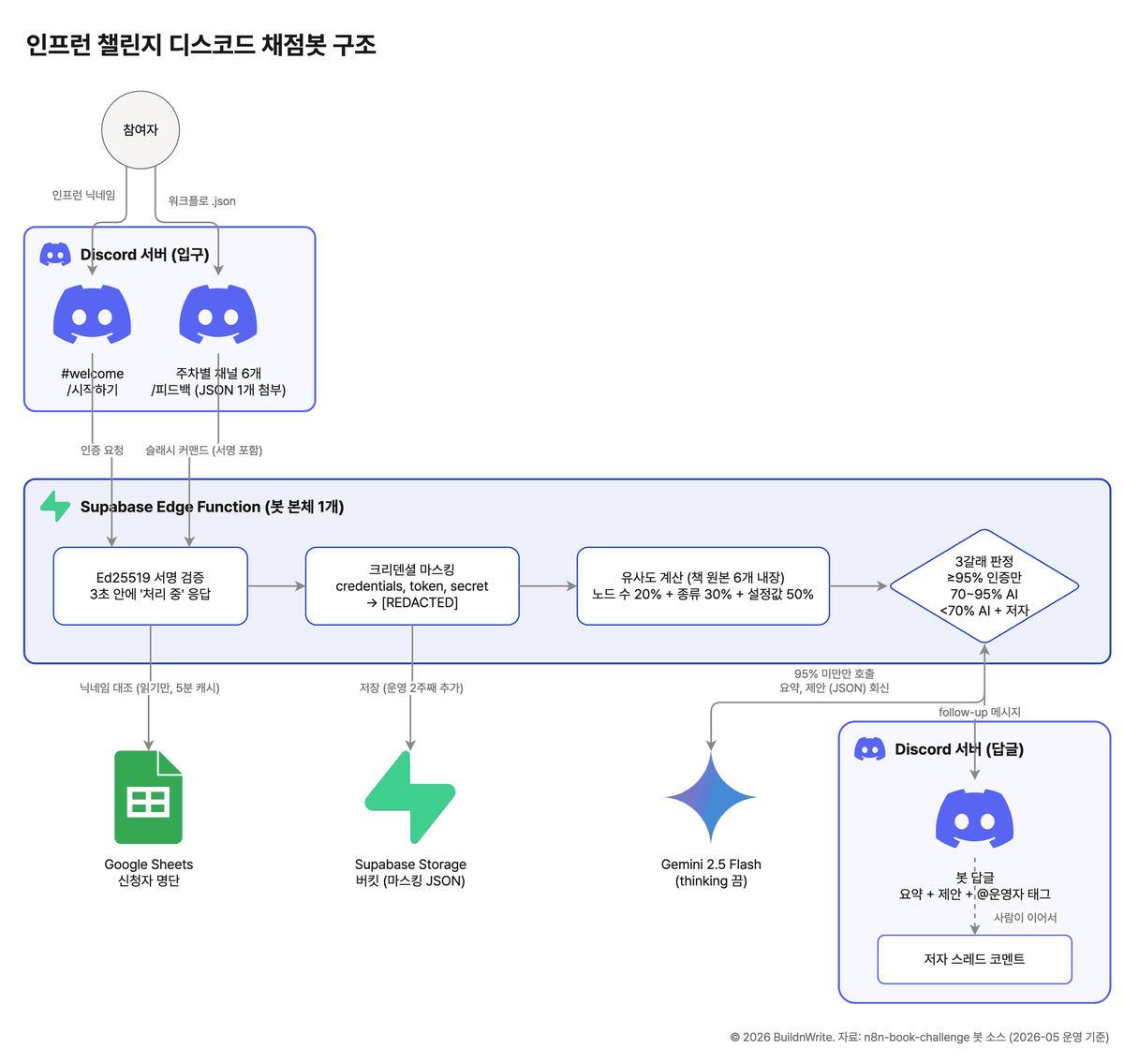
The structure we ran is shown on one page below. The only thing participants touch is Discord. The rest is one serverless function that calls three outside services.
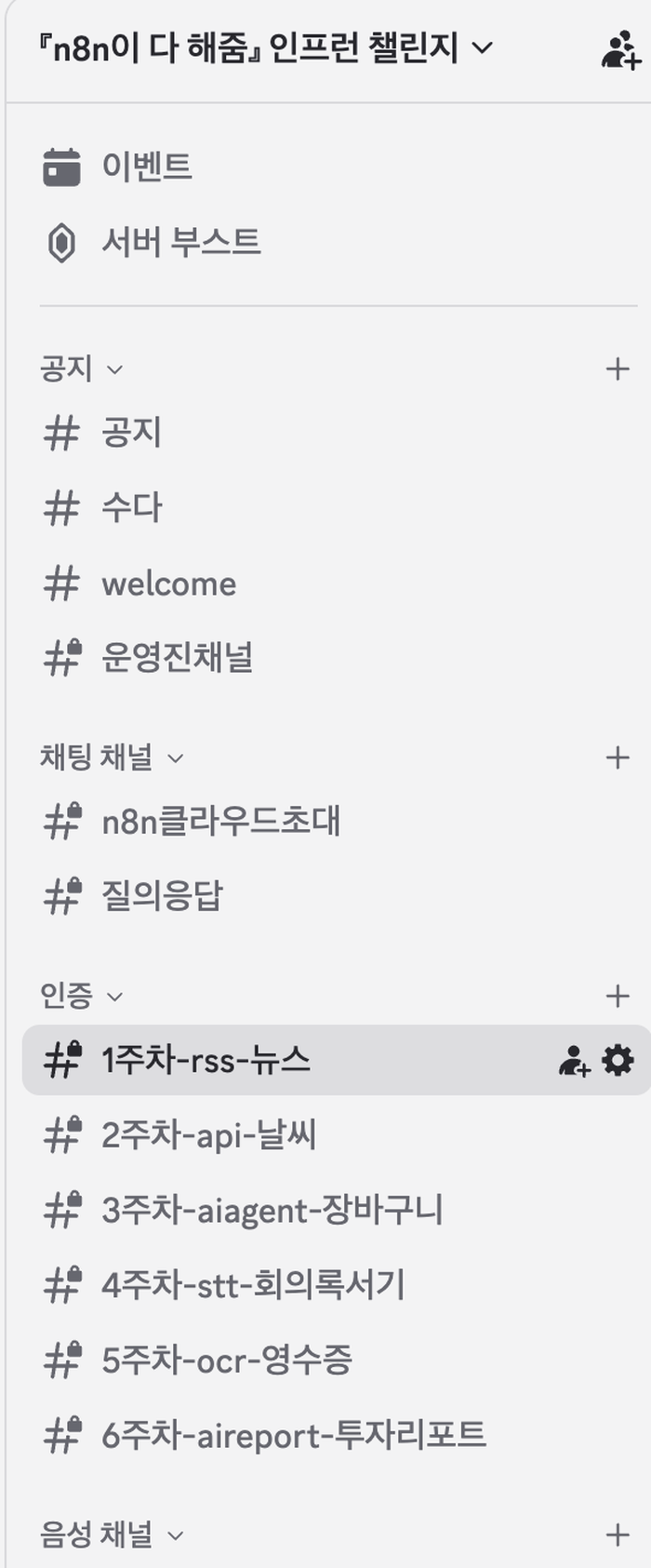
The Discord server looks like this. The announcement, chat, and welcome channels are visible to everyone, and the remaining channels with padlocks are visible only to learners who have completed verification. The six weekly channels are where the bot operates.
Typing a slash in the chat box brings up two commands for the bot. The start command grants learner permissions using your Inflearn nickname, and the feedback command uploads a workflow file.
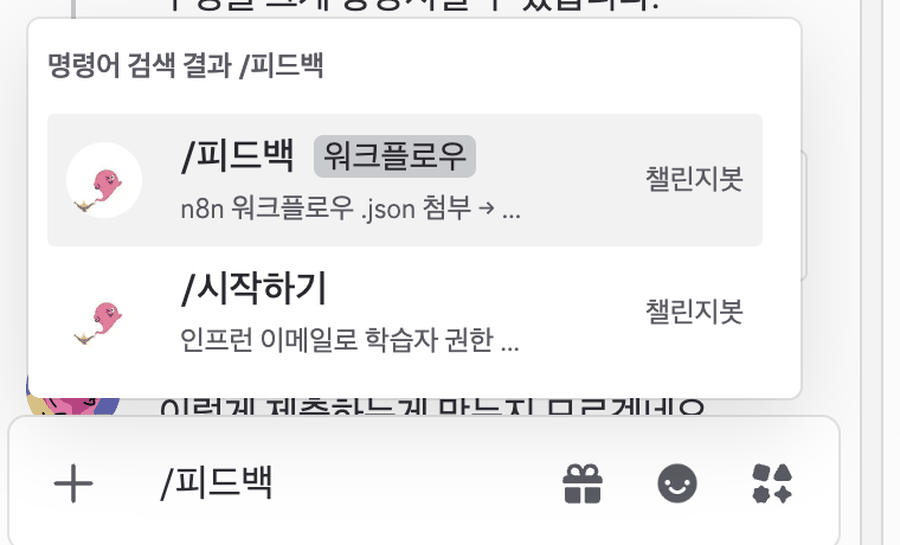
At first the feedback command had four options: the file, the week, the type (basic or advanced), and a memo. In testing, filling in four fields in the chat box was tedious. On reflection, the week was already implied by the channel, and the type could be determined by the bot through similarity. So I reduced the options to just the file. The fewer choices participants have to make, the more submissions come in.
4. Grading method: measuring similarity to the book’s originals
The core of this bot is the part that decides, without human hands, whether something was copied from the book or built by the participant. I could have asked an AI, but then every submission would trigger an AI call, and the judgments would be unstable. Instead, I put six original workflows from the book inside the bot and compared each submitted JSON directly against them.
An n8n workflow JSON is a list of nodes. Each node has a type and parameters. The comparison used three layers.
| Layer | What is measured | Calculation | Weight |
|---|---|---|---|
| Node count | Number of nodes in the original and the submission | Smaller ÷ larger | 20% |
| Node type | How much nodes of the same type overlap | Overlapping count ÷ count of the larger side | 30% |
| Parameters | Pair nodes of the same type and compare parameter values one by one | Matching values ÷ total values | 50% |
The similarity is the weighted average of the three values. Parameters get half the weight because even with the same node types, if you changed the RSS address, the search keyword, or the email recipient, you built your own version. Conversely, even if you added a few more nodes, if the parameters are identical to the original, it is not an adaptation.
Once the similarity is calculated, it is split into three paths.
| Similarity | Verdict | What the bot does | AI call |
|---|---|---|---|
| 95% or higher | Exact book original | Only a certification message: “If you try an adaptation, upload it again” | None |
| 70% or higher, below 95% | Slightly changed | Summary and 1 improvement suggestion in the basic-mission tone | Yes |
| Below 70% | Heavily changed | Summary and suggestions in an advanced tone, plus a call to the author with an @operator tag | Yes |
AI feedback used Gemini 2.5 Flash with thinking mode turned off. The answer comes back in a fixed JSON format, not free text: one summary paragraph, up to three traces of changes from the original, two to three improvement suggestions, and a copy-paste risk level (low, mid, or high). In the channel, only the summary and one suggestion are shown, in three or four lines. The first version was longer than this, but nobody reads long replies in a chat window.
5. How people reacted
Here is the actual screen of the week 1 channel. The bot’s reply goes out in this order: a checkmark, the nickname, the node count and similarity, the summary, one suggestion, and the yellow @operator tag. That tag is the author call. To protect privacy, participants’ nicknames and profile photos are blurred.
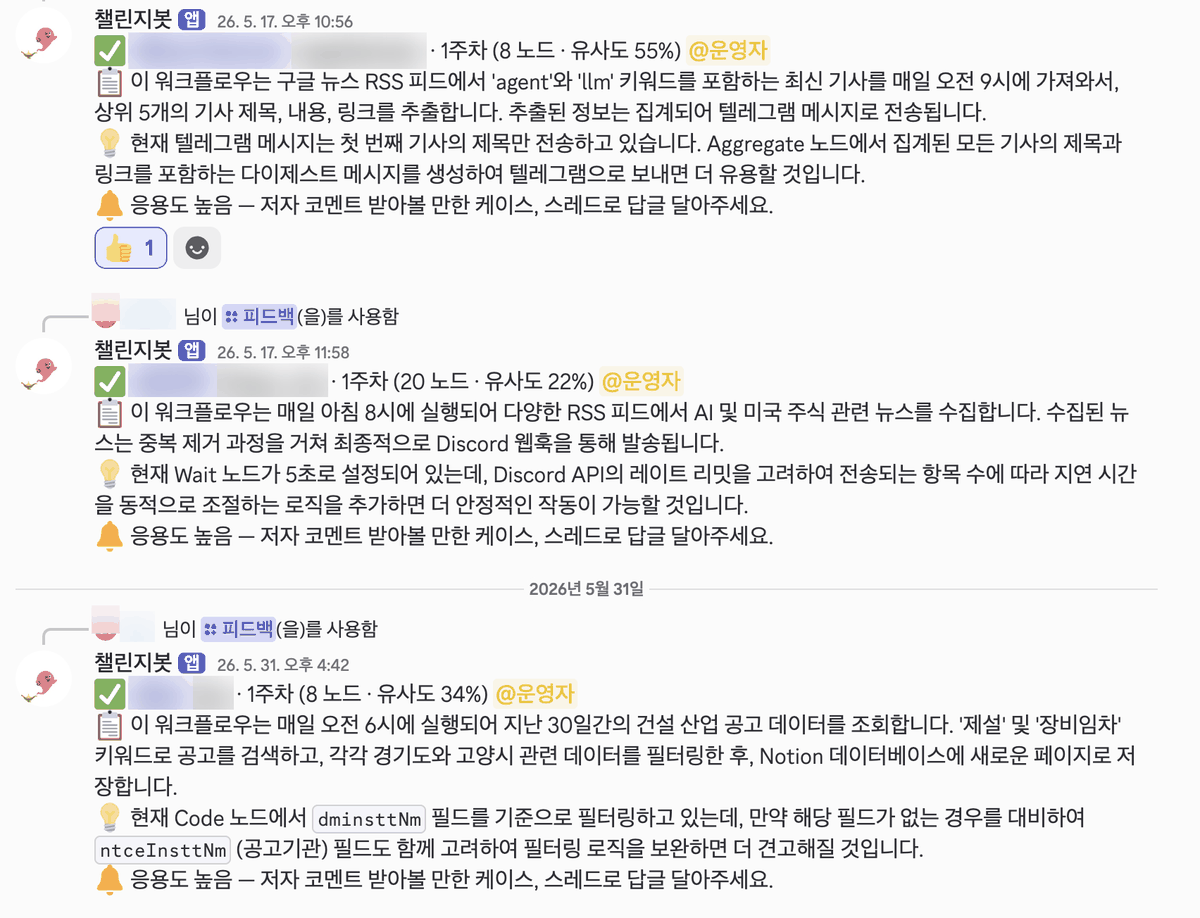
A workflow with more than 50 nodes was posted in week 1. The first version had 55 nodes, the revised version had 54, and the book’s example has 9. The bot gave both versions a 12% similarity and called the author, and a thread opened under the second reply.
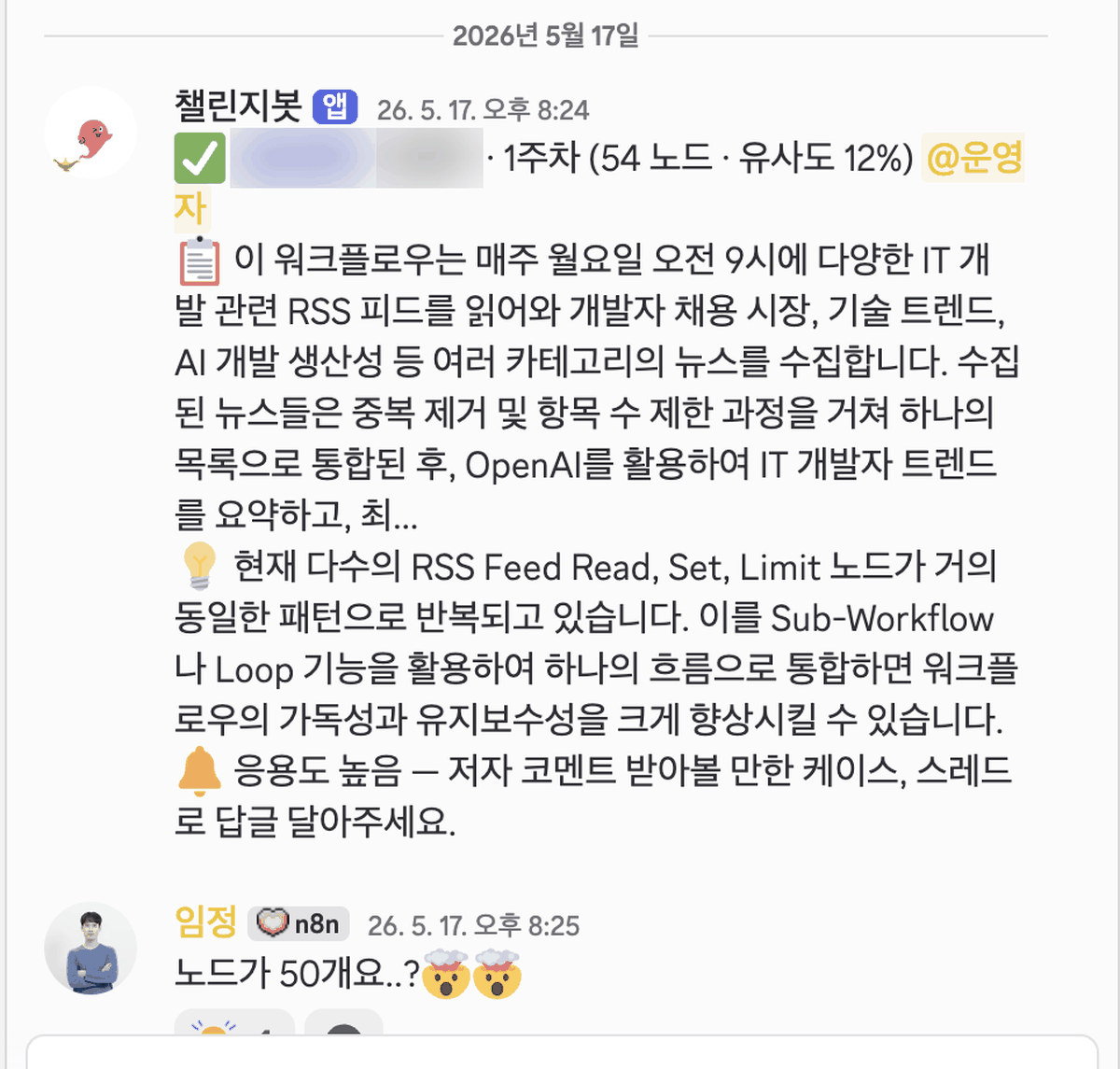
“50 nodes?? 🤯🤯” (author Im Jeong, first reply in the thread)
“Yeah… there are 9 spots total. I merged 8 RSS news feeds and 1 HTML scrape using Merge, so that’s probably why it got so big…” (participant Kang*)
“The automatic feedback says to use the loop feature, but I haven’t learned that yet, lol.” (participant Kang*)
“The AI seems to be guessing. There’s no loop, but there is batch. I’ll fix this. Could you take a screenshot of the workflow?” (author Im Jeong)
Here the limits and the usefulness of AI feedback show up at the same time. The bot correctly pointed toward “combine repeated nodes into one,” but the participant did not know the range covered that week. The author filled that gap in the thread. A few days later the participant posted a screenshot of the workflow, and the conversation continued like this.
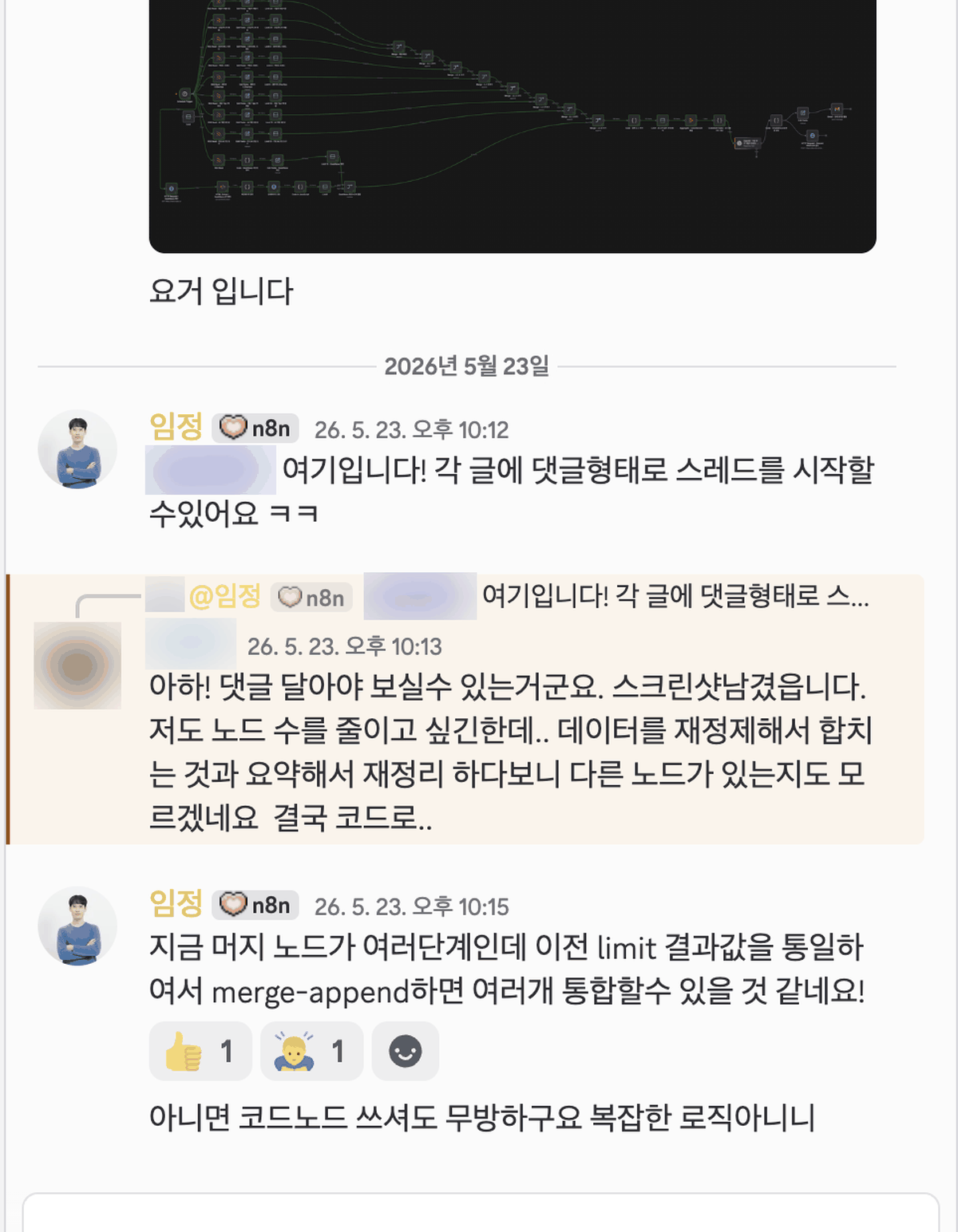
“Oh! So I have to comment to make it visible. Here’s the screenshot. I want to reduce the node count too, but I’m re-refining the data and merging it, then summarizing and reorganizing it again, so I don’t even know if there are other nodes… In the end I’ll have to do it in code…” (participant Kang*)
“Right now the merge node has several stages. If you unify the previous limit results and merge-append them, I think you can consolidate several into one!” (author Im Jeong)
“Or you can use a Code node. That’s fine too, since the logic isn’t complicated.” (author Im Jeong)
Not all the reactions were good. People seeing the bot for the first time did not know where to submit what. The first submitter pasted a Notion link into the channel instead of using the slash command and wrote, “I’m not sure this is the right way to submit.” A week later, another participant left the same sentence. Even with a pinned message at the top of the channel, first-time visitors did not read it. Both times, the author replied directly: “Type the slash, choose feedback, and it works automatically.”
Counting the bot’s replies to participants by similarity band during the week 1 period (May 11 to 17) gives this:
| Band | Verdict | Week 1 count |
|---|---|---|
| 95% or higher | Exact book original | 0 submissions |
| 70% or higher, below 95% | Slightly changed | 0 submissions |
| Below 70% | Heavily changed, author called | 21 submissions (19 people) |
The people who bothered to come to Discord to submit advanced missions had already made their own work. The first band, designed to filter out copy-paste, was never triggered in week 1, and the author looked at all 21 submissions.
6. The incident: submitted workflows were not saved
The bot started running with the start of week 1 on May 11. At the second live session on May 23, I planned to pick interesting submissions from weeks 1 and 2 and review them on screen. I found out while downloading channel messages to prepare the curation: the JSON files the bot had received were nowhere to be found.
The cause was simple. The bot downloaded attachments from the Discord server, sent them to the AI, posted a reply, and finished. It never saved the files themselves. The attachment URLs Discord gives the bot expire after 24 hours. The 27 submissions that had piled up over two weeks disappeared that way. The bot’s summary text remained in the channel, but there was no workflow to open on the canvas.
| Date | Status |
|---|---|
| April 28, bot completed | Passed tests for downloading files, masking, AI calls, and replies. No storage step |
| May 11, week 1 begins | Submissions pile up, but files are discarded every time |
| May 22, live preparation | While collecting channel messages, found that the original JSON files were missing |
| May 23, fix deployed | Added storage of masked JSON to Supabase Storage. The earlier 27 cannot be recovered |
At the live session, I chose candidates based on the bot’s summaries and similarity scores, then asked the relevant participants to re-send their workflows in a thread. The 55-node workflow from the earlier section could only be seen through the canvas screenshot the participant had posted in the thread.
7. If I build something similar next time
Whether it is an Inflearn challenge or an internal automation contest, if you build a system that receives submissions and posts automatic feedback, I recommend this order.
| Step | What to do | Why I learned this |
|---|---|---|
| 1 | Separate who handles attendance from who handles feedback | Once Inflearn took over attendance, a separate submission site became duplicate work |
| 2 | Put the bot in the app participants already use | One slash command lowers the submission barrier more than the login flow of a new website |
| 3 | Save submissions first, then process them | Attachment URLs expire. I lost 27 submissions |
| 4 | Place secret masking before the AI call and before storage | Workflow JSON can contain API keys |
| 5 | If an original exists, measure similarity with rules before calling the AI | Judgments are stable, and submissions identical to the original cost zero AI calls |
| 6 | Set the criteria for calling a person as a number | The author only looked at submissions below 70%. The threshold is a single constant, so it can be adjusted anytime |
| 7 | Reduce the number of options | Going from four fields to one made submitting easier |
| 8 | Have the bot give first-submission guidance in a reply | Pinned messages go unread. Two people asked the same question |
The materials I used to build the bot are covered in other posts on this blog. For the Discord connection, see the Discord webhook guide. For deploying the serverless function, see the Supabase Edge Function deployment guide. For the differences between key types, see the Supabase keys guide. For how the challenge itself unfolded, see the earlier post.
Frequently asked questions
- What happened to the 27 workflows submitted to the n8n challenge bot?
- The bot discarded them without saving. The author realized this only the day before the live broadcast.
- How does the n8n challenge Discord bot grade a submitted workflow?
- It measures similarity to the book's original workflow. An identical workflow only certifies completion, a slightly changed one gets an AI comment, and a heavily changed one gets an AI comment plus a call to the operator.
Want the full system? The Claude Code & Codex Skills guidebook collects the skills and subagents behind this blog, from $19.
BuildnWrite helps teams build AI agents that keep running. About BuildnWrite ›