Keeping AI Project Docs Under Control: A Signal-to-Noise Rule for md Files
Who this is forSolo operators running agents like Claude Code or Codex across several projects who can no longer tell which of their dozens of md files is current.
TL;DR: When AI writes your documents, the cost of producing them drops close to zero. The value of a document then depends on what you chose not to create, not on how many you made. In a signal-to-noise ratio, cutting noise is far cheaper than boosting signal. I fixed the md filenames allowed at the project root to five, split documents into living and record types, and handed the checks to a script rather than the agent. This article covers the measurements and judgments behind those rules.
Contents
- Measurement: md files multiply as sessions get longer
- Applying signal-to-noise ratio to documents
- Decision one: separate living documents from records
- Decision two: five names are allowed at the root
- Decision three: the folder is set by the nature of the material
- Scripts, not agents, do the checking
- List of things not to create
1. Measurement: md Files Multiply as Sessions Get Longer
I opened the docs/ folder of a live web service project. This is the result of running sessions with agents over two months.
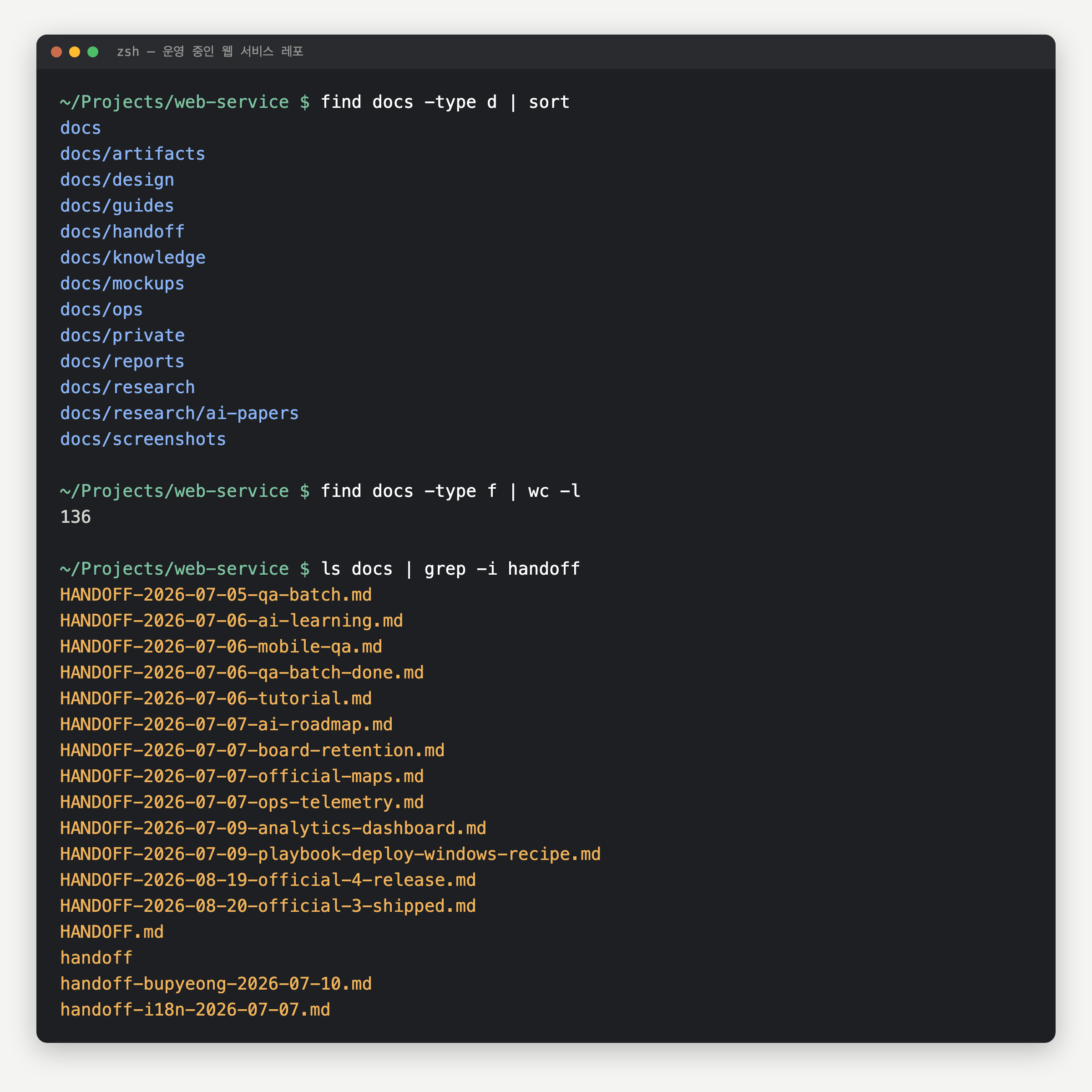
The same pattern repeated across three projects.
- Lecture project: each new course run adds new plan documents under
docs/plan/, and the structure document for the same course splits intoPRODUCTION-PLAN.md,DIAGRAM-PLAN.md, andSTRUCTURE.md - Web service: same as the screen above. An overview document declared a
living documentwent unedited for two months - Automation hub:
ARCHITECTURE.md,registry.md,README.md, andautomation-inventory.mdsit side by side at the root, so filenames alone don’t reveal where the currently accurate description lives
They share one trait: agents hesitate at nothing when creating documents, and people hesitate to delete them.
2. Applying Signal-to-Noise Ratio to Documents
Signal-to-noise ratio is a ratio. Increase the numerator or decrease the denominator and it goes up.
| Item | What it means for documents | How to raise it |
|---|---|---|
| Signal (numerator) | Documents that state what is true now | Write well. Expensive and slow |
| Noise (denominator) | Old versions, duplicate explanations, files nobody reads | Don’t create, merge, or delete. Cheap and fast |
Before AI, raising the numerator was the job. A single document took half a day to write, so there was no room for noise to build up. Now it’s the reverse. A one-line prompt produces a document, so the denominator grows on its own.
So I narrowed the decisions to three. All three are about not creating things.
3. Decision One: Separate Living Documents from Records
There are only two kinds of documents: those that must be revised as time passes, and those that must stop changing the moment they’re written.
Living: overwrite the same file
- Target Current structure, current status, rules ARCHITECTURE.md, top of STATUS.md, CLAUDE.md
- Method Edit the same file No new files with version numbers. Review results go into the body, not a separate file
- History Git keeps it If you need an earlier version, check the commit history
One file, one current state
Record: freeze at the moment it is written
- Target Meeting notes, audits, session handoffs, original external material docs/2026-09-11-topic.md, docs/handoff/, references/
- Method Add new files with a date prefix A growing file count is normal. The only subfolder is handoff/
- History Never edited Even if a name changes later, quotes inside past records stay as they are. Editing them distorts history
Only accumulates, with date prefixes
Once this split is clear, questions like “where do the PRD and planning docs go?” disappear. A PRD (product requirements document, the planning document that defines what to build) describes the current structure, so it is a living document. Living documents are consolidated into ARCHITECTURE.md, so the PRD goes there.
- Migration plans and catalogs, which describe “how things are right now,” all get attached to the existing living documents
- Backlogs and script-generated inventories, where items accumulate, are data, not documents. Store them in a single-file database such as SQLite
- We originally split
STATUS.mdandLOG.md, then merged them. In a solo operation, the discipline of updating two separate files never held up
4. Decision Two: Five Names Are Allowed at the Root
The md files at the project root have fixed names. If you feel a new name is needed, that feeling is itself a noise signal.
| File | Type | Update method | Contents |
|---|---|---|---|
CLAUDE.md |
Living | Overwritten | Rules and summaries only. No client requirements or contract terms |
ARCHITECTURE.md |
Living | Overwritten | Current structure. PRDs, planning docs, specs, and feature descriptions all live in this file |
STATUS.md |
Living + append-only | Top section overwritten, log appended | Current status and progress log |
registry.md |
Living | Overwritten | Hub only. List and status of child projects |
README.md |
Living | Overwritten | Public-facing introduction. Optional |
Hubs and working projects use different sets.
- A hub that only owns child projects: just
CLAUDE.md+registry.md. If anARCHITECTURE.mdappears here, it signals that the hub is holding implementation - A shared-asset hub that multiple projects pull from (such as a design system): an exception. Holding implementation is normal
- Child, one-off, ongoing, and experimental projects:
CLAUDE.md+ARCHITECTURE.md+STATUS.md
5. Decision Three: The Folder Is Set by the Nature of the Material
Outside the root, folder names describe the nature of the material. If you’re torn about which folder to use, you’ve misjudged the material’s nature.
| Material type | Location | Update method |
|---|---|---|
| Original external material (email attachments, client documents, contracts) | references/ |
Immutable |
| Our own point-in-time records (meeting notes, audits) | docs/YYYY-MM-DD-topic.md |
Record |
| Session handoffs between agents | docs/handoff/ |
Record. The only subfolder in docs/ |
| Finished deliverables (lecture materials, reports, manuscripts) | materials/, reports/ |
Updated |
| Description of a single feature | A section inside ARCHITECTURE.md |
Updated. No separate file is created |
Don’t put category folders such as research/ or reports/ inside docs/. The measurements in Section 1 are the result of that. The moment you create a category, that folder becomes an unmanaged layer.
6. Scripts, Not Agents, Do the Checking
After setting the rules, I first wrote them in CLAUDE.md and told the agent to follow them. It didn’t work. The original problem was that “the agent forgets the rules as sessions get longer,” and handing the checks back to the agent left the same hole in place.
So I moved the check into a hook script. It steps in the moment the agent tries to write a file, and if it would create a new md at the project root under a name outside the allowlist, it asks the user.
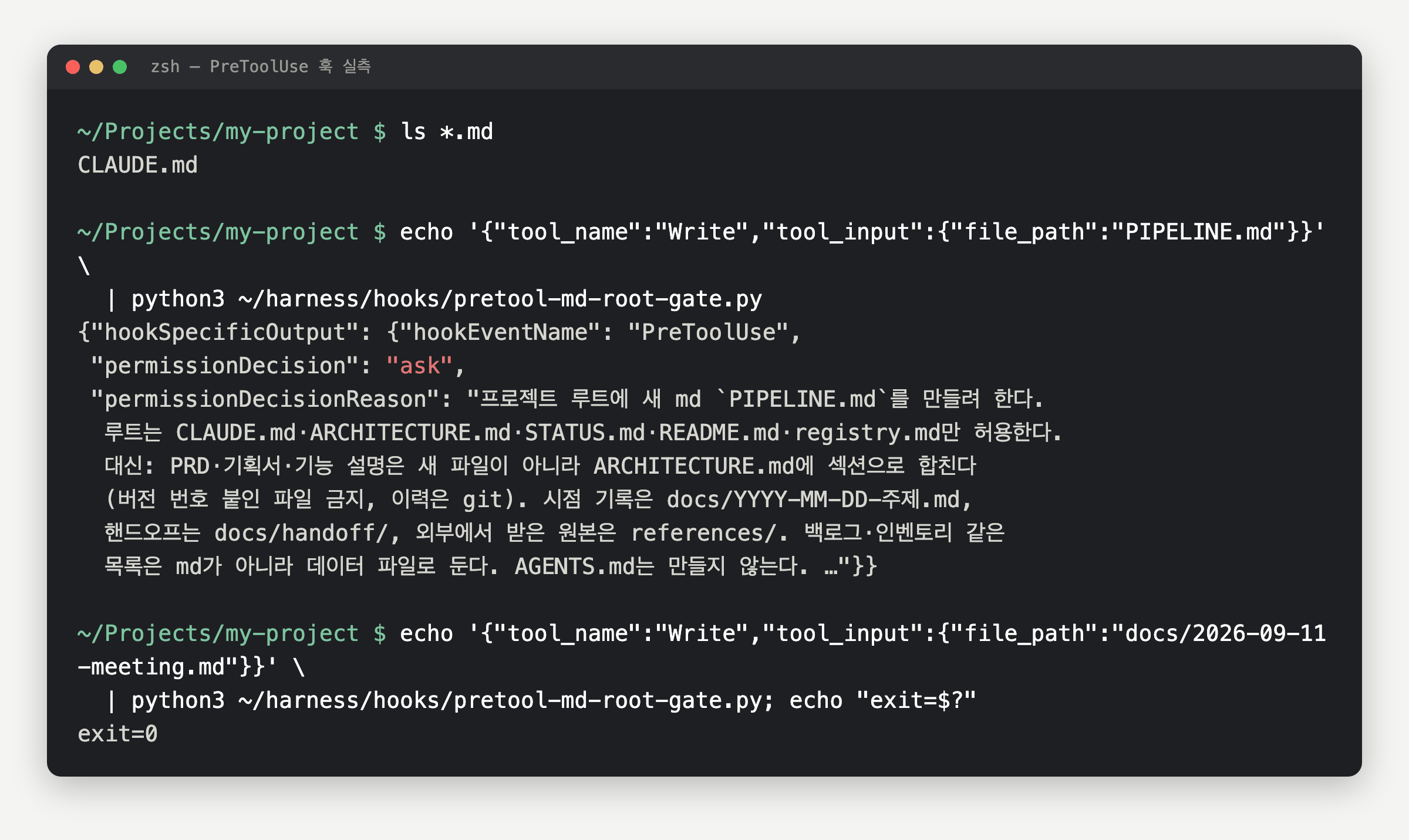
Deterministic checks that need no judgment, such as “is this filename on the allowlist?”, belong in a script. I also noted the limits in the rules document.
This is a speed bump against accidents, not a security boundary. Files written directly via a Bash heredoc or a script are not caught by this hook. (Operating rules document project-docs.md, September 11, 2026)
An agent can get around it if it tries. The goal isn’t to prevent circumvention; it’s to make the agent pause once at the moment it reaches for an impulsive write.
7. List of Things Not to Create
The part of these rules that actually does the work is the prohibition list.
Things not to create
- Version-numbered file PRD-v0.1.md, PRD-v0.2.md Edit the same file. History lives in git
- Per-feature md scripts/feature.md As a section in ARCHITECTURE.md
- Category folders docs/research/, docs/reports/ Keep docs/ flat; the only subfolder is handoff/
- List md BACKLOG.md, inventory md Store data in a data file such as SQLite
- Per-agent rule file AGENTS.md Configure several agents to read a single CLAUDE.md
- Implementation inside a hub ARCHITECTURE.md in an ownership-type hub Implementation and deliverables go to child projects
If you feel a new name is needed, first check whether the content fits as a section in an existing file
The rules apply only to what gets created from now on. I didn’t migrate the projects in Section 1 all at once either. When I come across an old document, I check its reference scope at that point, then merge or delete it. Cleanup itself must not become another source of noise.
Frequently asked questions
- Which md filenames are allowed at the project root?
- Five names are allowed at the root: CLAUDE.md, ARCHITECTURE.md, STATUS.md, registry.md, and README.md. A hub that only owns child projects uses just CLAUDE.md and registry.md.
- How does a hook script enforce the root filename rule?
- The hook runs when the agent tries to write a file. If a new md file at the project root has a name outside the allowlist, the script asks the user. Files under docs/ pass through.
BuildnWrite helps teams build AI agents that keep running. About BuildnWrite ›