excelkospi Architecture Teardown: Edge Functions, Durable Objects, Supabase
Who this is forSide-project developers and no-code builders who want to design low-cost, edge-first dashboards or real-time tools on free or low-cost tiers.
Many side projects that display live data, such as stock prices, crypto quotes, or news feeds, run into the same two problems. Scraping logic and API details leak to the browser, and polling costs grow with every visitor. excelkospi.pages.dev, a real-time Korean and US stock dashboard styled to look like a spreadsheet, shows one way to handle both. I inspected its HTML, bundles, and endpoints. The site is a 277KB vanilla JavaScript app with no build system. It splits its work across Cloudflare Pages Functions for data fan-out, a Durable Object for presence counting, and Supabase for chat with row-level security. Two cost-control tricks stand out. The server sends the next polling interval in each response, and the client steps its idle sleep through five tiers based on concurrent users, from 25 minutes down to 7 minutes. This article breaks down the architecture, explains why each piece sits where it does, and separates the parts you can copy into a small project from the parts that need redesign.
Architecture diagram
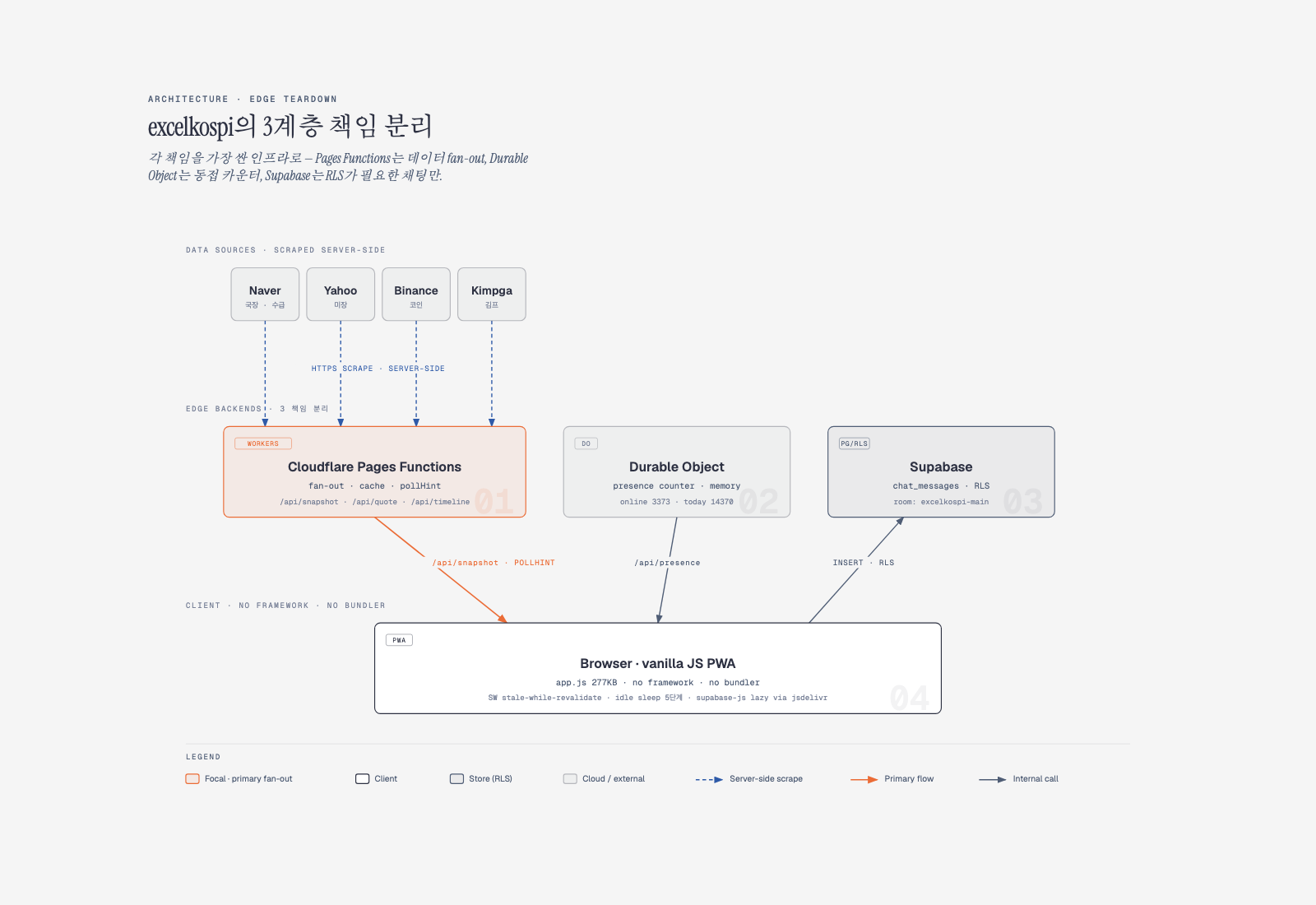
The browser loads a prebuilt static single-page app with zero frameworks. External data from Naver (South Korea’s largest search portal, which also runs a finance site), Yahoo, and Binance is fetched by Pages Functions on the server and combined before it is sent down. Scraping traces therefore never reach the client. The concurrent-visitor counter is handled in memory by a Durable Object (mode: "durable_object"). Only chat goes to Supabase, where the browser inserts rows directly and relies on RLS for access control. Each of the three components runs wherever it is cheapest to run.
Core data
This section measures the site’s HTML, bundles, and endpoints. I used curl, grep, and jq to collect the data. The goal is to show which parts of the pattern can be copied directly into another project and which parts need to be redesigned.
1. Response headers and hosting check
$ curl -sI https://excelkospi.pages.dev/
HTTP/2 200
server: cloudflare
cf-ray: 9fd85b546824df70-ICN
content-type: text/html; charset=utf-8
cache-control: public, max-age=0, must-revalidate
referrer-policy: strict-origin-when-cross-origin
x-content-type-options: nosniff
x-frame-options: DENY
Cloudflare acts as both the origin and the edge. Because the cache-control header is public, max-age=0, must-revalidate, the HTML itself is checked with the origin on every request. Assets are forcibly invalidated with a query-string cache buster (?v=20260518-146).
2. Bundle structure with zero build tools
index.html (722 lines, 52KB) loads only three external resources, plus the Cloudflare Insights beacon:
<link rel="stylesheet" href="/assets/app.css?v=20260518-146" />
<script src="/assets/app-config.js?v=20260518-146"></script>
<script src="/assets/app.js?v=20260518-146"></script>
<!-- + Cloudflare Insights beacon -->| File | Size | Lines | Notes |
|---|---|---|---|
app.js |
277KB | 6,762 | Vanilla JS, 0 import/export statements, 0 matches for React/Vue/jQuery |
app.css |
147KB | — | Hand-written CSS, 0 matches for Tailwind/Bootstrap |
app-config.js |
3KB | 60+ | Runtime constants split out as const declarations |
sw.js |
4KB | — | App shell and API stale-while-revalidate caching |
The first line of app.js states its intent:
/* excelkospi client app
 * Runtime: static Cloudflare Pages page plus /functions/api endpoints.
 * Major areas: settings persistence, update-notes modal, sheet rendering,
 * snapshot/news polling, chat, watchlist/holding controls.
 */
The app uses no import statements and no module system. Everything shares one scope, with about 6,000 lines of functions.
3. Thirteen /api/* endpoints on Cloudflare Pages Functions
I collected the endpoints that app.js calls directly with grep:
/api/snapshot              ← main data bundle (includes presence, flags, pollHint)
/api/quote?codes=...       ← single or batch quotes
/api/chart?token=...       ← mini chart
/api/timeline?limit=&market=
/api/presence              ← Durable Object counter
/api/community             ← community board
/api/community-admin
/api/chat-config           ← exposes the Supabase public key
/api/chat-messages         ← chat message pool (seed/failover)
/api/chat-guard            ← banned-word check
/api/chat-report           ← reports
/api/chat-admin
/api/admin/flags
4. The /api/snapshot response: the server controls the client
The response keys show how much the server hands to the client:
$ curl -s https://excelkospi.pages.dev/api/snapshot | jq 'keys'
["now","session","sessionLabel","defaultMarket","news","cards",
 "_meta","flags","pollHint","presence","_status"]
The key fields look like this:
"pollHint": {
  "snapshot": 180000,        // 3 minutes
  "timeline": 1440000,       // 24 minutes
  "fastQuote": 60000,
  "community": 360000,
  "chatMessages": 15000
},
"_meta": {
  "version": 1,
  "quoteCounts": { "kr": {"expected":7,"ok":7}, "us": {...}, "coin": {...} },
  "partialFailures": [],
  "apiHealth": {
    "yahoo": 0.068, "naver": 0.032, "binance": 0.022, "supabase": 0
  }
},
"flags": { "fastQuote": true, "chart": true, "community": true,
           "news": true, "degraded": false },
"presence": { "online": 3373, "chatOnline": 197, "today": 14370,
              "mode": "durable_object" },
"_status": {
  "health": "busy",
  "online": 3373,
  "externalApi": {
    "yahoo":   { "ok": 465,  "fail": 34 },
    "naver":   { "ok": 4210, "fail": 138 },
    "binance": { "ok": 261,  "fail": 6 }
  }
}
A single response gives the client its next polling interval, feature toggles, external API health, and concurrent user count. The client hardcodes almost nothing.
5. Supabase handles chat only, with direct browser inserts
The /api/chat-config response includes the Supabase connection details:
{
  "enabled": true,
  "url": "https://iqhbtvnlfvsrjwoyxcyh.supabase.co",
  "anonKey": "sb_publishable_zjEXSvNwVD12mjFCAXSTUg_cnqxpH5O",
  "room": "excelkospi-main"
}
The site exposes the publishable (anon) key directly, which is a standard pattern. Security depends on RLS policies rather than on hiding the key. The chat send logic in app.js looks like this:
async function ensureChatClient(){
  await ensureChatConfig();
  if(!chatConfig.enabled) return null;
  if(!chatClient){
    await loadSupabaseLib();   // lazy-loaded from jsdelivr
    chatClient = window.supabase.createClient(chatConfig.url, chatConfig.anonKey, {
      auth: { persistSession:false, autoRefreshToken:false },
    });
  }
  return chatClient;
}

// send a message: the browser inserts directly
const { data, error } = await client
  .from('chat_messages')
  .insert({
    room: chatConfig.room,
    user_id: chatUserId(),
    nickname: chatNickname(),
    body: text,
  })
  .select('id,user_id,nickname,body,report_count,created_at')
  .single();

// if the error message contains 'row-level' or 'policy', treat it as an RLS violation
if(msg.includes('row-level') || msg.includes('policy'))
  showToast('채팅 제한 중이거나 너무 빠르게 보냈습니다', 'err');
The toast in the last branch says, in Korean, “chat is rate-limited or you sent messages too quickly.” The Supabase JS library is lazy-loaded from jsdelivr and is not fetched until chat is opened:
s.src = 'https://cdn.jsdelivr.net/npm/@supabase/supabase-js@2';This keeps the library out of the initial bundle. Realtime is not used. Chat relies on polling: messages are read through the server at /api/chat-messages?limit=..., and new messages are inserted directly into Supabase.
6. Presence is an in-memory Durable Object counter
$ curl -s https://excelkospi.pages.dev/api/presence
{
  "ok": true,
  "online": 3282,
  "chatOnline": 175,
  "today": 14504,
  "windowSec": 660,
  "chatWindowSec": 75,
  "mode": "durable_object",
  "note": "presence_durable_object_memory"
}
The mode: "durable_object" and note: "presence_durable_object_memory" fields confirm the design. A single Cloudflare Durable Object instance counts unique visitors in memory within a TTL window: 11 minutes for general presence (windowSec: 660) and 75 seconds for chat (chatWindowSec: 75). The site uses neither a database nor KV for this.
7. Five-tier idle sleep based on concurrency
The most deliberate cost control is documented in app-config.js:
// Chat idle sleep: changes smoothly in steps based on concurrent visitors. When traffic
// is low, keep it on longer; at traffic spikes, shorten it to protect cost.
const CHAT_IDLE_SLEEP_CALM_MS = 25 * 60 * 1000;  // under ~100 users
const CHAT_IDLE_SLEEP_LOW_MS  = 20 * 60 * 1000;  // under ~500 users
const CHAT_IDLE_SLEEP_MID_MS  = 15 * 60 * 1000;  // under ~1,500 users
const CHAT_IDLE_SLEEP_HIGH_MS = 10 * 60 * 1000;  // under ~3,000 users
const CHAT_IDLE_SLEEP_PEAK_MS = 7 * 60 * 1000;   // 3,000+ spike range
At normal load, the client wakes only once every 25 minutes. Above 3,000 concurrent users, the interval drops to 7 minutes. Concurrency comes from /api/presence and the snapshot. In other words, the client knows the current load and throttles itself.
8. Service worker: stale-while-revalidate
const CACHE_NAME = 'excelkospi-static-20260518-146';
const API_CACHE_NAME = 'excelkospi-api-20260518-146';

const APP_SHELL = [
  '/', '/index.html', '/guide',
  '/assets/app.css?v=20260518-146',
  '/assets/app-config.js?v=20260518-146',
  '/assets/app.js?v=20260518-146',
  // + icons, manifest
];

const API_SWR_TTL_MS = {
  '/api/snapshot': 90 * 1000,
  '/api/timeline': 10 * 60 * 1000,
};

function withCachedAt(response){
  const headers = new Headers(response.headers);
  headers.set('x-sw-cached-at', String(Date.now()));
  return new Response(response.body, { ...response, headers });
}
The service worker records x-sw-cached-at itself, so it can calculate cache age directly. Cache names rotate with the build ID (-20260518-146), which keeps old caches from being served after a deploy.
9. PWA disguise: manifest and metadata
{
  "name": "Microsoft Excel",
  "short_name": "Excel",
  "description": "엑셀처럼 보이는 실시간 국장·미장 대시보드",
  "theme_color": "#107c41",          // Excel green
  "lang": "ko-KR",
  "display": "standalone"
}
The manifest description reads, in Korean, “a real-time domestic and US stock dashboard that looks like Excel.” The HTML head adds matching metadata:
<meta name="theme-color" content="#107c41" />
<meta name="apple-mobile-web-app-title" content="Microsoft Excel" />
<meta name="application-name" content="excelkospi" />
<meta name="build-id" content="20260518-146-theme-polish" />
On iOS, adding the site to the home screen labels the icon Microsoft Excel and uses Excel’s green. The disguise is thorough.
10. External data sources (scraping)
The URLs that the app opens when a user clicks a ticker reveal the data sources:
| Market | Source |
|---|---|
| Korean market: stocks, indices, flows | finance.naver.com (the snapshot includes source: "Naver") |
| US market | finance.yahoo.com/quote/... |
| Crypto | binance.com/en/trade/... |
| Kimchi premium (the price gap between Korean and overseas crypto exchanges) | kimpga.com |
The server fans out requests and merges only the results. The client never calls the source URLs directly, so CORS, rate-limit, and blocking risks stay on the server side.
Insights
1. Splitting edge responsibilities into three layers is a sound default for side projects
The pattern in excelkospi is simple:
- Public data fan-out goes to Cloudflare Pages Functions (Workers). The free tier is enough, edge caching is automatic, and CORS, rate limits, and blocking are isolated on the server.
- Lightweight volatile state, such as counters and short time windows, goes to a Durable Object. Concurrent visitor counts are a good example of a value that does not need a database.
- User data that must persist, such as chat, notes, or members, goes to Supabase. RLS isolates permissions, and the JS SDK is lazy-loaded.
Merging all three into one component concentrates cost in one place. Splitting them lets each part run where it is cheapest. Dashboards, trackers, news feeds, and real-time scoreboards often map closely to this shape. The same layout could work for a public dashboard built on a tech-research-hub project, or for a KAMIS (a South Korean agricultural price data service) price tracker that exposes results for embedding.
2. Server-controlled polling intervals are an effective guard against cost spikes
The pollHint field in the /api/snapshot response does the main work:
"pollHint": { "snapshot": 180000, "fastQuote": 60000, "chatMessages": 15000 }The client does not hardcode something like setInterval(180_000). It receives the next interval with every response and uses that value. This has three effects:
- If Naver or Yahoo becomes unreliable, the server can lengthen intervals immediately and protect itself. The client follows without knowing why.
- During a traffic spike, longer intervals cap cost. Every client polls more slowly at the same time.
- Testing a new polling interval is a one-line server change and requires no client redeploy.
This pattern fits nearly any project that combines cron-style jobs with external API dependencies. The same idea applies to the cron intervals in n8n workflows: moving them from environment variables into a database value achieves the same effect.
3. Step-based idle sleep is a safety margin for free and low-cost operation
The five-step CHAT_IDLE_SLEEP_* design is clean. Under 100 concurrent users, the sleep is 25 minutes. Above 3,000, it drops to 7 minutes.
The logic runs in the opposite direction of a naive design. If clients woke more often as load grew, server costs would grow along with it. But users are more likely to be watching the screen during a spike, so the tolerance for stale data is shorter at exactly that moment. excelkospi resolves this trade-off with a five-step function over concurrency bands rather than a continuous curve. Within each band the interval is constant, which makes debugging simpler. The thresholds are explicit, which makes post-incident analysis easier.
For reuse, this approach fits social media analytics polling, mentoring notification polling, or dynamic backoff in n8n workflows. Three to five steps are usually enough.
4. Supabase is used only where RLS adds value
In excelkospi, Supabase handles one table: chat. Price data, concurrent counts, news, and stock charts are all handled by Pages Functions.
The reasons are straightforward:
- Price data can be cached statelessly. It needs no RLS. A Pages Function is cheaper, faster, and gets edge caching for free.
- Chat needs row-level permissions, such as editing only your own messages or enforcing report limits. Building that in a Pages Function would also mean building authentication and session management. With Supabase RLS, the same rules take a few policy lines.
The more cost-effective approach is not “do everything in Supabase” but “use Supabase only where RLS adds the most value, and use edge functions for the rest.” Course trackers, member notes, and replies fit Supabase. Public price and news aggregation fits Workers.
The risk is that an exposed anon key combined with weak RLS policies leaves the data open. After writing a policy, test all four operations (select, insert, update, delete) directly against PostgREST to verify it.
5. Using no framework and no build tools is no longer an anachronism
A single 277KB app.js file runs a PWA at the scale of 3,000 concurrent users. There are no import statements, no bundler, and no TypeScript. Cache busting uses a query string, ?v=20260518-146.
The benefits of this choice:
- Zero build pipeline. A push goes straight to Cloudflare Pages. There is no CI/CD debugging overhead.
- No source maps needed. Debugging happens directly in browser dev tools. Without a transform step, line numbers are the real ones.
- No dependency update work. With zero npm packages, the supply chain attack surface is zero.
The costs:
- The editing unit is large. A single file of 6,762 lines makes function search, name collisions, and dead code cleanup harder. At 277KB the file is large, but gzip brings it into the 50KB range, so the initial load stays reasonable.
- No type safety. Vanilla JS gives IDEs little to work with. On the other hand, at 6,762 lines the whole codebase is small enough for one person to hold in their head.
As a rule for borrowing this approach: for a side project built by one person and finished within about six months, skipping the build tooling may be faster. Static builders such as Astro or Vite become valuable when multi-page routing, image optimization, and CSS separation become necessary.
6. A PWA disguise takes only a few lines of manifest and metadata
The core of the disguise is this:
<meta name="apple-mobile-web-app-title" content="Microsoft Excel" />
<meta name="theme-color" content="#107c41" />
{ "name": "Microsoft Excel", "short_name": "Excel" }These few lines change the iOS home screen label and turn the top bar Excel green. PWAs are often understood as offline support and push notifications, but the biggest value here is the app-like identity.
For side projects that users open often, such as daily counters, daily notes, or course-watching trackers, adding a manifest and a theme-color tag can noticeably improve how the app feels.
7. The x-sw-cached-at pattern makes stale-while-revalidate straightforward
In app.js, the service worker attaches an x-sw-cached-at header to responses:
function withCachedAt(response){
  const headers = new Headers(response.headers);
  headers.set('x-sw-cached-at', String(Date.now()));
  return new Response(response.body, { ...response, headers });
}
The appeal of this pattern is that the client calculates age in one line. Standard SWR depends on the server sending correct Cache-Control and Age headers. Here, the client records the time in its own cache and compares it on later hits.
When borrowing this approach, it fits read-heavy data where slight staleness is acceptable, such as progress data on mentoring or course sites, or recently cached prices in a price tracker.
8. Reporting external API health in the response itself
"_meta": {
  "apiHealth": { "yahoo": 0.068, "naver": 0.032, "binance": 0.022 }
},
"flags": { "degraded": false }
The response includes the failure rate of each external API. When flags.degraded === true, the client downgrades the UI, for example by marking data as stale or highlighting the refresh button.
The value of this is that the site reports problems before users ask about them. If prices stop updating, users can tell whether the cause is an external API outage or their own network. For the operator of a side project, this creates a debugging channel in advance. Users can say “it shows degraded, what happened?” instead of only “it looks wrong.”
9. Lazy-loading CDN scripts protects the initial bundle
function loadSupabaseLib(){
  if(window.supabase?.createClient) return Promise.resolve();
  const s = document.createElement('script');
  s.src = 'https://cdn.jsdelivr.net/npm/@supabase/supabase-js@2';
  s.async = true;
  // ...
}
The supabase-js library loads only when chat is opened. An anonymous visitor’s initial page load therefore carries no Supabase dependency. First paint gets faster, and Core Web Vitals scores can improve as well.
This is the opposite of the standard npm and webpack or Vite workflow, which bundles everything up front. The standard approach loads everything at once so it is ready to use. This approach loads each feature only when needed. For side projects where first-screen latency matters and feature usage is uneven, such as a chatbot that only 5% of users click, lazy CDN loading is a clear advantage.
When borrowing this approach, consider chat interfaces, payment modules (Stripe or Toss, a South Korean payments provider), PDF viewers, and chart libraries. Good candidates have a click rate under 50% and a library size over 100KB.
10. Build ID, version checks, and idle reloads
const VERSION_CHECK_MS = 10 * 60 * 1000;
const VERSION_IDLE_RELOAD_MS = 3 * 60 * 1000;
const VERSION_MAX_STALE_MS = 60 * 60 * 1000;
The app checks the <meta name="build-id"> value every 10 minutes. If a new version is detected and the user has been idle for 3 minutes, the page reloads automatically. If the page is more than an hour stale, it reloads regardless.
The key point is that the app does not interrupt a user who is working. Unlike SaaS apps that show a “new version available” toast and force a reload, this approach waits for an idle moment and updates quietly.
The cache buster (?v=20260518-146) and the build ID pattern work together consistently. The manifest, the sw.js cache names, the asset query strings, and the meta tag all share the same 20260518-146 value. The deployment likely uses a build script that injects a single BUILD_ID environment variable into every file. That is an inference, not something the site confirms directly.
For small side projects that push hotfixes often, this pattern reduces the frustration caused by forced reloads.
Bottom line
The evidence supports a few reusable patterns from excelkospi: separate responsibilities by cost, let the server set polling intervals through the response, use a small number of concurrency-based idle sleep steps, and reserve Supabase for data that needs row-level permissions. The rest of the stack, including no build tools and no frameworks, is a tradeoff that fits small single-owner projects better than large teams. Keep the limits in mind, though. These conclusions come from one public site measured on May 18, 2026, and the 3,000-user figure is observed concurrency, not a load test. Copy the patterns, and calibrate the numbers to your own traffic.
Sources
- Analyzed site: https://excelkospi.pages.dev/
- Live endpoints measured:
/api/snapshot,/api/presence,/api/quote?codes=,/api/chat-config,/api/timeline,/sw.js,/manifest.webmanifest(all measured on May 18, 2026, at the ICN edge, cf-ray 9fd85b54…) - Bundle measurements:
app.js277KB / 6,762 lines,app.css147KB,app-config.js3KB,sw.js4KB - Cloudflare Pages Functions documentation: https://developers.cloudflare.com/pages/functions/
- Cloudflare Durable Objects documentation: https://developers.cloudflare.com/durable-objects/
- Cloudflare Pages free limits (Workers requests and CPU): https://developers.cloudflare.com/workers/platform/limits/
- Supabase JS v2: https://supabase.com/docs/reference/javascript/start
- Supabase RLS policy guide: https://supabase.com/docs/guides/database/postgres/row-level-security
- Service Worker stale-while-revalidate (MDN): https://developer.mozilla.org/en-US/docs/Web/HTTP/Headers/Cache-Control#stale-while-revalidate
- Data sources (scraping targets): https://finance.naver.com/, https://finance.yahoo.com/, https://www.binance.com/, https://kimpga.com/
Frequently asked questions
- Why does excelkospi let the server decide the polling interval?
- Each /api/snapshot response includes a pollHint object with the next polling interval for each data type. The server can slow clients down when external APIs fail or traffic spikes, without redeploying the client.
- Why is Supabase used only for chat?
- Price data is stateless and can be cached at the edge by Pages Functions, so it does not need row-level security. Chat needs per-user permissions, which Supabase RLS policies handle in a few lines.
Want the full system? The Claude Code & Codex Skills guidebook collects the skills and subagents behind this blog, from $19.
BuildnWrite helps teams build AI agents that keep running. About BuildnWrite ›