How an AI Host Catches Late Viewers Up and Blurs Spoilers in Watch Parties
Who this is forAnyone planning watch party and chat features on live-streaming platforms such as Chzzk, SOOP, Tving, Wavve, or YouTube.
TL;DR: Viewers who join a watch party late lose the context and leave, and chat from people who have already watched turns into spoilers. In one day at the hackathon, I built the AI part of a manager that summarizes the broadcast up to the current point for late joiners, and covers chat about scenes that haven’t aired yet with blur the moment it appears.
Contents
- Watching together is more fun, but hard to do at the same time
- Two problems with watch party streams
- Judging by the scene a chat refers to, not when it was sent
- One day split as 70% planning, 20% presentation, 10% development
- What the winning projects taught us
- How it went at the watch session
1. Watching Together Is More Fun, but Hard to Do at the Same Time
Do you remember when Spider-Man: Brand New Day came out this summer? Right after the world premiere, a post-credits scene leaked online.
Watching together makes it more fun. Things you need to watch right now, like soccer matches or dramas, are most fun when you watch them together. But not everyone can watch at the same time. If you arrive late, you see spoilers and miss the earlier context.
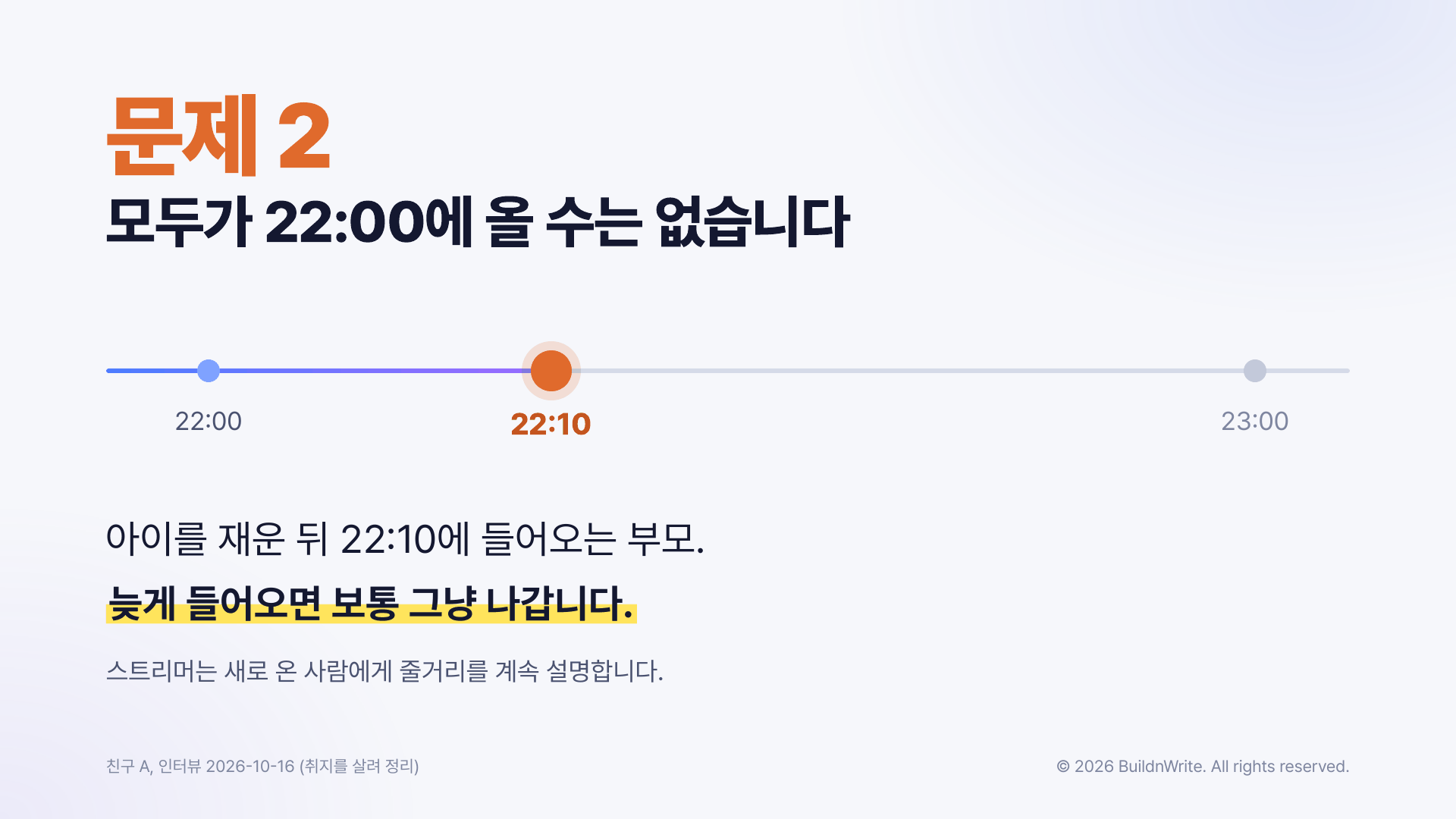
On the night of October 16 at 10 p.m., my friends are holding a watch session. They wanted to watch the survival reality show The Community 2 (a Korean survival reality show), so we put it together on the spot. Each of us plays it at home with popcorn and beer and reacts in a group chat. But one friend who has a kid has to put the kid to bed first, so they’ll join about 10 minutes late.
2. Two Problems with Watch Party Streams
On the morning of the hackathon, I asked that friend about their recent experience. They said that when they join late, they usually just leave. They said it’s even more true when it’s a show they’ve never seen.
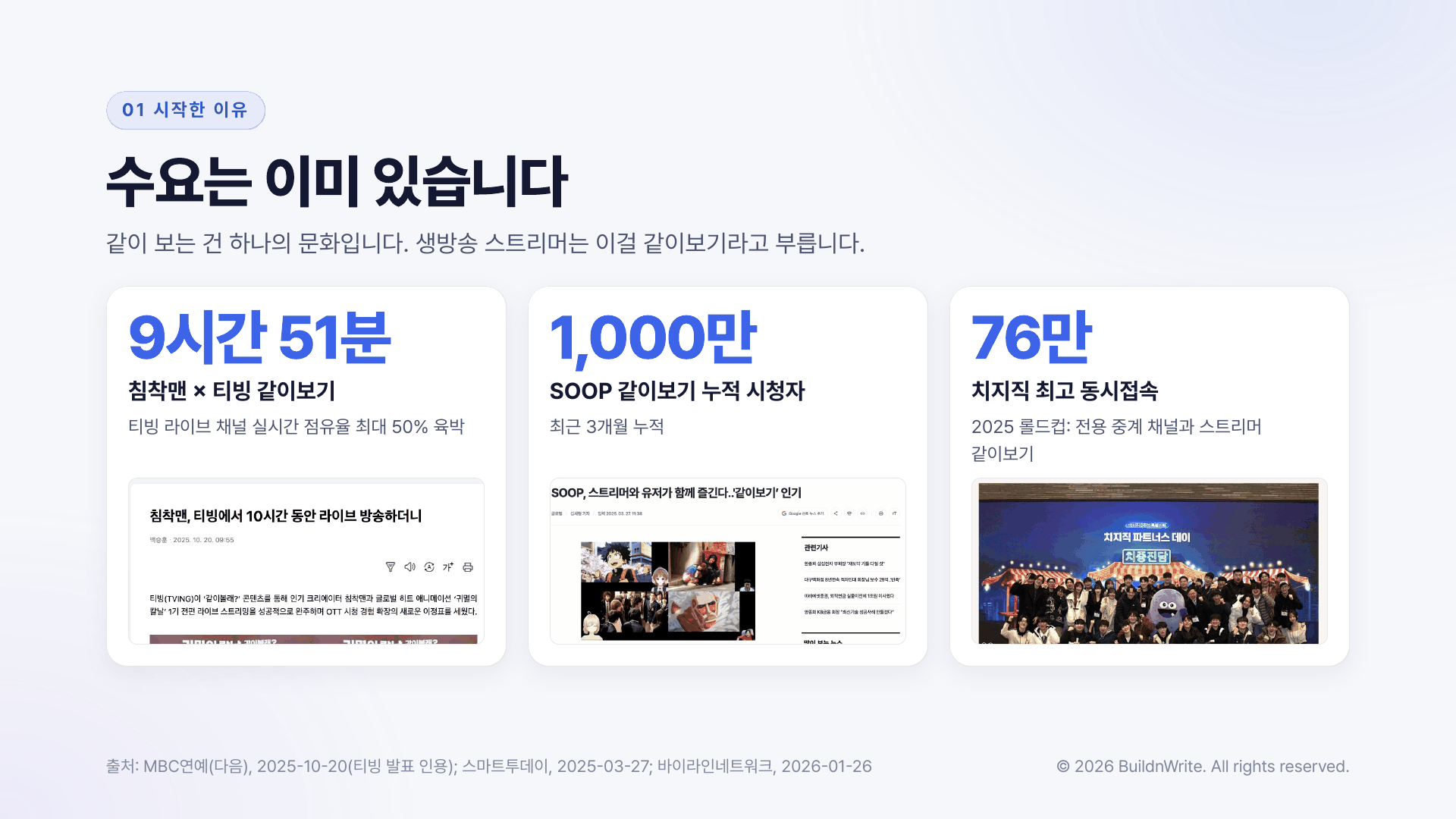
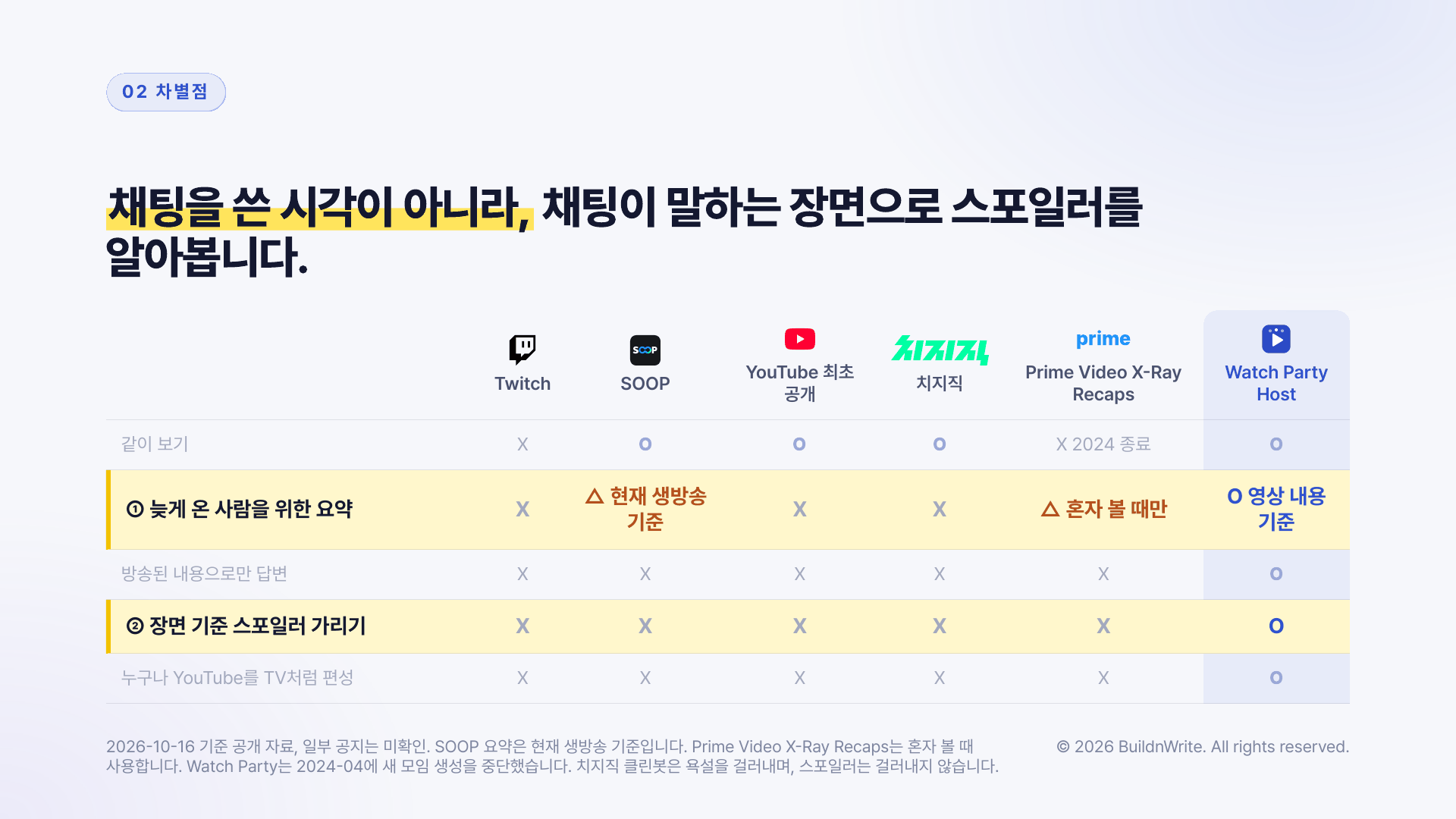
Watch parties are already a big deal. A watch party between Chimchakman (a popular Korean streamer) and Tving (a South Korean streaming service) lasted 9 hours and 51 minutes (October 2025, announced by Tving). As of March 2025, SOOP (a South Korean live-streaming platform) watch parties reached 10 million cumulative viewers over three months, and Chzzk (a South Korean live-streaming platform) hit a peak of 760,000 concurrent viewers during the 2025 League of Legends World Championship, combining its dedicated broadcast channel with streamer watch parties.
The same problem is even bigger for creators’ watch party streams. Creators struggle every day, starting with deciding what to broadcast. In a 2017 interview with Inven, a South Korean gaming news site, streamer Pungwolryang said that back when he was on Twitch, he spent a lot of time and worry finding games. Watch parties of existing shows have two problems.
- Late viewers don’t know the earlier context. A viewer’s account describes how, in watch parties of foreign movies, newcomers kept asking “What did I miss?” and hosts kept re-summarizing the plot.
- Viewers who have already watched leak spoilers. People who have seen the show and people who haven’t share one chat room. One SOOP watch party posted a notice by adding “No Spoilers” to its title.
Chzzk and SOOP have features for rewinding to watch earlier scenes again. But rewinding means falling further behind everyone else. There are features that summarize chat or the live broadcast, but I haven’t yet seen one that summarizes the video content up to the scene currently airing. What a late viewer wants isn’t to rewatch from the beginning, but to laugh along right now.
3. Judging by the Scene a Chat Refers To, Not When It Was Sent
So I built Watch Party Host, an AI manager for watch party streams.
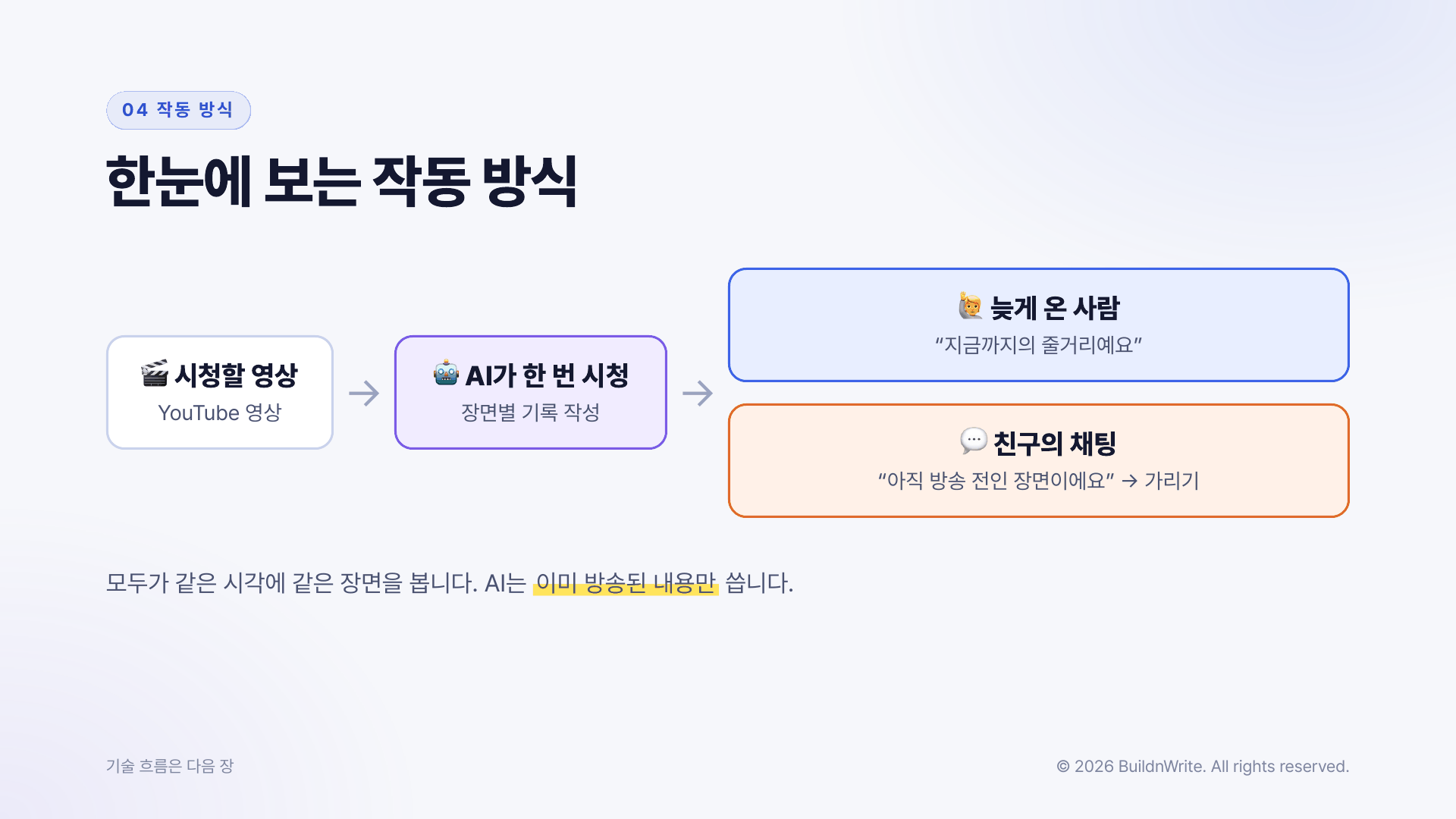
Everyone watches the same scene, like TV, with the host starting playback. Even if you join late, you snap straight into the current scene. On top of that, the AI does two things:
- Catch me up. Pressing “Catch me up” summarizes only up to what has aired. It also shows the timestamps of the supporting scenes. You can also ask questions directly, and the answers don’t mention content that hasn’t aired yet.
- Spoiler blur. When someone who has already watched mentions a scene that hasn’t aired yet, the AI finds that scene the moment the chat appears and covers it with blur. Only people who want to see it click through. Once the scene airs, the blur lifts.
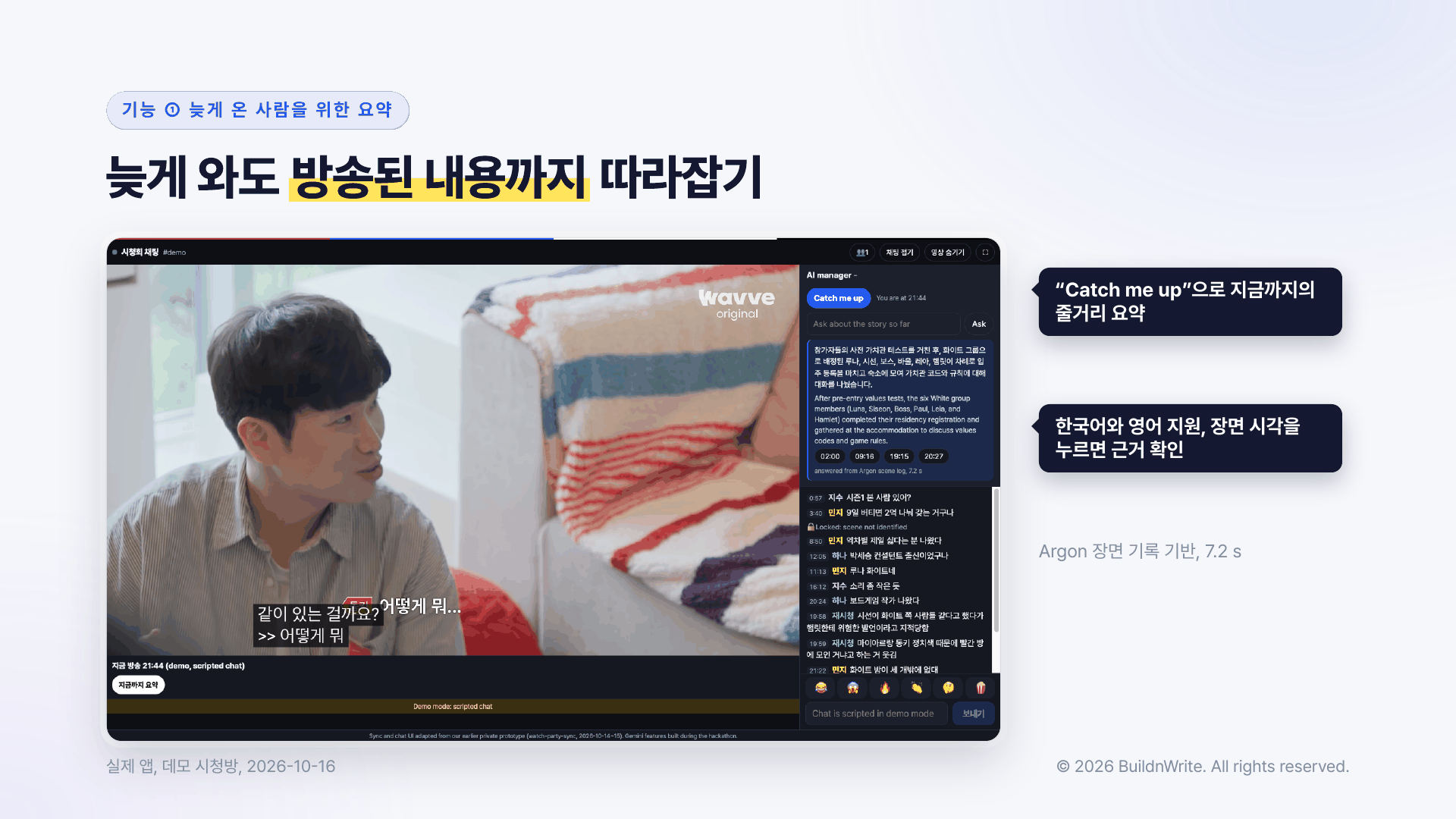
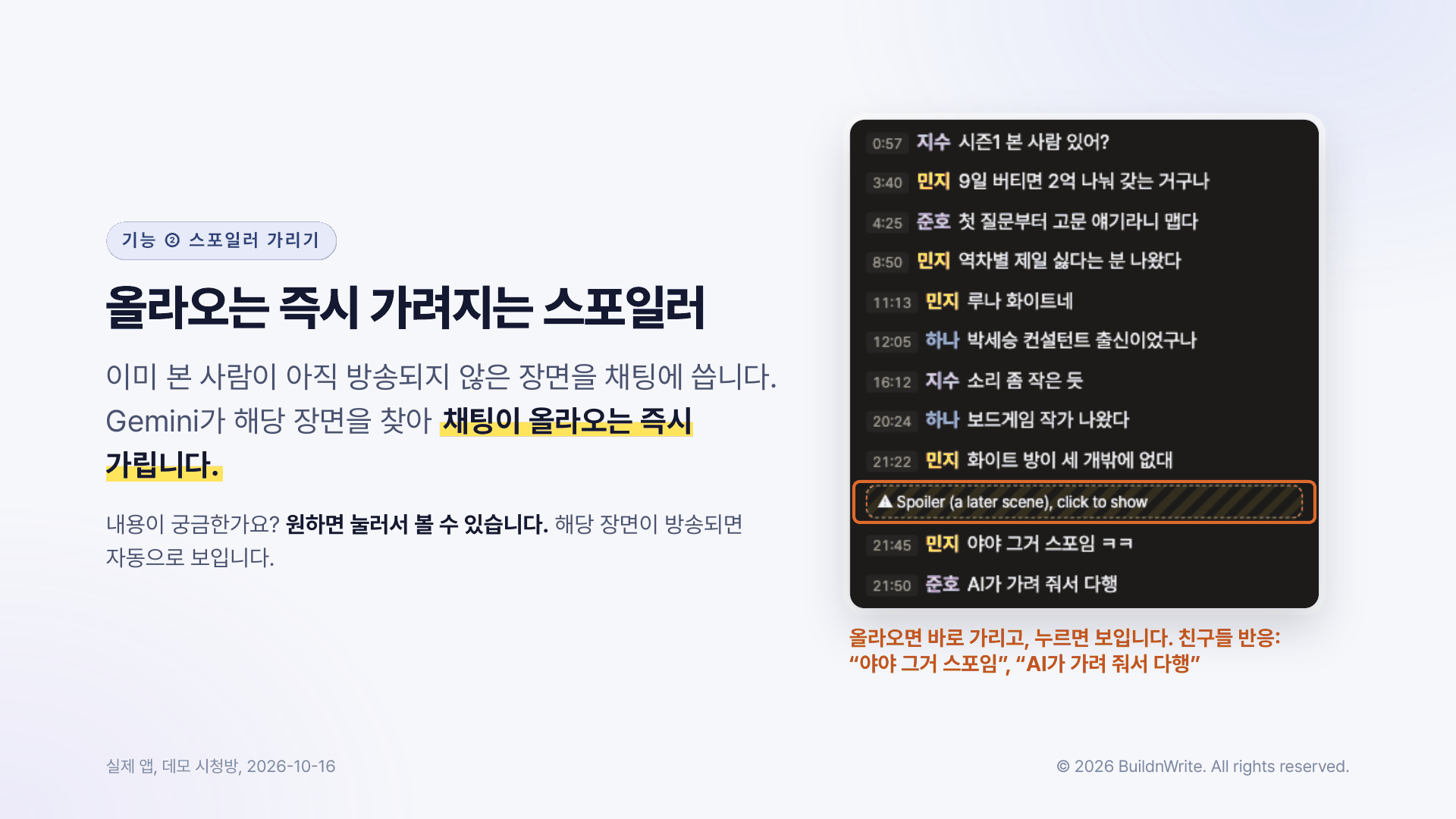
The key is the standard for handling chat. Usually, chat is handled only by when it was posted. We don’t go by when a chat was posted. We look at the scene the chat refers to and hide spoilers accordingly. Because the AI watches the video once in advance and builds a scene log, it can determine which scene a chat is talking about.
We don’t handle the video itself. Each person watches on the original platform with their own legitimate subscription or access. What we share is not the video but “which minute of which video the host is playing.” At the hackathon, we demoed with YouTube’s official embed (the sharable player YouTube allows).
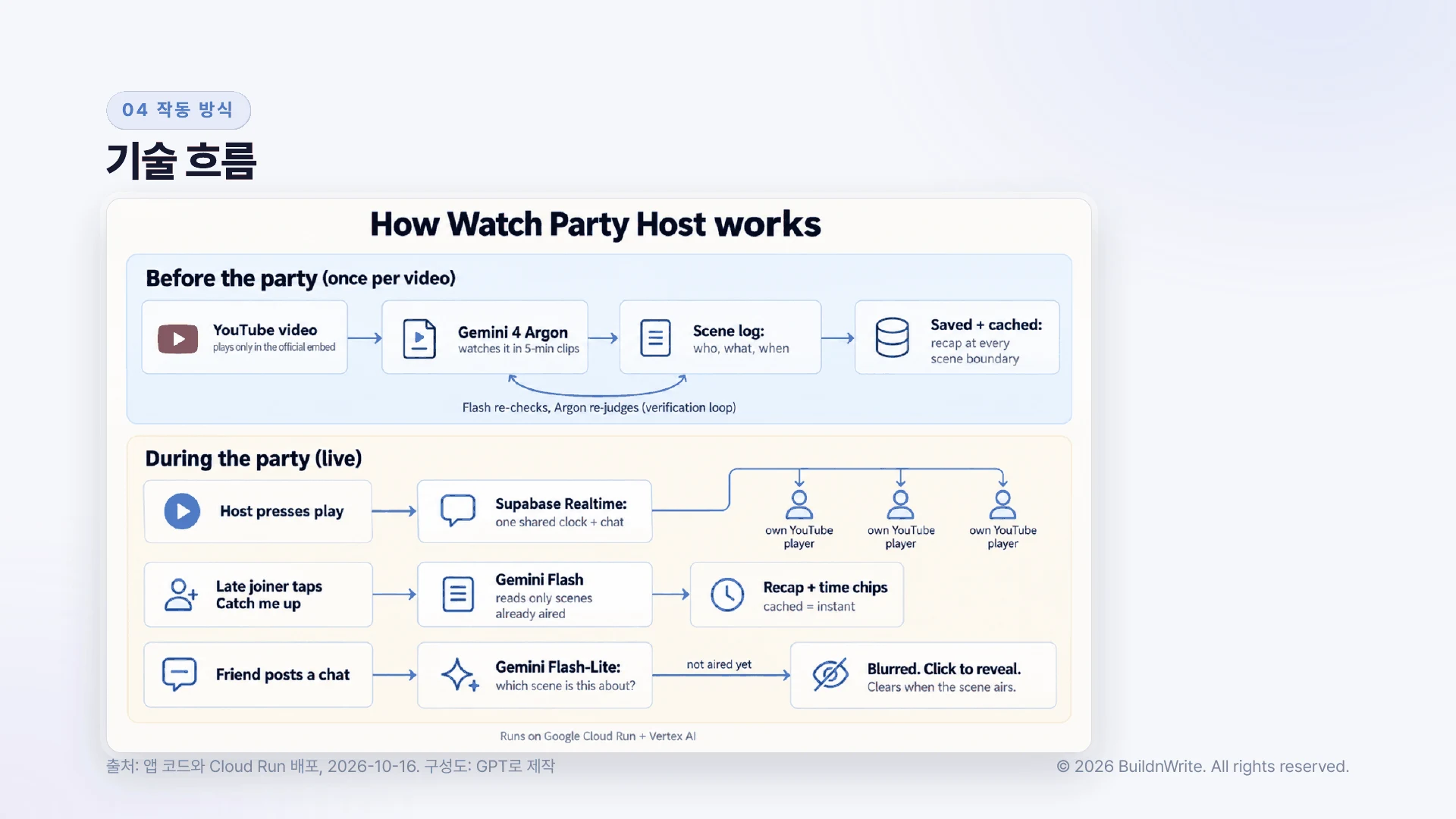
We also paid attention to speed so it feels like a live broadcast. We pre-generate answers to likely questions at each scene boundary, so a saved summary appears in 0.2 seconds. A question asked for the first time takes about 7–10 seconds. Spoiler judgments take 0.3 seconds if a saved result exists, and 1.3–2.0 seconds for a new chat.
Scene log costs don’t grow as viewers increase. Each video is processed only once, and all rooms share that log. Costs grow in chat judgments, which we plan to reduce with a keyword index in the next phase.
4. One Day Split as 70% Planning, 20% Presentation, 10% Development
The hackathon was one day long. We were told judging would be based on a working demo, not presentation slides.
So I split the time into 70% planning, 20% presentation, and 10% development. I figured that nailing the problem would change the outcome more than staring at code for hours.
I split the AI tools across three roles:
- Research went to GPT and Gemini. I had them cover the state of watch party services, creator interviews, and spoiler research, and asked for sources. I dropped any claim without a source from the presentation.
- Code went to Claude Code. It built the server and the UI.
- AI inside the product was Gemini. Building scene logs from the video was done by Gemini 4 Argon, and answering questions and judging spoilers was done by the lighter Flash family. When the smaller model and Argon disagree, Argon re-watches the video and re-judges whether to keep or fix the log.
The real-time playback sync and chat UI came from a personal prototype I built before the event (October 14–15). What I built during the event was the Gemini-powered AI part, the server, and the AI panel. The GitHub documentation also states this.
What broke on site
Since it was a one-day event, all the mistakes surfaced within that day.
- Couldn’t have Argon write the code. We didn’t sign into Google’s terminal coding agent tool (Antigravity CLI) with the event account and project, so Argon didn’t appear in the model list and only Flash showed up. In unattended runs with no one watching, we also didn’t approve the file-write permission step, so it couldn’t write files. In the end, we wrote the code with Claude Code.
- Mixing prepaid API keys with project billing caused confusion. Two AI Studio prepaid keys, used for research and the backup server, ran out one after another at 1 p.m. and 2 p.m. (402 errors). For a moment I thought the submission app had stopped too, but the deployed app was calling Vertex AI (project billing) on the event GCP project, so it was unaffected. I should have fixed a single billing path for every call from the start.
- Changed the spoiler design on site. At first, the design locked stories about scenes not yet aired in advance. But in a live broadcast, chats arrive in step with broadcast time, so “locking future chats in advance” didn’t hold. So we switched to judging each chat when it appears and covering it with blur.
We Didn’t Use Gemini the Way It Should Be Used at the Google Hackathon
The judging criteria pointed to five strengths of Argon. Looking back, we used most of those strengths only in small ways.
| Argon strength | What we did | What we’d do next time |
|---|---|---|
| 1-million-token context | Fed the video in five-minute chunks | Feed a full episode (about 610,000 tokens) at once and judge even foreshadowing |
| Long output | Scene log of about 17,000 tokens | Generate a per-second timeline for the whole episode and a spoiler keyword index in one pass |
| State-of-the-art reasoning | Only judged which scene a chat referred to, by minute | Judge spoiler severity and who still doesn’t know the information |
| Orchestrating multiple models | Only split work between Flash and Flash-Lite | Argon acts as host, orchestrating live voice and summary visuals |
| Verification loops and agents | Re-judged up to two conflicting logs | An agent loop that re-checks its own work until it passes |
There were three causes.
- Splitting the day into 70% planning and 10% development left too little development time.
- I didn’t sign the Gemini coding tool into the event account and project, so Argon wasn’t in the model list, and I didn’t approve the file-write permission step.
- The biggest cause was the order. I settled on the product first and slotted Argon in afterward.
One lesson stands out. Model design matters more. Before starting, you need to research which agent gets which role, along with its capabilities and limits.
Evaluating the result
After submitting, I asked two AIs to score the project on the five judging criteria. Claude helped build this project, while I had GPT read it separately, playing a judge seeing it for the first time.
| Judging criterion | Claude | GPT |
|---|---|---|
| Working demo | 4 | 3 |
| Use of Argon and verification loop | 3 | 3 |
| Problem and impact | 4 | 3 |
| Originality | 4 | 4 |
| Clarity of explanation | 4 | 4 |
| Total | 19/25 | 17/25 |
The conclusion fits in one line: planning and demo were strong, but the technology was shallow. The most painful anticipated question was, “Couldn’t Flash alone do this?” Flash is a lighter, cheaper model than Argon.
Subtitles and Flash could handle this too. Why Argon? (First question from GPT’s independent judging)
We used Argon to record information not in the subtitles, such as on-screen text, but couldn’t show with numbers that it beat subtitles. GPT named the best differentiator as the approach of hiding spoilers based on the scene the chat refers to.
What to change next
1. I’ll decide which model each feature uses before starting. I spent 70% of the day on planning, yet went in with less done than I expected. What was missing was a working framework that specified which model each feature should use. Since I granted permissions to fit the framework I usually work in, centered on Claude Code, I couldn’t use Argon in more places. Conversely, I used Argon wholesale for video organization. In hindsight, Flash was mostly enough for video organization, and Argon should have been reserved for re-judging when Flash got it wrong.
2. I’ll name things in advance. It never even occurred to me that I should settle the product name ahead of time, haha
What to improve in the next version
- Measure Argon’s effect in numbers. Have a person write test questions about on-screen information, then compare using subtitles alone against using Argon’s scene log.
- Flash writes the scene log, and Argon only acts as judge. Argon re-watches only the scenes Flash finds confusing.
- Keep running the verification loop until it passes. Right now it only re-checks a few scenes. Repeat until it passes, and check against answers made by people.
- Cut spoiler judgment down to milliseconds. Build a keyword index from the scene logs and filter before calling the model.
- Measure with real watch session chats. Gather chats from the October 16 night friends’ watch session, not pre-written script chats.
- Find ways to plug it into creator streams. Explore a form that runs like a manager beside the watch party broadcast screen.
I documented this way of splitting the day as a skill called run-hackathon. From reading the rules and deadlines through planning, development, verification, video recording, presentation, and submission, it specifies which session handles each stage and what counts as done. If you’re preparing an internal hackathon or demo day, you can preview the workflow in the run-hackathon chapter of the skill guidebook.
5. What the Winning Projects Taught Us
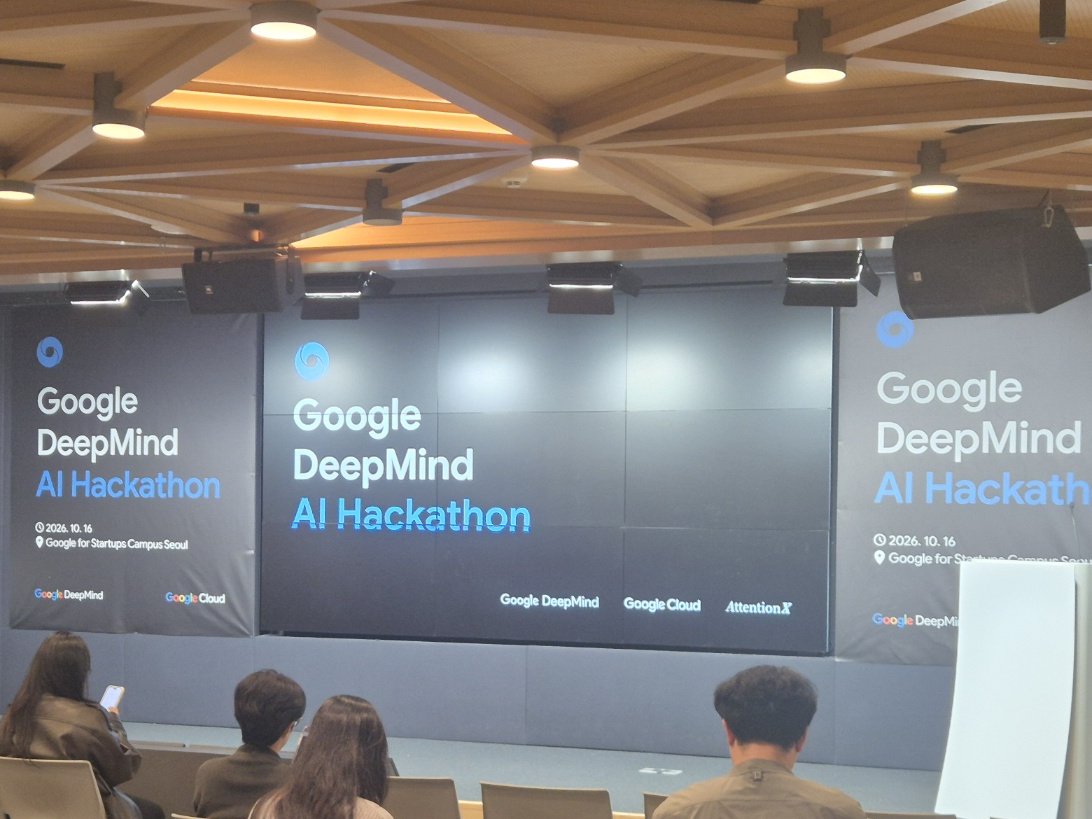
To start with the result: Watch Party Host did not win. After the awards were announced around 4:30 p.m., I recorded my thoughts that evening, and here they are.
Second through fourth place were all products that showed a “wow” moment within one minute, using real-time processing or handling several channels at once. The second-place team had solid planning too, a case where planning and clear software can go together. One team built a 3D modeling tool that decides “where to open a cafe” from small-business data. It drew 1,000 scenarios, and moving a structure changed foot traffic and cost. They separated the generating AI from the verifying AI and kept the calculation engine deterministic.
I learned four things.
- Hackathon judging looks at feasibility. The judges cared about a real prototype that shows “this technically works” more than rigorous numbers or a business plan. It was not a place to judge business viability.
- I over-planned. What the planning aimed at (problem definition, market evidence, sourced figures) differed from how judging worked (a demo that runs on real input within three minutes). Building one clear piece of software might have been the better call.
- Our product needed context before its value showed. I had to explain the “late joiner” situation first, and the demo used scripted chat, so the surprise was weak. The winners showed their scene within a minute.
- Model design comes first. This points the same way as the conclusion in section 4. The right order was to start from the model’s strengths (real time, multimodal, long context), pick a one-minute scene, and then attach the problem.
Here is how I’ll go into the next hackathon.
- Make the first planning deliverable “one scene to show within a minute.”
- List the event model’s strengths first, and pick features where those strengths show on screen right away.
- Design with a clear split between what the AI judges and what is computed deterministically.
- Cut business viability, market figures, and sourcing down to one slide, and give that time to implementation.
6. How It Went at the Watch Session
At 10 p.m. on October 16, I used it with real people for the first time at the friends’ watch session. The event account was gone by then, so it ran on the backup server at home, and because the Gemini key’s credits had run out, the backup server had text generation switched to another model (Claude). Problems that scripted chat never showed came up on the first night.
- Spoiler judgment produced false positives on real chat. Some messages got covered even though they weren’t about unaired scenes, so I loosened the threshold on the spot.
- Late joiners and page refreshes couldn’t see earlier chat. An app built for late joiners showed late joiners an empty chat window. I fixed it right away.
- The connection dropped every 25 seconds. Sending presence status every five seconds hit the real-time server’s rate limit, and spacing the updates out solved it.
The plan to measure with real chat started, as it turned out, with a fix list.
Free 10-minute checklist: share one SKILL.md between Claude Code and Codex. Get it free
BuildnWrite helps teams build AI agents that keep running. About BuildnWrite ›