What Can Claude's Free Plan Do? Three Tasks to Try Before Paying
Who this is forOffice workers who already use an AI tool like GPT and are either trying Claude for free or deciding whether to pay for it.
TL;DR: Claude’s free plan handles chat, web search, and file creation, including Excel files. Try three work tasks for free before paying, and think about Pro only when you need to hand over a whole folder. Prices and features are based on the official pricing page as of October 16, 2026.
Contents
- You Can Check Things for Free Before Paying
- What the Claude Free Plan Covers
- Three Things to Try for Free Before Paying
- Free Limits and What Pro Unlocks
- Deciding Whether to Pay: When You Need to Hand Over a Whole Folder
- To Decide Further: Free Guide and Sign-Up Info
- Summary
1. You Can Check Things for Free Before Paying
I already use GPT, and people around me say Claude is good. But I’m not sure I need it enough to pay for Pro.
This post walks through that “take a look” using the free plan.
- Check what the free plan includes on the official pricing page
- Hand Claude three of your own work tasks for free
- Learn in advance the signs that you need a paid plan
2. What the Claude Free Plan Covers
You can check Claude’s pricing on the Personal tab of claude.com/ko/pricing (the Korean-language version of Anthropic’s pricing page).
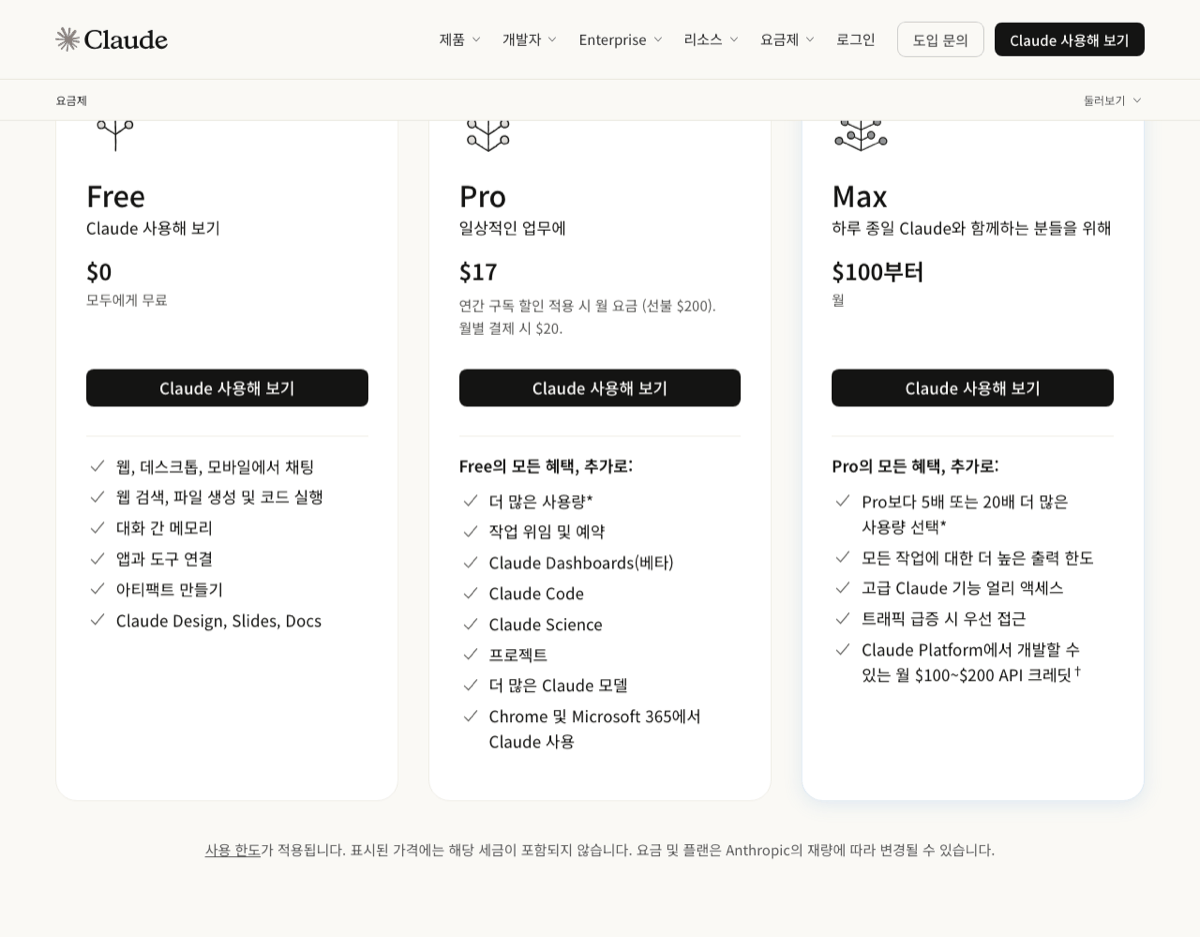
Below the pricing page, I combined the Free and Pro columns of the plan comparison table with the Cowork conditions from the help center article. Here’s the summary:
| Feature | Free | Pro |
|---|---|---|
| Web, mobile, and desktop chat | Yes | Yes |
| Web search | Yes | Yes |
| File creation and editing via code execution | Yes | Yes |
| Artifacts (outputs such as web pages, documents, and charts) | Yes | Yes |
| Memory, connectors, voice mode | Yes | Yes |
| Claude Design, Slides, Docs | Yes | Yes |
| Projects | Up to 5 | Yes |
| Research | No | Yes |
| Claude Code, Claude in Chrome | No | Yes |
| Cowork | No | Yes |
- The basis for the Cowork row is the help center article Getting Started with Claude Cowork. Cowork is available only on paid plans (Pro, Max, Team, Enterprise).
- Prices shown in the screenshot do not include tax.
3. Three Things to Try for Free Before Paying
The free plan also handles web search and file creation. So if you hand over three of your usual tasks as they are, you’ll have material to decide whether to pay.
Here are prompts you can paste as they are, along with what to check in each response.
- Meeting notes into an action item table: “Organize the meeting notes below into a three-column table: who, what, and by when.” After you get the answer, send one more line: “Pull out only my action items.”
- What to check: missing owners and dates
- Email report in three lines: “Shorten the content below into a three-line report email, in this order: conclusion, reason, request.”
- What to check: whether the conclusion is in the first line
- Weekly work log Excel template: “Create an Excel file for a weekly work log. Columns: date, task, status. Count the items per status with formulas.”
- What to check: whether the formulas actually calculate in the downloaded file
The third one comes back as a real Excel file. The help center article Creating and Editing Files with Claude says all users, including Free, can create Excel, PowerPoint, Word, and PDF files. If no file gets created, check in Settings under Features that the “Code execution and file creation” toggle is on.
4. Free Limits and What Pro Unlocks
The free plan has usage limits too. Here’s what the official pricing FAQ under “Plans and usage” says:
- Every plan has usage limits based on 5-hour rolling sessions (windows where usage resets every five hours), and paid plans add a weekly limit on top
- There is no fixed message count. Usage depends on conversation length and complexity, the model you choose, and the features you use
- Free handles everyday questions
- Pro gives at least 5 times more usage per 5-hour session than Free
Setting usage aside, the main features Pro newly unlocks are research, Claude Code, Claude in Chrome, and Cowork. The Pro card also lists “delegating and scheduling tasks.” Free allows up to 5 projects.
5. Deciding Whether to Pay: When You Need to Hand Over a Whole Folder
After you try the three tasks, you’ll land on one of two paths: either your work finishes within the chat, or you want to hand over an entire folder on your computer.

Handing over a whole folder is Cowork’s job. According to the help article Getting Started with Claude Cowork, Cowork can read and write files on your computer from the desktop app, and it is available only on paid plans. The same article says Cowork is now being folded into Claude and is rolling out to Pro and Max in stages. If you don’t see the name Cowork on your screen, it’s the same feature.
6. To Decide Further: Free Guide and Sign-Up Info
If you want more questions to weigh before paying, you can get the free PDF guide. It opens without signing up or entering an email address.
7. Summary
Official documentation checked: October 16, 2026. Prices, the feature comparison, and usage limits were confirmed from the price cards, the plan comparison table, and the “Plans and usage” FAQ on claude.com/ko/pricing. Cowork’s terms were confirmed from the help center article Getting Started with Claude Cowork, and file creation on the free plan from Creating and Editing Files with Claude. Plans and prices can change, so check the pricing page once more right before you pay.
Frequently asked questions
- Does Claude's free plan have usage limits?
- Yes. Claude's pricing FAQ says every plan has limits based on 5-hour rolling sessions (usage resets every five hours), with no fixed message count. Usage depends on conversation length, complexity, model, and features. Pro gives at least 5 times more usage per session than Free.
- Can I use Claude Code on Claude's free plan?
- No. The plan comparison on the official pricing page lists Claude Code as not included in Free and included from Pro. The Cowork help article also says it is offered only on paid plans (Pro, Max, Team, Enterprise).
- Can I create Excel files with Claude's free plan?
- Yes. The help article on file creation and editing says all users, including Free, can use code execution and file creation, and can create and download Excel, PowerPoint, Word, and PDF files. If it doesn't work, check that 'Code execution and file creation' is turned on in Settings under Features.
BuildnWrite helps teams build AI agents that keep running. About BuildnWrite ›