Share a Home Mac mini MySQL With 28 Students: Cloudflare Tunnel and Adminer
Who this is forInstructors and home-server builders who need to give a classroom of SQL beginners database access to a MySQL server on a residential internet connection.
If you run MySQL on a home Mac mini and need to let a classroom of students query it, the obvious options each break in some way. Port forwarding fails on many residential internet lines, a Tailscale IP works only inside your own tailnet, and a cloudflared TCP tunnel asks every student to install a client and run a command before each class. This article walks through the four paths I tried for a 28-student SQL course at OzCoding School, a Korean coding school, and explains why the setup that worked was a Cloudflare Tunnel serving the Adminer web UI over HTTPS. You will get the configuration files, the diagnosis of a failed port forward, and the operational trade-offs behind the final choice.
One-line summary
I tried four paths to open a MySQL server on a home Mac mini to 28 students in a SQL course. The lightest option that worked was a Cloudflare Tunnel with the Adminer web UI on top, served over HTTPS. Installing the cloudflared client was too large a barrier for students. The home line from SK Broadband, a South Korean ISP, blocks all inbound traffic, so port forwarding never worked. Sharing through Tailscale required 28 separate invitations and student accounts, which made it about as much friction as cloudflared. The real zero-install option turned out to be a web UI.
Core diagram
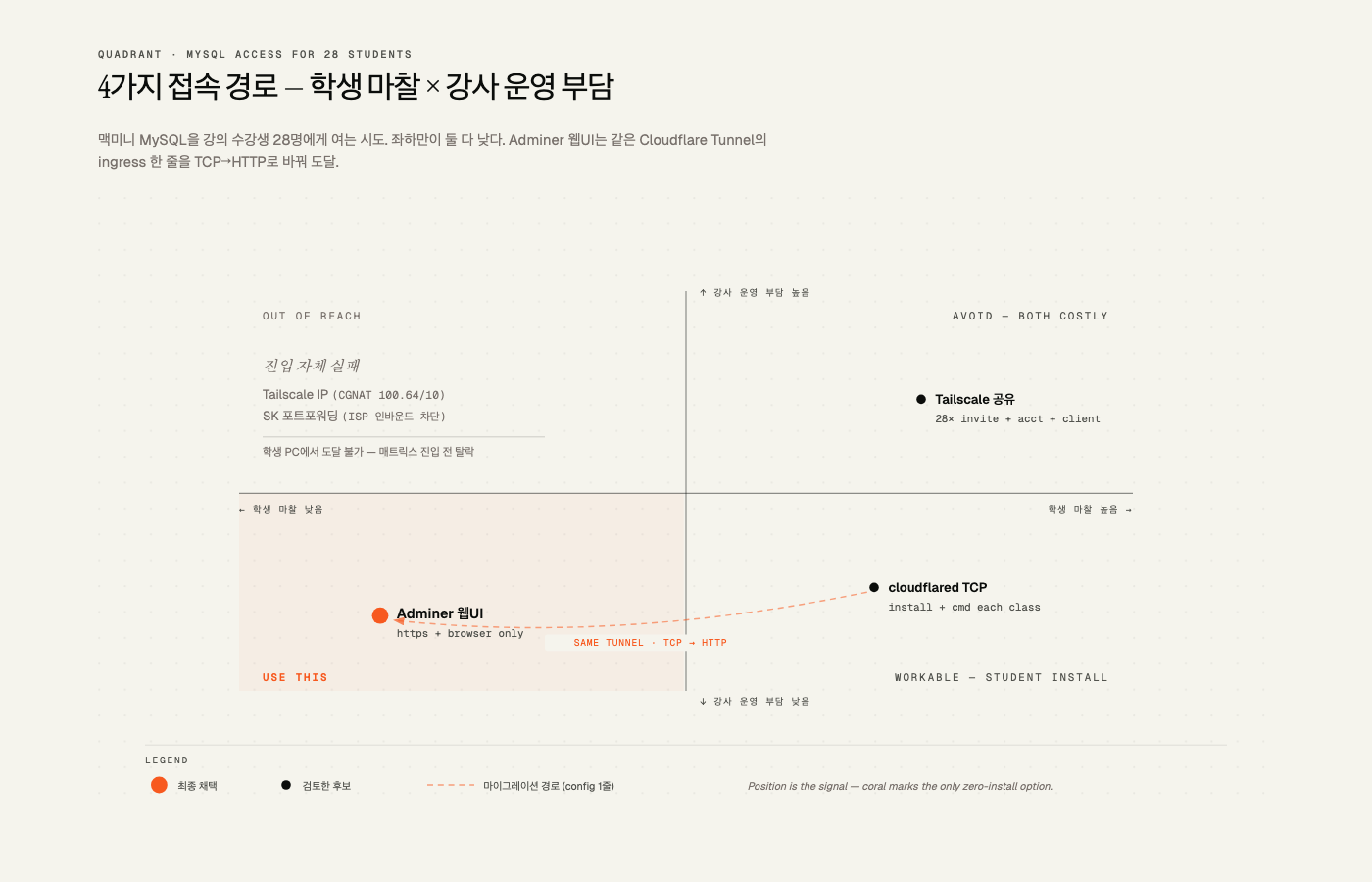
The only option that reaches the lower-left quadrant, where student friction and instructor operating burden are both low, is the Adminer web UI. The cloudflared TCP path can move to that same spot by changing one ingress line in the same Cloudflare Tunnel (tcp://localhost:3306 to http://localhost:8080). The dashed arrow in the diagram marks that migration path. The two options in the upper left, the Tailscale IP and SK port forwarding, were eliminated before entering the matrix because students could not even reach them from their own PCs.
Core data
This note follows the sequence of attempts and failures. When you run into the same problem, the important question is how far to push each approach before you stop.
1. The first mistake: the Tailscale IP
For the healthcare nanodegree SQL course at OzCoding School, I ran a Docker MySQL 8.4 container named ozcoding-mysql on the instructor’s Mac mini. I then wrote the following into the student guide:
Server Host: 100.123.107.37
Port: 3306
Username: student
This IP is the Mac mini’s Tailscale IP. The output of tailscale status shows it:
100.114.89.100  macbook-pro-4     jayjunglim@  macOS
100.123.107.37  mac-mini-macmini  jayjunglim@  macOS  active; direct 192.168.45.104:41641
100.64.0.0/10 is a private range that the IETF allocated for CGNAT. It is not routed on the public internet. The address was reachable only from the instructor’s own MacBook, which was logged into the same tailnet. A student PC without Tailscale installed could not reach it from any ISP.
2. First attempt: Cloudflare Tunnel with the cloudflared client (TCP)
I chose Cloudflare Tunnel because it exposes a TCP service to the outside without a public IP on the server. These commands were run over SSH on the Mac mini:
brew install cloudflared
cloudflared tunnel login          # authenticate the ggplab.xyz zone in a browser
cloudflared tunnel create ozcoding-mysql
# Created tunnel ozcoding-mysql with id 5ea42122-0267-4a2c-8601-ff8aad00a7e0
The tunnel configuration in ~/.cloudflared/config.yml:
tunnel: 5ea42122-0267-4a2c-8601-ff8aad00a7e0
credentials-file: /Users/mac_mini/.cloudflared/5ea42122-0267-4a2c-8601-ff8aad00a7e0.json

ingress:
  - hostname: db.ggplab.xyz
    service: tcp://localhost:3306
  - service: http_status:404
The DNS CNAME was created automatically:
cloudflared tunnel route dns ozcoding-mysql db.ggplab.xyzAutostart did not work through brew services because the arguments were not passed. I wrote a LaunchAgent by hand and loaded it with launchctl load. Four connections registered over QUIC at the ICN data center.
To verify, I acted as a fake student PC on the MacBook:
cloudflared access tcp --hostname db.ggplab.xyz --url localhost:43306
mysql -h 127.0.0.1 -P 43306 -u student -p
mysql_version 8.4.9
part_d_prescriber 4097
open_payments 36565
uci_admissions 101766The path worked functionally. But the student flow looked like this:
1. brew install cloudflared (or winget install --id Cloudflare.cloudflared)
2. Every class, open a terminal and run:
   cloudflared access tcp --hostname db.ggplab.xyz --url localhost:43306
3. Leave that terminal open and connect DBeaver to 127.0.0.1:43306
Feedback came in at this point. Asking 28 students to install cloudflared and memorize a terminal command for every class was too much. The goal became connecting with nothing more than an IP or URL plus an ID and password.
3. Second attempt: home-router port forwarding (failed)
The most direct way to keep DBeaver and require zero installs on the student side is a port-forwarding rule on the router.
The home setup:
Public IP : 211.109.16.179 (SK Broadband)
Router    : SK B box GW-HF611R (192.168.45.1)
Mac mini LAN: 192.168.45.104
I added this rule on the SK B box admin page (http://192.168.45.1) under NAT/Router, then Port forwarding:
| Protocol | External port | Internal IP | Internal port |
|---|---|---|---|
| TCP | 33333 | 192.168.45.104 | 3306 |
After applying the rule, I checked reachability from outside using three check-host.net nodes, in the United States, Japan, and Germany:
us1.node.check-host.net  → Connection timed out
jp1.node.check-host.net  → Connection timed out
de1.node.check-host.net  → Connection timed out
Ports 22 and 443 gave the same result. Every inbound connection was blocked. To diagnose the cause, I ran a traceroute:
ssh [email protected] traceroute -m 8 -w 1 -q 1 8.8.8.8

 1  192.168.45.1
 2  *
 3  211.109.16.129
 4  100.71.32.137     ← CGNAT range
 5  100.72.34.145     ← CGNAT range
 6  10.44.255.160
 7  10.222.24.104
 8  10.222.23.207
Hops 4 and 5 show the 100.64.0.0/10 CGNAT range. I checked the public mapping again with STUN:
Public mapping seen from outside: 211.109.16.179:55916So outbound works, because the public IP appears and a mapping exists, but inbound is blocked by SK Broadband’s upstream NAT or firewall. This is standard behavior for residential lines. No matter how carefully you configure the router’s NAT, the job is finished if the ISP does not accept inbound connections.
Fixing this would mean calling SK to request a static IP or removal of CGNAT. That costs KRW 5,000 to 30,000 per month, takes a few days, and can be refused on a per-line basis. Given the course schedule, I closed this path.
4. Third review: sharing Tailscale with 28 students (rejected)
The free Tailscale Personal plan allows 3 users / 100 devices, but node sharing is a separate feature, so the Mac mini node could in principle be shared with 28 students. However, the student flow is nearly identical to the cloudflared flow.
| Method | What students must do | Instructor operating burden | Student identity |
|---|---|---|---|
| cloudflared client | Install + one command every class | Almost none | Anonymous |
| Tailscale sharing | Sign up for an account + install client + accept share | 28 separate invitations sent | Email exposed |
The instructor’s operating burden actually goes up. Student-side friction is about the same as cloudflared. Rejected.
5. Final solution: the Adminer web UI over HTTPS on the same tunnel
Cloudflare Tunnel supports both TCP routing (tcp://...) and HTTP routing (http://...) on the same instance. So I only swapped the ingress of the existing ozcoding-mysql tunnel to HTTP and placed Adminer, a web-based SQL editor, behind it. Students then need only a browser and a URL. The server-side change comes to about two lines.
I started the Adminer container:
docker run -d \
  --name ozcoding-adminer \
  --restart unless-stopped \
  -p 127.0.0.1:8080:8080 \
  -e ADMINER_DEFAULT_SERVER=host.docker.internal \
  -e ADMINER_DESIGN=nette \
  adminer:latest
It binds only to 127.0.0.1:8080. External exposure is handled by cloudflared, so host port 8080 is never exposed to the outside.
Then I replaced the ingress:
tunnel: 5ea42122-0267-4a2c-8601-ff8aad00a7e0
credentials-file: /Users/mac_mini/.cloudflared/5ea42122-0267-4a2c-8601-ff8aad00a7e0.json

ingress:
  - hostname: db.ggplab.xyz
    service: http://localhost:8080   # ← changed from tcp://localhost:3306
  - service: http_status:404
I restarted the LaunchAgent with launchctl unload and launchctl load. The log shows the four connections registered again at ICN01 and ICN06.
No DNS changes were needed. The db.ggplab.xyz CNAME was already proxied (orange) to <tunnel-id>.cfargotunnel.com, so HTTPS came through automatically.
6. Verification
The external HTTPS response:
$ curl -sI https://db.ggplab.xyz/
HTTP/2 200
content-type: text/html; charset=utf-8
set-cookie: adminer_sid=...; HttpOnly
set-cookie: adminer_key=...; HttpOnly; SameSite=lax

$ curl -s https://db.ggplab.xyz/ | grep -oE "<title>[^<]+</title>"
<title>Login - Adminer</title>
The connection from the Adminer container to MySQL internally:
$ docker exec ozcoding-adminer php -r "..."
OK MySQL=8.4.9
part_d_prescriber rows=4097
The 4097 rows match the result from the first attempt through mysql -h 127.0.0.1 -P 43306. Same data, different entry point.
7. The final student flow
1. Open https://db.ggplab.xyz in a browser
2. Username: student / Password: ********
3. Click Login → database list → SQL command → query
Zero installs. Zero terminal lines. Zero exposures of the Cloudflare or Mac mini IP.
Insights
1. Do not use a Tailscale IP for external sharing
In my earlier note on Tailscale (April 21, 2026), I argued that Tailscale does not replace SSH but lays down a private path for SSH to travel. By the same logic, a Tailscale IP only has meaning on that private path. The address 100.123.107.37 is a CGNAT address that is not routable on the public internet. If you distribute a guide that lists this IP to students, every student PC without Tailscale will fail 100% of the time.
The trap in this case was that “it worked in my environment” was really only a test inside the instructor’s own tailnet. Simulating an external network once, for example by tethering or connecting from a different network, would have caught this before launch.
2. SK Broadband home lines block all inbound traffic
The port-forwarding failure came from the ISP’s structure, not from the router configuration. I mapped external port 33333 to internal 192.168.45.104:3306 on the SK B box exactly as intended, and the rule applied. But SYN packets sent from the US, Japan, and Germany nodes were dropped before they reached SK Broadband’s upstream NAT or firewall.
The diagnostic signal is the 100.71.x.x and 100.72.x.x CGNAT range in traceroute hops 4 and 5. If you see it, there is no self-service fix on a home line. You have to call SK and request a static or public IP, or switch to a business line, which adds a monthly cost.
Without knowing this, you can waste hours tweaking router settings. Run an external reachability test right after any router change. Use an external-node tool such as check-host.net or portchecker.
3. For 28 students, true zero-install means a web UI
Neither the cloudflared client nor Tailscale sharing is frictionless for students. Both require “a program install plus a command or account setup.” On the instructor’s side, Tailscale sharing is actually heavier, with 28 separate invitations.
If you want true zero-install, the structure has to rely only on a tool students already have, which is a browser. For a SQL course, web SQL editors such as Adminer, phpMyAdmin, or CloudBeaver fill that role. You give up DBeaver and friction drops to zero.
This trade is clearly a win for an introductory SQL class. Students came to learn SELECT, JOIN, and GROUP BY, not the DBeaver interface. Adminer is enough for reading result tables and exporting them to CSV. A GUI client closer to production environments can be introduced later in the course.
4. The same Cloudflare Tunnel can route both TCP and HTTP
Migrating from the cloudflared client to the Adminer web UI cost almost nothing. It took one ingress line in config.yml (tcp://localhost:3306 to http://localhost:8080), one added Adminer container, and a launchctl reload.
The DNS side also stayed the same. The CNAME (proxied) that cloudflared tunnel route dns created first works for either TCP or HTTP. The tunnel stayed the same and only the student entry point changed.
This is the strength of Cloudflare Tunnel. Once it is installed, you can experiment with different entry methods on the same hostname. If TCP does not work, switch to HTTP. If you want more authentication on HTTP, add Cloudflare Access on top. You can evolve the setup in stages.
5. brew services and cloudflared do not work well together
After brew install cloudflared, running brew services start cloudflared reports the service as started, but it does not actually run:
Use `cloudflared tunnel run` to start tunnel 5ea42122-...The plist in the brew formula runs cloudflared with no arguments. But cloudflared only works when given arguments such as tunnel run <name> or tunnel --config <path> run <name>.
The fix is to skip brew services and write your own LaunchAgent plist. If you give the label a domain-based name such as com.ggplab.cloudflared, it will not collide with brew’s homebrew.mxcl.cloudflared.
6. Cloudflare TCP requires a client cloudflared
When you expose HTTP through Cloudflare Tunnel, students just open the URL in a browser. TCP services such as MySQL on port 3306, Postgres on 5432, or Redis on 6379 are different. On the free plan, the Cloudflare edge does not accept arbitrary TCP ports, so clients must also install cloudflared (or Cloudflare WARP) to run a local forwarder.
That is the barrier students hit, and for a 28-person class this cost was decisive. The paid Cloudflare Spectrum option can expose arbitrary TCP ports without a client cloudflared, but there was no reason to pay for that over a single semester.
For internal tools or a small group of specialists who really need a GUI database client, the cloudflared TCP path is still valid. For a broad rollout to 28 students, that path breaks down.
7. “Open access” is a deliberate choice
If you create an Access Application in Cloudflare Zero Trust and attach no policy, default deny can block everyone. While the student roster is still unsettled, the clean approach is to delete the Application and turn off Access enforcement.
In this setup, the only authentication gate is the password of the MySQL student account. The model is acceptable because the data is public. For private data, the same architecture can grow by adding Cloudflare Access on top. The URL in the student guide stays the same, and students see a one-time Google or PIN login before the database login.
8. Keep an explicit authentication gate, even if it is one layer
“Open access” does not mean truly anonymous access. A student must know three things to connect:
- The URL
https://db.ggplab.xyz - The MySQL account
student - The MySQL password
The last item, the password, serves as the effective authentication gate. Two measures support it:
- Restrict the MySQL user to read-only: Grant the
studentaccount SELECT only, and block INSERT, UPDATE, DELETE, and DROP. - Share the hostname and password only through the course channel: The student guide PDF is distributed inside the coding school’s LMS.
If the password leaks to an external channel such as GitHub or Slack, the gate fails. It is worth setting an operating rule to rotate the password every semester.
An Adminer note: the Server field on the login form is prefilled by ADMINER_DEFAULT_SERVER, but a student can change it. In theory this is an SSRF risk. In practice, the check passes only for the authenticated student account, which is read-only, so the real risk is low. To block it entirely, hide the Server field with the adminer-auto-login plugin.
9. docker pull over non-interactive SSH is blocked by the macOS keychain
This was the hardest trap to work around. Running docker pull adminer:latest on the Mac mini over SSH produced this error:
error getting credentials - err: exit status 1, out: `keychain cannot be accessed
because the current session does not allow user interaction.
The keychain may be locked; unlock it by running
"security -v unlock-keychain ~/Library/Keychains/login.keychain-db" and try again`
Docker Desktop’s credentials helper (osxkeychain) cannot unlock the keychain in a non-interactive SSH session. Even an anonymous pull is blocked, because the helper is still invoked. Pointing to an empty config with DOCKER_CONFIG or --config produced the same error.
There are two ways around it:
- Log in to the Mac mini directly (keyboard and monitor, or screen sharing) and run
docker pull adminer:latestonce. After that,docker runworks over SSH. - Or force a TTY with
ssh -t mac_mini@... 'docker pull ...'. The keychain password prompt then appears in your terminal, and the pull proceeds after you enter it.
The same trap reproduces in remote automation and CI pipelines. You can unlock the keychain in advance (for example, with launchd), keep a separate Docker config with the credential store disabled ({"credsStore":""}), or switch to a different tool such as podman if you are pulling anonymously from Docker Hub.
Bottom line
On a residential line without a static IP, the lightest way to share a home MySQL with a classroom is a Cloudflare Tunnel serving a browser-based SQL editor over HTTPS, with a read-only MySQL account as the only gate. The evidence rules out the other paths for this use case. A Tailscale IP is a CGNAT address that outsiders cannot reach. SK Broadband blocked every inbound port I tested. cloudflared TCP and Tailscale sharing both put an install and an account step in front of every student. The instructor can still use cloudflared TCP for private GUI access, but for 28 students who need zero installs, the Adminer web UI behind the same tunnel is the working answer. Run an external reachability test after every router change, since that is the cheapest check that would have saved the most time here.
Sources
- Cloudflare Tunnel documentation: https://developers.cloudflare.com/cloudflare-one/connections/connect-networks/
- Cloudflare Tunnel HTTP/TCP routing: https://developers.cloudflare.com/cloudflare-one/connections/connect-networks/configure-tunnels/local-management/configuration-file/
- Adminer official site: https://www.adminer.org/
- Adminer Docker image: https://hub.docker.com/_/adminer
- Tailscale CGNAT IP range: https://tailscale.com/kb/1304/ip-pool
- IETF RFC 6598 (CGNAT 100.64.0.0/10 allocation): https://datatracker.ietf.org/doc/html/rfc6598
- External reachability test (check-host.net): https://check-host.net/check-tcp
- SK Broadband CGNAT user report on Clien, a Korean community forum (community reference, not an official source): https://www.clien.net/service/board/cm_iphone/18420489
- Docker credentials helper behavior (osxkeychain): https://docs.docker.com/desktop/setup/sign-in/#credentials-management-for-linux-users
- Dataset sources:
- CMS Medicare Part D Prescribers: https://data.cms.gov/provider-summary-by-type-of-service/medicare-part-d-prescribers/medicare-part-d-prescribers-by-provider-and-drug
- CMS Open Payments: https://openpaymentsdata.cms.gov/
- UCI Diabetes 130-US Hospitals: https://archive.ics.uci.edu/dataset/296/diabetes%2B130-us-hospitals%2Bfor-years%2B1999-2008
- Test environment (all run on May 8, 2026):
cloudflared tunnel create/route/runon the Mac mini; port forwarding on the SK B box GW-HF611R; TCP tests from check-host.net nodes us1, jp1, and de1;tracerouteto 8.8.8.8 from the Mac mini; STUN (stun.l.google.com:19302); and a PHP MySQL connection test from inside the Adminer container. - Related notes: “How Tailscale creates a private path between a MacBook and a Mac mini” (April 21, 2026); “Debugging Claude Code launchd automation” (April 17, 2026).
Frequently asked questions
- Why does a Tailscale IP fail for students?
- A Tailscale IP such as 100.123.107.37 sits in the 100.64.0.0/10 CGNAT range, which is not routed on the public internet. It works only for devices logged into the same tailnet, so students without Tailscale cannot reach it.
- Why use Adminer instead of a cloudflared TCP tunnel?
- Adminer runs in the browser, so students need no installs and no terminal commands before class. The same Cloudflare Tunnel now routes HTTPS traffic to Adminer on 127.0.0.1:8080, and the MySQL student password remains the gate.
Want the full system? The Claude Code & Codex Skills guidebook collects the skills and subagents behind this blog, from $19.
BuildnWrite helps teams build AI agents that keep running. About BuildnWrite ›