How to Get Claude Max and Team Monthly API Credits and Where You Can Spend Them
Who this is forClaude Max or Team subscribers who want to know how to claim the monthly API credits included with their plan and where they can be used.
TL;DR: Claude Max and Team subscribers get monthly API credits after linking one Console org in the billing settings on claude.ai (Max 5x $100, Max 20x $200, Team up to $500). The credits pay for API calls from programs and agents you build, not for Claude Code or extra usage in the Claude app. Unused credits do not carry over to the next month.
Contents
- Who gets how much
- How to claim: link an org in billing settings
- Where you can and cannot use them
- What to know before linking
- Order of use and what happens when credits run out
- Changing or canceling your plan
- How to spend less
- Frequently asked questions
On October 7, 2026, Anthropic announced Claude Haiku 5.5 and, alongside it, the monthly API credits for Max and Team plans. The content below is based on the official document API credits for Max and Team plans.
1. Who gets how much
| Plan | Monthly credits |
|---|---|
| Max 5x ($100 per month) | $100 |
| Max 20x ($200 per month) | $200 |
| Team Standard seat | $20 per seat |
| Team Premium seat | $100 per seat |
| Team combined cap | $500 |
- Free, Pro, and Enterprise do not receive credits. Discounted Team plans (for nonprofits and scientists) receive the same amounts as Team.
- Team pools the credits from all seats into one balance. Three Standard seats and two Premium seats give you $260 per month.
- The Team amount is set by the number of seats when the billing month starts. Adding seats takes effect in the next month’s credits.
- Credits are granted right after each plan payment is processed, and annual plans also receive them monthly. You do not need to register a separate payment method on the Claude Platform.
2. How to claim: link an org in billing settings
- Go to claude.ai in a web browser and open Settings > Billing. On Team, it is Organization settings > Billing.
- In the API credits section, click Link organization and choose the Console org that will receive the credits. Linking counts as agreeing to the program terms.
- If you do not have a Console org yet, create one first at platform.claude.com, or create it during the linking step.
- Credits appear with their amount and expiration date in the Promotional credits section of the Settings > Billing page in the Console.
- Create an API key in the Console and send your first request. The credits are deducted as you use them.
When you try to create an API key in the Console, a dialog recommending ID federation appears first.
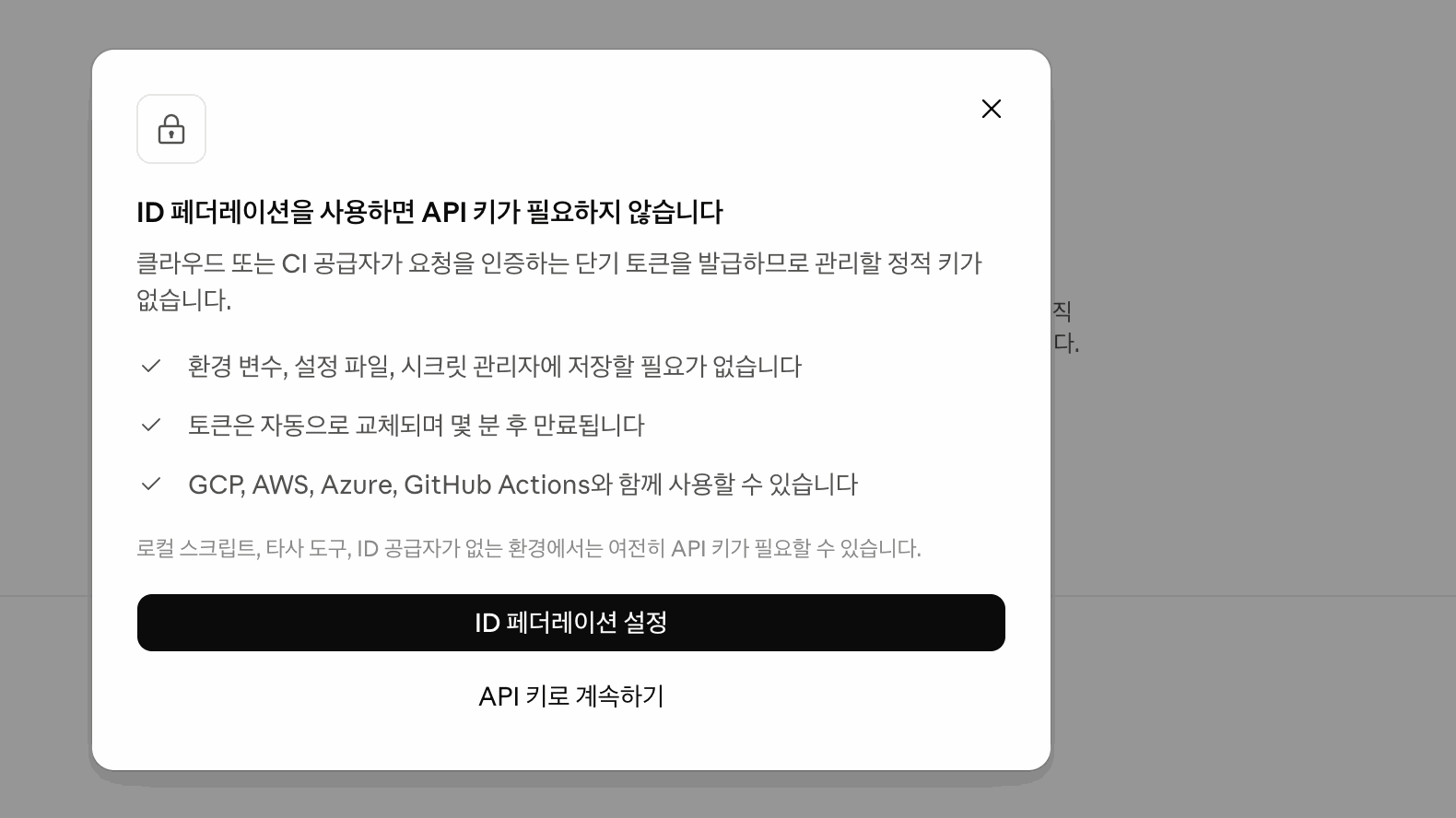
- If you run on GCP, AWS, Azure, or GitHub Actions, choose “Set up ID federation.” As the dialog describes, it uses tokens that expire after a few minutes, so you do not keep a static key.
- If you attach it to a script on your own computer or to a third-party tool, click “Continue with API key.” The dialog also notes that an API key may be required in these environments.

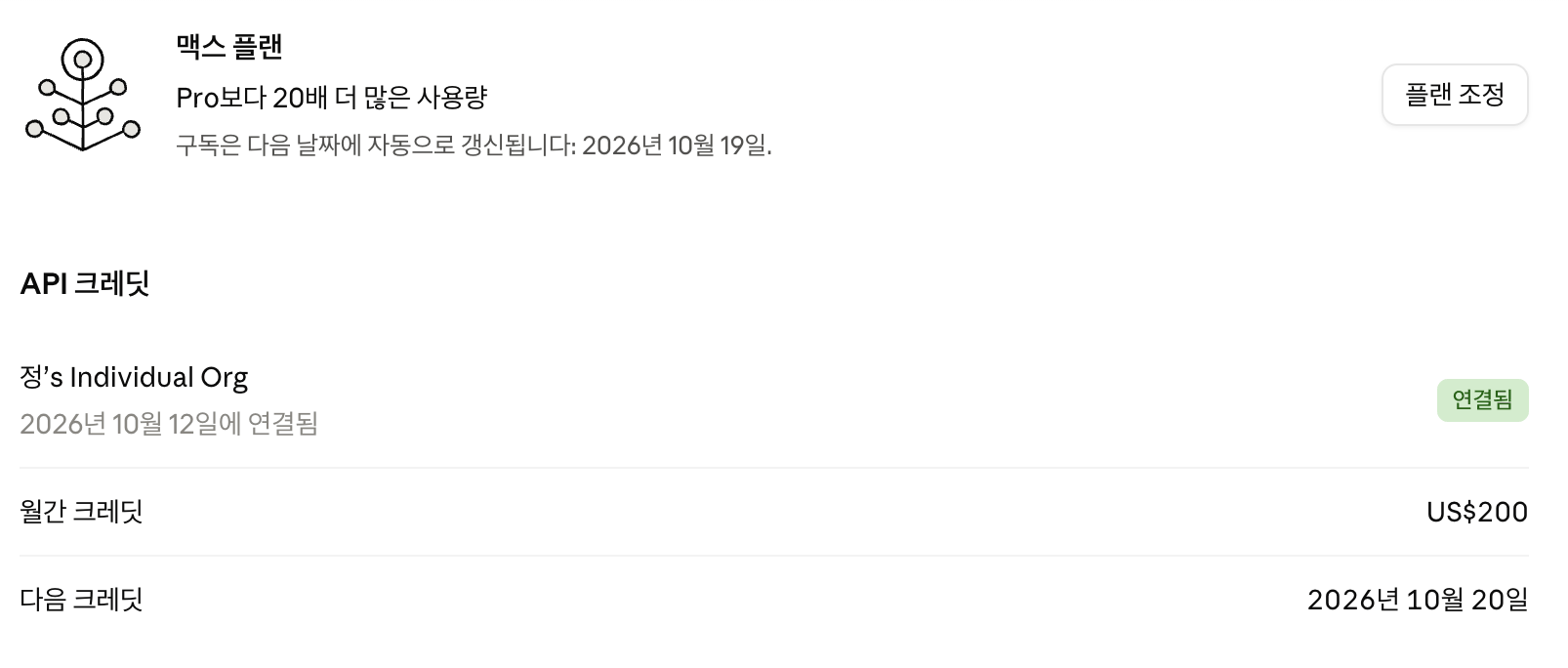
After linking, the screen shows the plan renewal on October 19 and the next credit on October 20. Check the next credit date in the Next credit line on this screen, not the renewal date.
3. Where you can and cannot use them
| Product | Credits usable |
|---|---|
| Claude API (called from your program) | Yes |
| Claude Managed Agents | Yes |
| Claude Agent SDK | Yes |
| Console Playground | Yes |
| Claude Code | No |
| Extra usage in the Claude app | No |
| Claude Platform on AWS, Bedrock, Google Cloud, Microsoft Foundry | No |
The official document lists Claude Code as excluded.
- The credits do not change the usage limits for the Claude app or Claude Code.
- Extra usage credits under the claude.ai billing page are credits you buy to keep using Claude after you hit your plan limit. They are different from these API credits.
4. What to know before linking
- One plan, one org. A plan links to only one Console org, and an org receives credits from only one plan.
- You cannot change the linked org yourself. To change it, you have to contact support, so link the org that will run the programs you plan to build and run.
- Two roles are required. On the plan side, you must be the Max subscriber, or on Team, the default owner or an owner. On the Console org side, you must have the Owner, Admin, or Billing role.
- New subscribers wait 7 days. You can receive credits after using the plan for 7 days. If you are not eligible, the API credits section does not appear on the billing page.
- Subscriptions bought in the app also count. You can receive credits even if you subscribed through the iOS or Android app, but linking is done in claude.ai in a web browser.
5. Order of use and what happens when credits run out
| Item | Details |
|---|---|
| Order of use | Plan-included credits first, then credits you purchased |
| Auto-reload | Works only based on purchased balance. It can reload even when included credits remain |
| Multiple API keys and workspaces | The entire linked org shares one balance |
| Included credits used up, purchased credits remain | Requests continue on purchased credits |
| No credits left | API requests stop until the next monthly grant. Nothing is charged to the plan |
| Orgs billed by invoice | Usage above the credits is billed as usual |
| Remaining balance | Expires at the end of the billing cycle. No rollover |
- To cap spending per project, create a separate workspace for each project and set a workspace spend limit.
- Usage paid with credits also counts toward the org’s monthly spend limit. The spend limit resets on the 1st of each month, while credits renew on the billing cycle, so the reset dates differ.
- A linked org moves up to at least the Start usage tier, and to at least the Build tier if the monthly credit exceeds $200. Otherwise, credits do not count toward tier advancement.
- When the balance runs out, API responses return an error starting with
Your credit balance is too low to access the Anthropic API.
6. Changing or canceling your plan
| Change | Result |
|---|---|
| Cancel, downgrade to an ineligible plan, or refund | New grants stop. Credits already received can be used until they expire |
| Upgrade from Max 5x to Max 20x | Prorated credits granted immediately, then $200 every cycle |
| Move from Max to Team | Max link ends. The Team owner receives credits after 7 days on Team |
| Add or remove Team seats | Added seats take effect from the next billing month. Removed seats remain until renewal |
If you subscribed through Google Play, the $200 from upgrading to Max 20x is granted later than this, no later than the next renewal.
7. How to spend less
The official document recommends four approaches.
- Choose a model that fits the task. The official document points to Choosing a model. I covered the pricing of Haiku 5.5, the cheapest model, in the Claude Haiku 5.5 launch post.
- Prompt caching. If you send the same instructions or reference material with every request, use prompt caching to cut the cost of the repeated portion.
- Message Batches API. For work that does not need an immediate answer, send it as a batch to get 50% off.
- Track spending. Check how much you have used on the Cost page in the Console.
8. Frequently asked questions
Can I use these credits for more chat?
No. They do not apply to extra usage in the Claude app, and your Claude plan usage limits stay the same.
Can I use them with Claude Code?
No. Claude Code is excluded. Agents you build with the Agent SDK can run on these credits.
Do Pro subscribers get these credits?
No. Only Max 5x, Max 20x, and Team (including discounted Team plans) are eligible.
Do unused credits roll over to the next month?
No. Remaining credits expire at the end of the billing cycle.
Will my plan card be charged when I run out?
Not for the plan itself. If you have no other credits, API requests pause until the next monthly grant. Two cases still cost money:
- If auto-reload is on, your purchased balance reloads with the payment method on the Console. Included credits may still remain, but the purchased balance reloads once it reaches the threshold.
- Orgs billed by invoice through the Anthropic sales team are charged for usage above the credits as usual.
Does this work with Claude on Bedrock or Google Cloud?
No. It applies only to the Claude API in the Claude Console.
Frequently asked questions
- Can I use these credits for chat?
- No. The credits do not apply to extra usage in the Claude app, and your Claude plan usage limits stay the same.
- Can I use these credits with Claude Code?
- No. Claude Code is excluded. Agents you build with the Agent SDK can run on these credits.
- Do Pro subscribers get these credits?
- No. Only Max 5x, Max 20x, and Team (including discounted Team plans) are eligible.
- Do unused credits roll over to the next month?
- No. Remaining credits expire at the end of the billing cycle.
- Will my plan card be charged when I run out?
- Not for the plan itself. If you have no other credits, API requests pause until the next monthly grant. Two cases still cost money: auto-reload with a Console payment method, and orgs billed by invoice through the Anthropic sales team, where usage above the credits is billed as usual.
- Does this work with Claude on Bedrock or Google Cloud?
- No. It applies only to the Claude API in the Claude Console.
BuildnWrite helps teams build AI agents that keep running. About BuildnWrite ›