The 4 Stages of AI Automation Adoption in a Company: The Challenge Stage Decides It
Who this is forManagers responsible for settling AI automation in a company, and people stuck after repeated training sessions where nobody uses the tools.
TL;DR: In a company, AI automation settles in four stages: training, challenges, going live, and documentation. The key is decided in the second stage. People who did not use the tools even when given access and training started moving in the challenge, where they built workflows for their own jobs. The last stage, documenting what was built, is something both presenting companies said they have not solved yet. I laid out what to do at each stage for people leading AI adoption at a company and for people starting workflow automation on their own.
Contents
- The Four Stages at a Glance
- Training and Challenges: Access Alone Doesn’t Get Used
- Going Live: Moving What You Built Into Company Systems
- Documentation: Keeping It Running Without Its Creator
- The Order for Someone Starting Alone
I often hear that companies have rolled out AI tools and nobody uses them. Accounts are open to every employee and training has run several times, yet usage doesn’t rise. On the individual side, there’s a different frustration: people have learned the tools but don’t know what to attach them to in their own work.
On September 1, 2026, I attended two talks at Infograb’s Next Delivery Stack 2026, held at Yangjae L-Tower (an office building in Seoul), that tackled this problem head-on. One was an account of how a manufacturing group, not a software company, spread n8n across the whole company. The other was a report from someone who manages development infrastructure at a group IT services company, on what happened after opening AI tools to everyone.
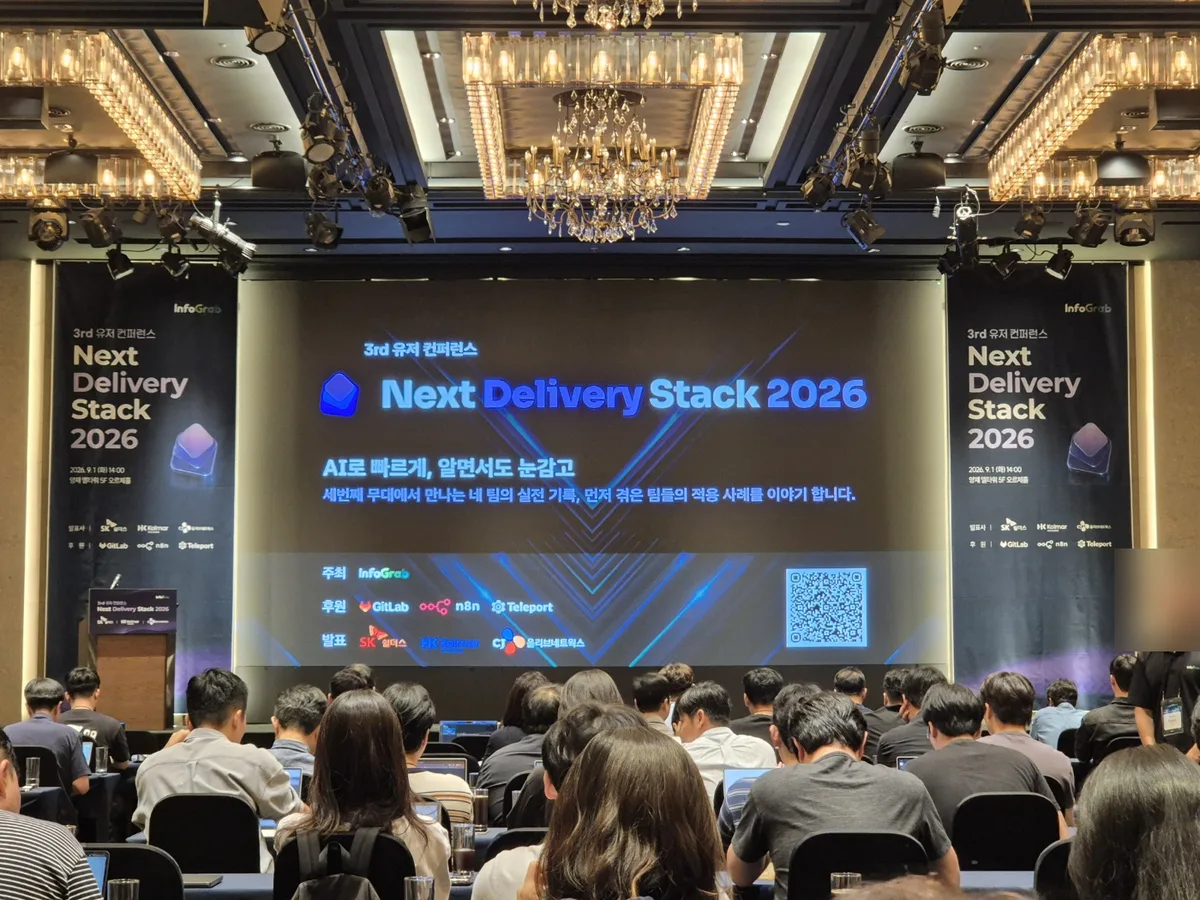
The two talks were different, but their message was the same. This post organizes that picture into four stages and lays out what company managers and individual practitioners should do in each one.

1. The Four Stages at a Glance
The order in which AI automation settles into a company
The key is decided at stage 2; the homework is at stage 4
Here is each stage’s goal, deliverables, and to-dos laid out in a table.
| Stage | Goal | Key deliverables | What the company does | What the individual does |
|---|---|---|---|---|
| 1. Training | Tool awareness and first use | Accounts, completed training, voluntary usage rate | Training led by the talent development team; IT prepares development and test environments | Note down one repetitive task of mine |
| 2. Challenge | Automate one of my own tasks directly | Workflows for operational use, presentation to executives | Open call, selection, supporter assignment, presentation event, awards and reflection in performance reviews | Build that one task through to the end |
| 3. Going live | Move personal builds into company systems | Separated development and production, approval process, management of access info and execution limits | Standardize system connections on one designated communication channel (API); install human approval gates | Review permissions, accounts, and costs with IT or administrators |
| 4. Documentation | Keep operations running even without the owner | Flow charts, architecture documents, a question channel for code | Adopt automated documentation tools; record owners and linked departments | Records that let someone else fix things even without me |
2. Training and Challenges: Access Alone Doesn’t Get Used
The talk by Kim Wook, team lead at Kolmar Holdings, was an adoption story from a manufacturing group. The group has no dedicated IT company, so the holding company handles shared IT. It showed how far a cosmetics and pharmaceutical maker had taken n8n.
The first point was the limits of training. Last year they opened a company-wide AI service and gave everyone access, but usage did not rise. The talent development team led training, while IT prepared development and test environments. They ran 58 AI training sessions last year and 61 this year. Even so, people who were only given access still did not use it.
So they created a Challenge Lab. Seeing that hackathons were in vogue in early last year, they tried the same format with automation tools. The flow went like this:
- Open call: 36 teams across the company applied
- Selection: 15 teams were chosen and assigned supporters (instructors, an idea validation team, and the talent development team)
- Build: over a set period, teams took training while building their ideas for real
- Presentation: a final showcase in front of executives
- Awards: prizes, plus reflection in performance reviews
Ten of the teams that did not make it but still wanted to try applied separately to an Open Lab. Counting the two Challenge rounds and one Open Lab, according to the presenter, 41 teams took part and 75 workflows built for operational use came out of it. Personal experiments were not counted.
What changed the atmosphere was a remark from management. After the direction came down to reflect the work in performance reviews, training sessions filled up quickly. Submissions kept coming in even after the program ended. Complaints came in that people were neglecting their own jobs to do only this, and the team lead took that as the measure that activation had happened in a short time.
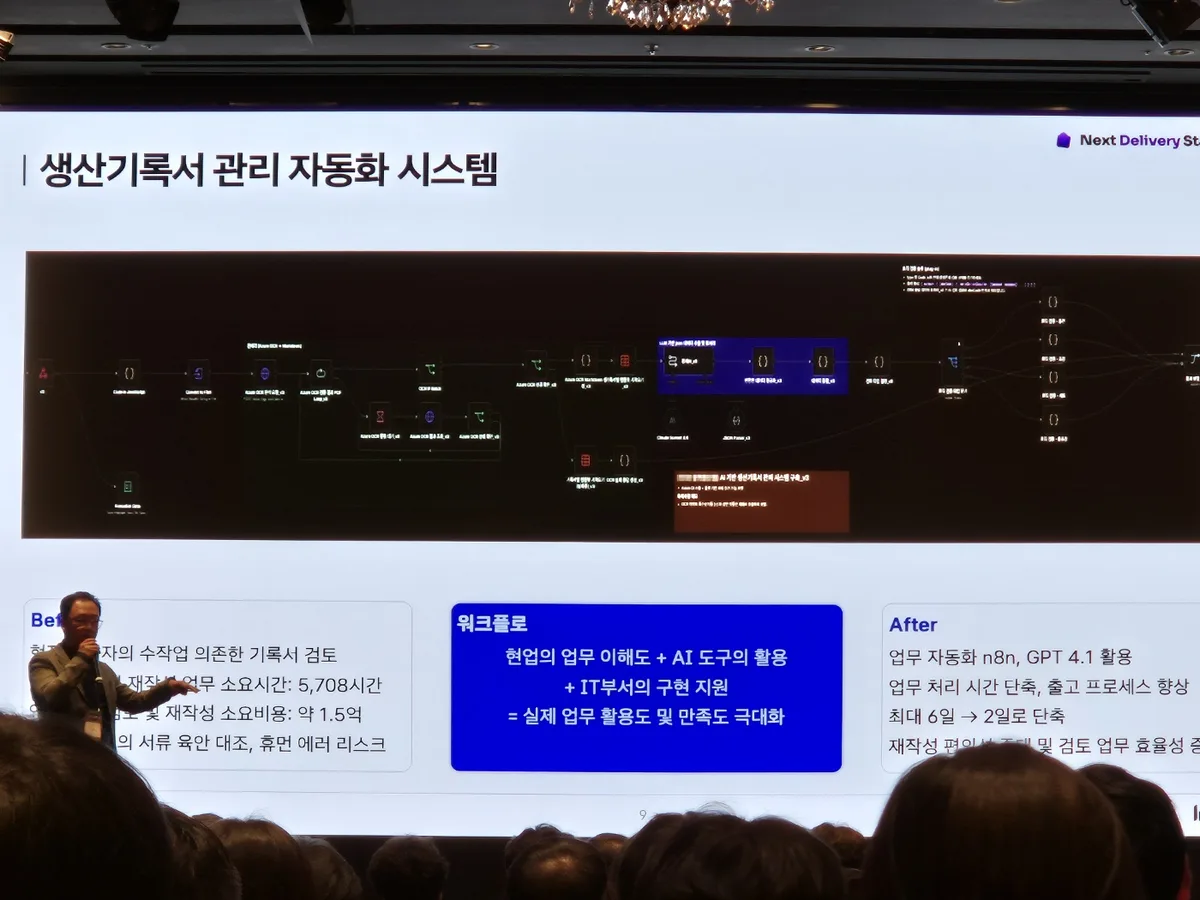
Production record review: from manual work to automation
The builder is the business team that knows the work, not IT
A question came up about why they chose n8n, and the answer was accessibility for non-developers. The principle is that learning time comes out of one’s own work hours, and in return the company creates training opportunities and an atmosphere for learning. They also added that more nodes do not make a better workflow; what matters is how well it turns business people’s ideas into something that works.
3. Going Live: Moving What You Built Into Company Systems
When the challenge ends, workflows pile up. The second half of the talk covered the problems that start here. Workflows that business teams built themselves flow back into IT. They come in with HTML screens made by talking to AI, asking, “Couldn’t we do it this way?” The number of management points spikes.
So they split development servers from production servers. Even entering development requires a drafting and approval step, and moving to production has a separate approval process. Because business teams put their own convenience ahead of security, accounts, and cost, going live carries risk, and the team lead’s conclusion was that IT’s skills and budget to handle it are a must.
Manager Cho Dae-hwi of CJ Olivenetworks was tackling the same problem from a different angle. This was a report from someone responsible for development infrastructure and quality at a group IT services company.
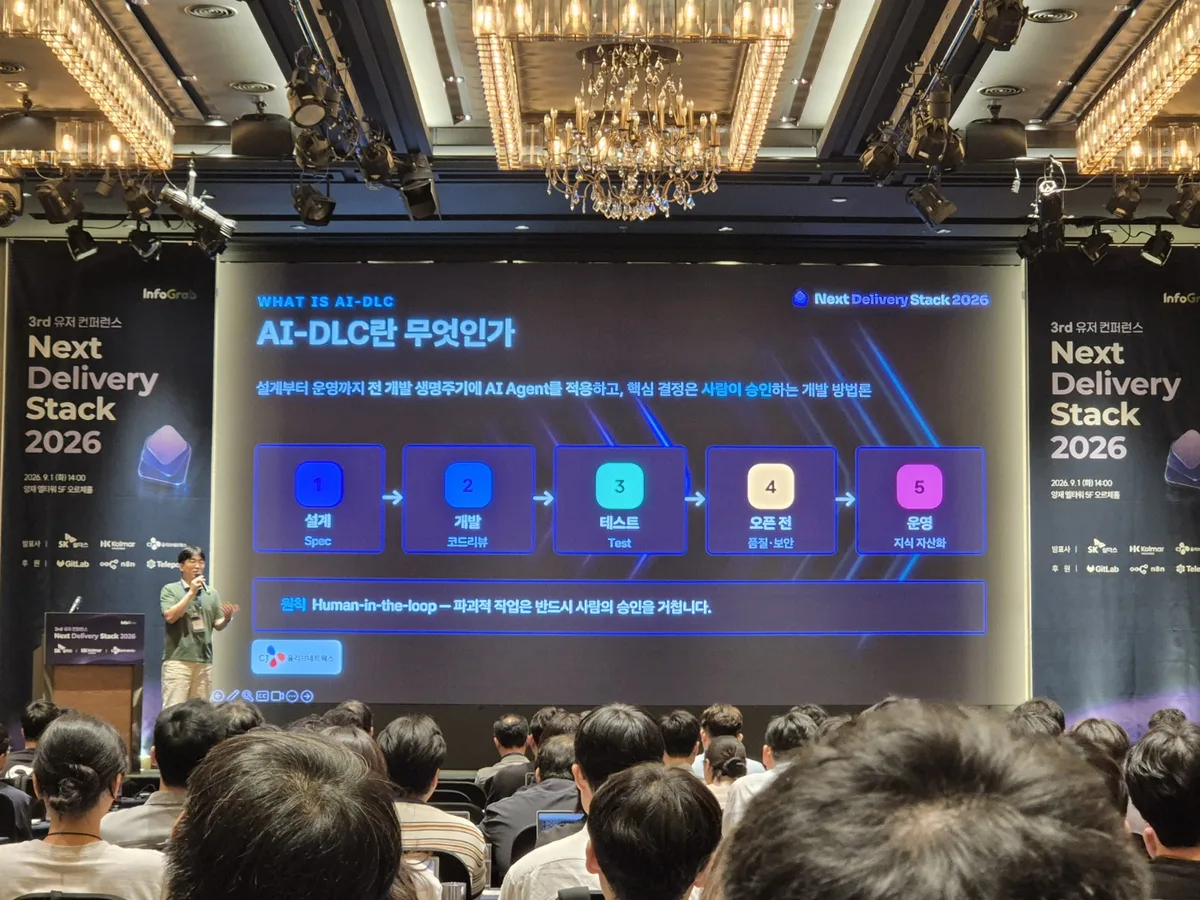
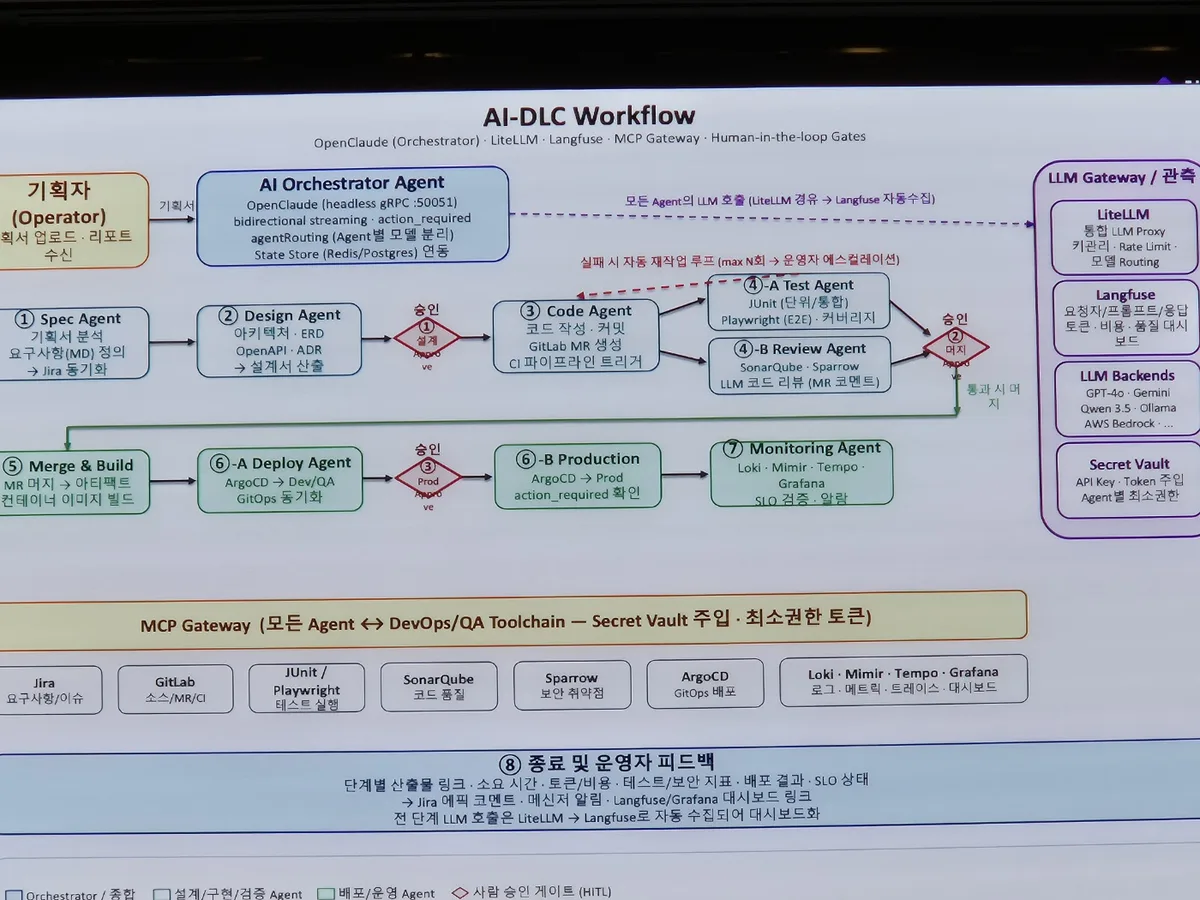
The starting point was variation. Even when tools like Claude Code were rolled out company-wide, the results varied greatly depending on each developer’s individual skill. So they moved quality judgments that had been left to individuals into an agent system for each stage of the development lifecycle. AI-DLC is a methodology that applies AI agents from design through operations while humans approve the key decisions.
Three gates where people stay in control in AI-DLC
- First gate Design approval Preceding step: the agent reads the planning document and writes requirements and design documents
- Second gate Code merge approval Preceding step: the agent writes code, runs tests, and checks quality and security
- Third gate Production deployment approval Preceding step: deploys first to development and verification environments. Following step: production monitoring, with the operator alerted if problems arise
Destructive work always requires human approval. The three gates implement that principle
Getting here took a four-month task force (TF) and pilot applications (PoC) across five projects. Six organizations joined: technology strategy, DevOps connecting development and operations, SI (system integration) delivery, AI operations, AI infrastructure, and security. What stuck with me was the point that when DevOps was introduced, only the DevOps team took part, but an AI transition cannot be done by the technology organization alone.
I laughed at this part. After Claude Code was opened to developers across the company, the number of slides the teams using it made went from 40 to over 50 by the morning of the presentation day. When DevOps spread, it took years to convince people why Git should be used, but now the speaker says people complain, “Give us more tokens” and “Why don’t you give us accounts?” The person who once pushed adoption is now standing where demand has to be held back.
4. Documentation: Keeping It Running Without Its Creator
Putting it into operation was not the end. During Q&A, someone asked Kolmar Holdings what they would do if the person who built a workflow left and no one could understand it. The answer was candid. Honestly, they still haven’t figured out the specifics, and the current stage is one where more is being added than lost.
CJ Olivenetworks handled this problem with a tool. They connected DeepWiki to GitLab, which automatically generates architecture documents and code flow from source code, and they added an in-house AI model so people can ask questions about the code. The problem definition was clear: no one is in charge, so how do you turn agent-written code into a managed asset after the fact? They said it is not yet part of formal governance, but it was the first case of handling stage 4 with a tool.
In the opening of the talk, the speaker contrasted the DevOps adoption story with today. Back then, there was clearly an advanced company to follow. The closing remarks wrapped up that contrast: “There’s no advanced company’s case and no proven effect. It’s a game of who finds it first.”
5. The Order for Someone Starting Alone
If you hear the two talks only as company stories, there’s little to take away. Turning the same four stages into the sequence for one practitioner looks like this:
What an individual does, same four stages
- Training Note down one repetitive task of mine Training is the time for finding material
- Challenge Build that one task through to the end Ideas matter more than node count
- Going live Review permissions, accounts, and costs with IT or administrators If you only look at your own convenience, you stop here
- Documentation A record that lets someone fix it even without me A one-page flow chart and a one-page explanation
Most people stop at the second stage, because once you've built something it feels finished
Source: The Kolmar Holdings and CJ Olivenetworks sessions at Infograb’s 3rd User Conference, Next Delivery Stack 2026 (Yangjae L-Tower), September 1, 2026. Figures and quotes in this post are based on a transcript of 2 hours 12 minutes of field recording and slides I photographed myself. Team counts, workflow counts, and cost estimates are as stated by the presenters. I will update this post if Infograb publishes the presentation materials.
Frequently asked questions
- What are the four stages of AI automation adoption in a company?
- The four stages are training, challenge, going live, and documentation. The key is decided at the challenge stage. Both presenting companies said documentation is still unsolved.
- How many teams took part in Kolmar Holdings' automation challenge?
- According to the presenter, 41 teams took part, counting two Challenge rounds and one Open Lab. The effort produced 75 workflows built for operational use.
Want the full system? The Claude Code & Codex Skills guidebook collects the skills and subagents behind this blog, from $19.
BuildnWrite helps teams build AI agents that keep running. About BuildnWrite ›