Don't Build AI Agents by Department: Define Roles and Structure First
Who this is forPractitioners building several AI agents for company work and adoption leads planning department-specific agents for sales or analytics.
TL;DR: Running a virtual office of agents is not the point. If you move the org chart without deciding who plans and who executes, information leaks out. Attach skills to one main agent, and add subagents only when one of the four cases below fits.
Contents
- What happens with agents built on the org chart
- Attaching skills to one main agent
- Four cases for a separate subagent
- How I split my agents by responsibility
- Decide whether to split or merge by scoring
1. What happens with agents built on the org chart
Agent marketing often shows virtual office screens. You build a sales agent, an analytics agent, and a marketing agent, then put a manager agent on top to hand out work. Copying the company org chart gives you the satisfaction of running a one-person startup.
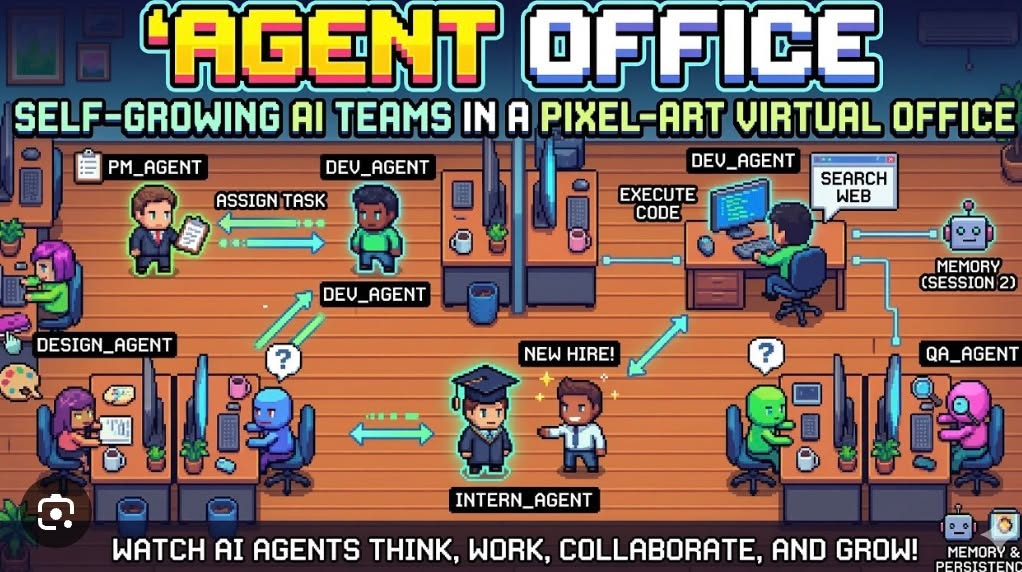
But does this structure actually work? On October 22, 2026, Anthropic published Building agents: When to fold subagents into your main agent loop. The article argues that as companies give each team its own subagent, agent structures turn into copies of the org chart.
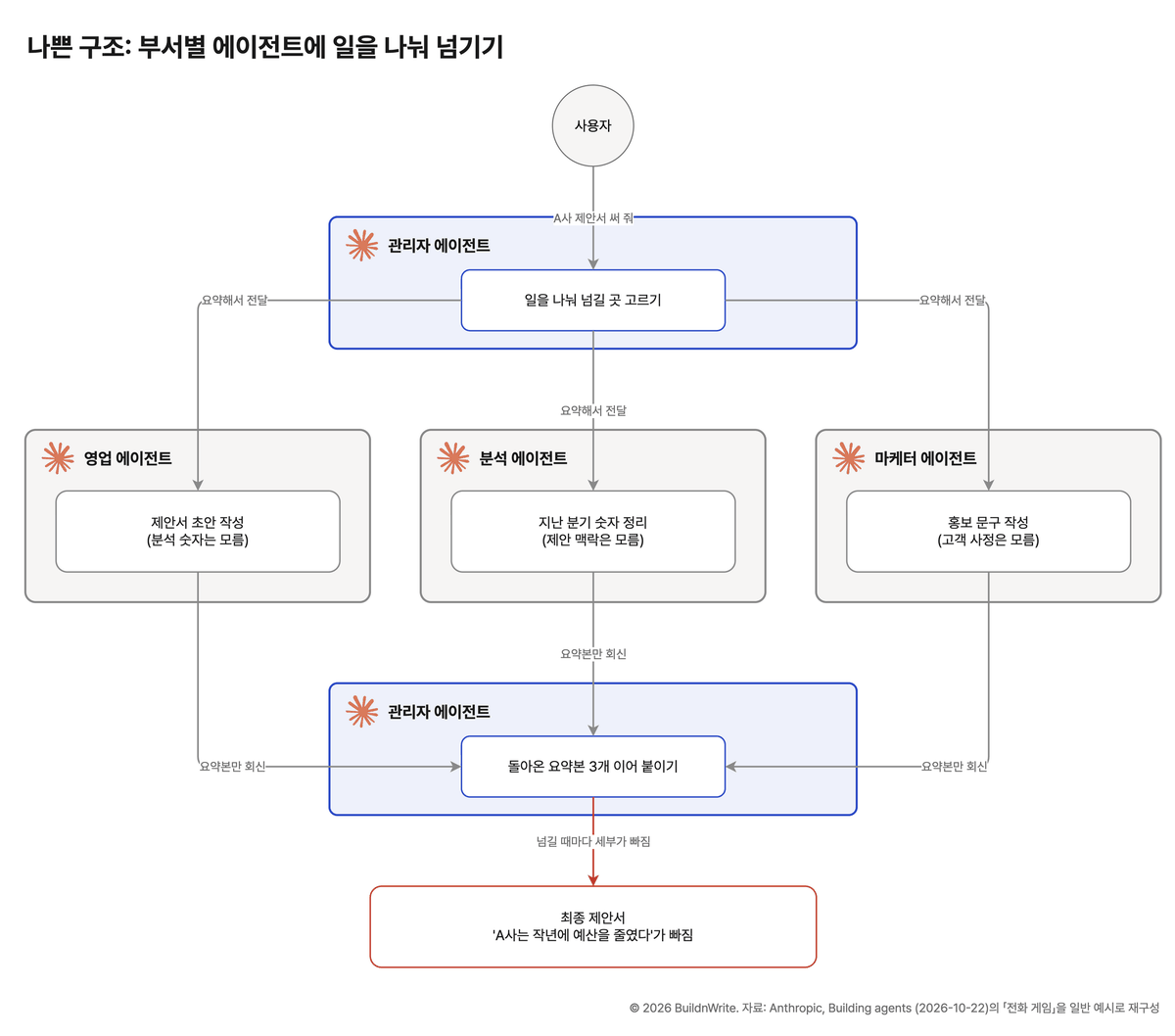
For example, if a manager agent gives three agents the job “write a proposal for Company A,” each returns only a summary of its own part. If the line “Company A cut its budget last year,” found by the analytics agent, doesn’t make it into that summary, it drops out of the final proposal. Anthropic compared this to the telephone game, in which a message changes as it is whispered from person to person.
2. Attaching skills to one main agent
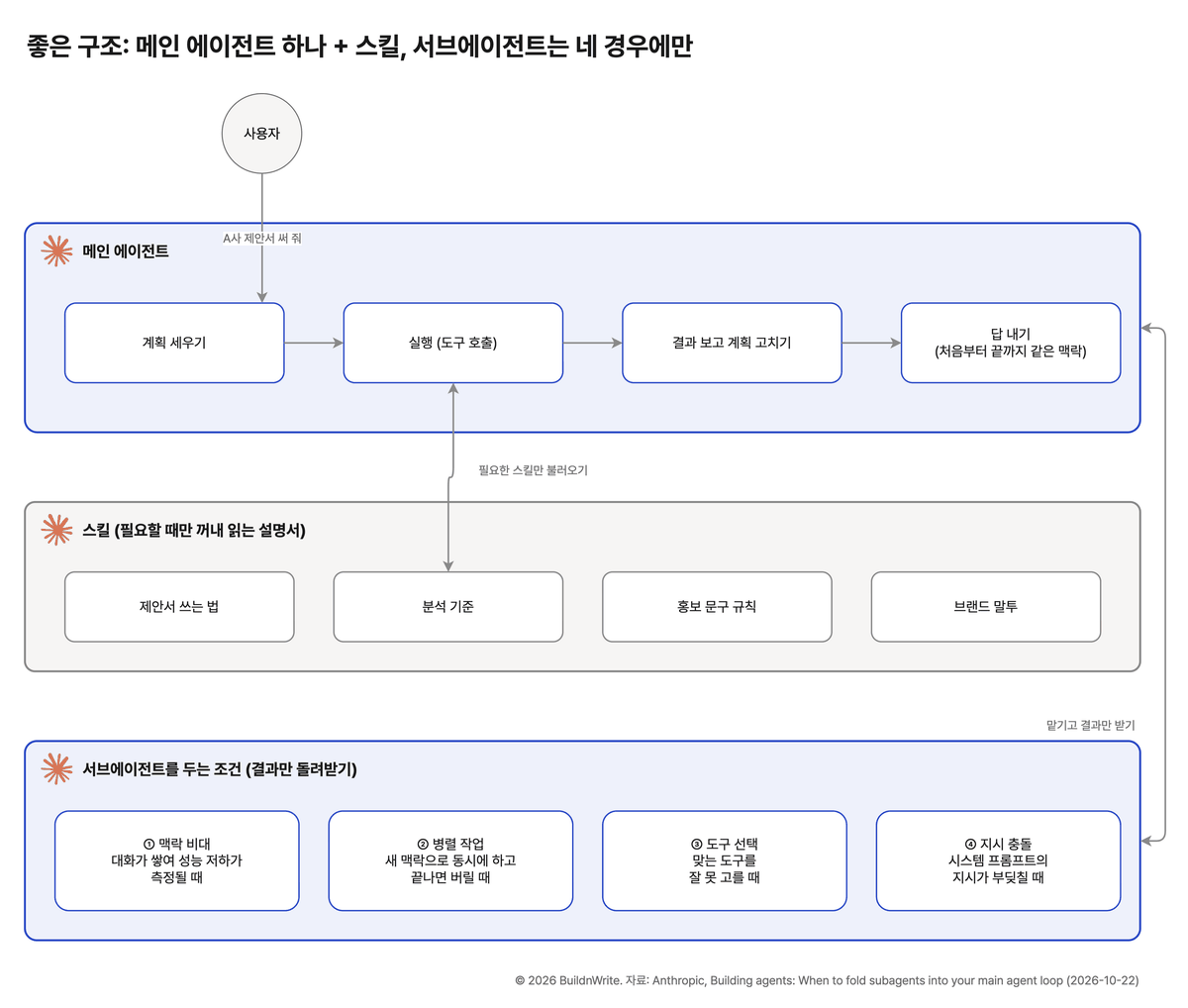
From the start, one main agent makes the plan and pulls in the right skill for each task. Because a single agent sees the same context throughout, nothing gets lost in handoffs, and if the plan turns out to be wrong, it gets fixed on the spot.
- At one client company that compared the two structures, the single-agent setup was about twice as fast.
- Anthropic cut the system prompt for its high-performance Claude Code model by more than 80%. That included the change of having skills and tools read only when needed.
3. Four cases for a separate subagent
Anthropic didn’t say to drop subagents. It listed three conditions for when to use them. Splitting the third condition (tool selection or conflicting instructions) into two gives four cases.
| Case | One-line description |
|---|---|
| Context bloat | Performance drops are measured because of accumulated conversation and material |
| Parallel work | Tasks that don’t wait on each other run at the same time in fresh contexts |
| Tool selection | Too many tools make it hard to pick the right one |
| Conflicting instructions | Rules in the system prompt collide with each other |
Context bloat: when piled-up material makes answers worse
When conversation, material, and intermediate results keep piling up in one agent, it is easy to lose track of earlier instructions. One example is an agent that has to read hundreds of pages of contracts and then summarize them.
- Before splitting: have skills and tools read only when needed. Anthropic wrote that this approach removes the main reason teams had been splitting work into subagents.
- If it still gets worse: have a subagent read the material and return only a short result. The criterion is a measured performance drop, not a feeling.
Parallel work: when tasks don’t wait on each other
If three reporters each write one of three articles, the job finishes sooner. Researching three competitors separately works the same way. Each subagent starts with a fresh context, and once its job is done, that context is discarded.
- Good fit: independent research and separate tasks with clear boundaries
- Poor fit: tasks that pick up the output of a previous step. Anthropic said agents like these are better candidates for merging.
Tool selection: when there are too many tools to pick from
Attaching a tool to each system (mail, calendar, customer management, accounting) quickly makes the tool count grow. Anthropic wrote that tool selection tends to get worse once tool definitions in the system prompt pass 30 to 50.
- Before splitting: group tools by what the user is trying to do rather than by system, and have them looked up and loaded when needed.
- If it still can’t pick the right tool: set up a subagent that uses that group of tools.
Conflicting instructions: when rules collide
When each team adds a line to the system prompt, the rules clash and the tone wobbles. If one agent is given both the rule to write reports in polite speech and the rule to write chat messages in casual speech (Korean has distinct speech levels for each), the reports come out with casual wording mixed in.
- Before splitting: a small central team owns the system prompt and reviews new rules before they are added.
- If one prompt still can’t hold everything: split the side with the conflicting rules into a subagent.
4. How I split my agents by responsibility
I also run six agents for responsibilities: customers (sales and consulting), content, marketing, analytics, tax, and development. But the criterion for choosing which owner to call is not the department. It is the length of the work.
| Component | Responsibility |
|---|---|
| Main conversation | Picking the owner, writing briefs, delivering results, getting human approval |
| Six owner agents | Reading each owner’s definition document and drafting; continuing the work when a human reply comes in |
| Review agent | Reviewing each output type, such as blog posts, Threads posts, and course materials. Runs in a different context from the one that made the output |
| Work board | Recording work passed between owners and work waiting on human confirmation |
- Human-owned actions such as sending, publishing, paying, and deploying are not done by owner agents. The main conversation asks me for approval and then handles them.
- The sales owner and the consulting owner were separate at first. They kept revising the same client matters, and schedule changes and delivery checks went back and forth between them. After comparing them on the same evaluation problems, I merged them into one. Quality and cost stayed the same, and fewer documents needed handing off.
- For work with no matching owner, the main conversation handles it directly instead of passing it to a general-purpose agent, because that would only add another briefing to the same model.
Rules that keep information from leaking when handing off
To prevent the telephone game, I set a rule at each handoff point.
| Handoff point | Rule |
|---|---|
| From main to owner | Pass the user’s input verbatim without summarizing, reference documents by path, and state the facts already settled and what is prohibited |
| After a human reply comes in | Call the same agent again to continue, instead of a new agent |
| From owner to main | Report separately anything the owner judged on its own that was not in its definition |
| From owner to owner | Pass the item number from the work board and the original text of that row |
| Results to the human | The main conversation opens the output directly before delivering it |
The work board you review with the agents
Work passed between owners is collected in one Google Sheet (work-pending). The agents read and write this sheet, and I view the same sheet directly.
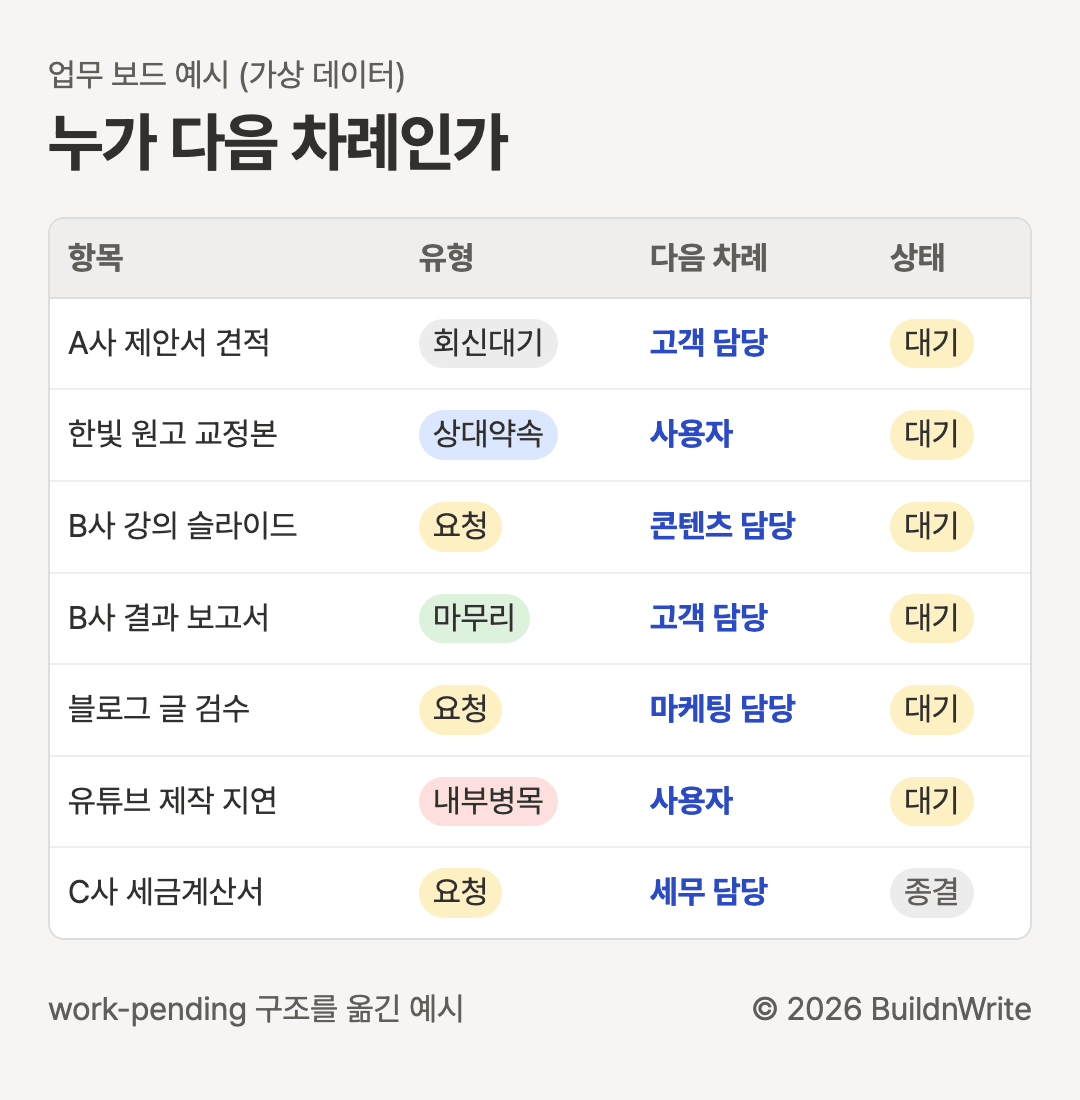
- The Waiting tab holds items waiting for a reply, items I handle myself, or items passed to another owner.
- The Items tab has one line per external promise, and owners add anything that needs to be handed off here.
- Every morning, a reconciliation job compares mail, calendar, Slack, and the sheet, and logs missing facts in the Records tab.
5. Decide whether to split or merge by scoring
Don’t decide whether to split or merge by feel. Anthropic recommended scoring both structures on the same problems and deciding from the results. It also said you can start with 10 reference answers for grading.
- Write 10 frequent requests, and attach a scoring rubric that lists what a good answer must include.
- Include one problem for each connected agent and each rule that must be followed.
- Have both the merged and the split structures solve the same problems several times.
- Don’t look only at the total score. Check which problems that passed before now fail.
- Don’t look only at the answers. Check whether the right skills and tools were called.
BuildnWrite helps teams build AI agents that keep running. About BuildnWrite ›