Which AI Diagram Tool Should You Use: diagram-design, draw.io, Mermaid, or Excalidraw?
Who this is forInstructors, course designers, and automation builders who need system diagrams made with AI tools for slides, documentation, or team discussion.
If you need a system diagram for a lecture deck, a README, or a design review, the tool you pick matters more than most people expect. AI-assisted tools can all produce something that looks like a diagram, but the output files behave very differently. Some give you a polished PNG in one step. Some give you a text file you can diff in Git. Some give you an editable source file that a non-developer can change. This article reports a test in which I drew the same n8n automation with four approaches: diagram-design, draw.io, Mermaid, and Excalidraw. The comparison is organized by purpose rather than by a single ranking. You will get a clear recommendation for each goal, the export command I used, the test conditions, and a simple workflow for deciding when one diagram is enough and when you need two.
Quick answer
If the goal is a PNG for lecture slides, diagram-design is the fastest option. If you need an original file that you will keep editing by hand, draw.io is the right choice. Mermaid works best for documentation, and Excalidraw works best for discussion. In practice, the diagram that looks good for presenting and the source file you keep editing should be produced by different tools.
Key data
1. Test conditions
I drew the same automation four ways. The workflow under test was this file:
/Users/limjung/Projects/n8n-economy/workflow_market_tracker.jsonThe automation does the following:
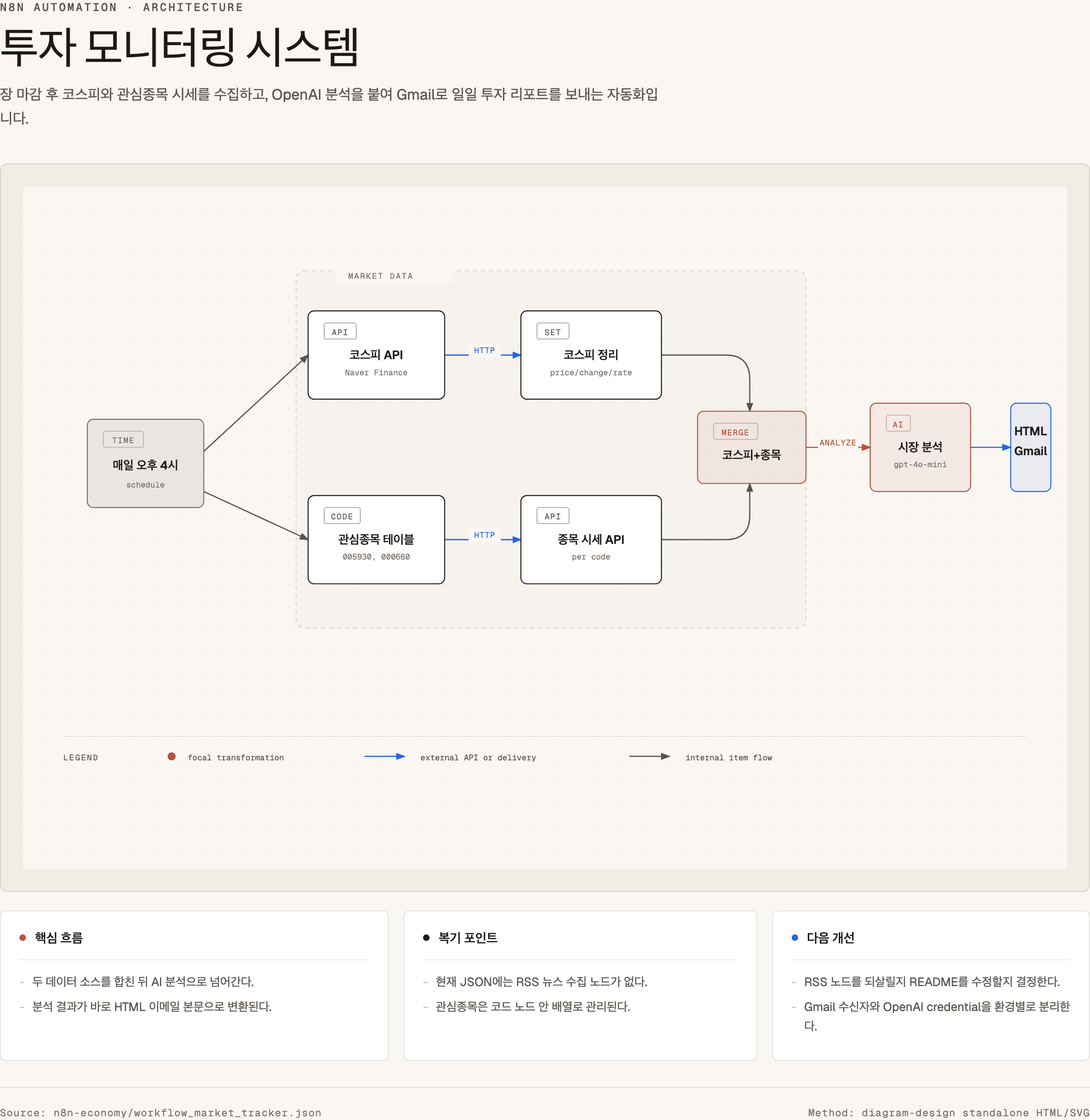
- It runs every day at 4:00 PM.
- It fetches the KOSPI index (South Korea’s main stock market index) and watchlist stock prices from the Naver Finance API. Naver is South Korea’s largest search portal, and its finance service is widely used there.
- It merges the two data flows.
- It creates a market analysis with OpenAI
gpt-4o-mini. - It generates an HTML report.
- It sends the daily investment report by Gmail.
I also found an important discrepancy. The project README mentioned collecting news through RSS, but the actual workflow_market_tracker.json file had no RSS node. Because of this, I built the diagram from the actual JSON file rather than from the README. When documentation and implementation disagree, the implementation is the more reliable source for a diagram.
2. Four outputs
Each approach produced a different kind of file, and each file suits a different use.
| Approach | Output | Main use |
|---|---|---|
| diagram-design | HTML, PNG | Lecture materials, slides, blog images |
| Mermaid | Markdown | README, GitHub docs, wikis |
| Excalidraw | Excalidraw source | Brainstorming, sketch-style discussion |
| draw.io | draw.io source | Editable, formal diagrams |
Here is the representative result:
3. Comparison table
| Criterion | diagram-design | draw.io | Mermaid | Excalidraw |
|---|---|---|---|---|
| Visual quality of the first output | High | Medium | Low to medium | Medium |
| PNG for lecture slides | Very good | Good | Average | Good |
| Ongoing manual editing | Weak | Very good | Text editing | Good |
| Git diff and document management | Average | Weak | Very good | Average |
| Easy for an agent to create | Good | Average | Very good | Average |
| Handing off to non-developers | Good for PNG | Very good | Weak | Average |
| Complex system design | Good | Very good | Average | Average |
| Explaining during a lecture | Very good | Good | Average | Good |
Insights
1. For lectures, an image people understand immediately comes before an exact source file
A diagram on a lecture slide is judged by first impression, not by how easy it is to edit. Students and audience members never see the .drawio source file. They see the PNG on the slide. By this standard, diagram-design performed best. It produces HTML/SVG, which you can check immediately in a browser before exporting to PNG. The title, explanatory sentences, diagram, and summary card all fit within one frame, so the result works the way a Claude Artifact works.
I exported the PNG for this test with the following command:
python3 ~/.codex/skills/lecture-diagram-maker/scripts/export_html_png.py \
  diagram-design-investment-monitor.html \
  diagram-design-investment-monitor.png \
  --selector main \
  --width 1600 \
  --height 1000 \
  --scale 2
2. draw.io is strongest when you need final editing control
draw.io does not produce the most attractive result on the first try. What it offers instead is the most stable editable source. It is the better choice in these situations:
- A customer or student needs to make their own changes.
- The lecture material must be updated repeatedly.
- A person needs to fine-tune shape positions and line routing.
- The original source file must be delivered alongside the PNG.
For these reasons, draw.io is closer to a diagram document format than to an image generator.
3. Mermaid is a diagram that lives inside the text
Mermaid is not the most visually striking option, but it is easy to manage inside Markdown documents, GitHub, and some Notion setups. Its advantages are clear:
- Because it is text, changes show up clearly in diffs.
- It is easy to include in a README.
- You can share a structure quickly.
- An AI agent can write it reliably.
The drawback is that a PNG for a slide requires a separate rendering step. If the goal is to put an image on a slide, Mermaid takes one more step than either diagram-design or draw.io.
4. Excalidraw is better for opening a discussion than for giving a final answer
Excalidraw suits system design meetings and brainstorming sessions. Its hand-drawn look signals that a design is not yet settled.
For lecture materials that must convey exact information, however, that advantage shrinks. Excalidraw works better for drawing with students during class or for presenting a rough architecture draft than for a polished final slide.
5. The same automation needs different diagrams for different purposes
The most important conclusion from this test is not a tool ranking. It is the separation of purposes. The table below summarizes the recommendation for each purpose.
| Purpose | Recommendation |
|---|---|
| PNG to drop straight into lecture slides | diagram-design |
| Editable source file as well | draw.io |
| Embedding in a README or technical document | Mermaid |
| Discussion and brainstorming during class | Excalidraw |
If you plan a lecture material workflow, the default I recommend is the following:
Check the actual source
→ Generate an explanatory HTML/SVG with diagram-design
→ Export PNG
→ Insert into slides
→ Create a draw.io source in parallel only when needed
Decision criteria
My default workflow going forward
I plan to follow these steps from now on:
- Read the actual workflow JSON, code, and configuration files first.
- If the README or other documentation does not match the actual structure, trust the actual structure.
- For lecture materials, create the first draft with diagram-design.
- Export a PNG and insert it into Keynote, PowerPoint, or the blog.
- If I expect repeated revisions, also create a draw.io file.
- Add a Mermaid file only when the diagram needs to be kept in a documentation repository.
- Use Excalidraw only when I need a rough sketch for discussion.
One-line version of tool selection
- A diagram to show: diagram-design.
- A diagram to edit: draw.io.
- A diagram to keep in a document: Mermaid.
- A diagram to talk through together: Excalidraw.
Draft social posts
I also drafted short posts for LinkedIn and Threads. They are summarized below, with the same conclusions as the article.
LinkedIn version
When you draw system diagrams with AI agents, which tool should you use?
I drew the same n8n automation four ways:
- diagram-design
- draw.io
- Mermaid
- Excalidraw
The test subject was an investment monitoring automation. Every day at 4:00 PM, the n8n workflow fetches KOSPI and watchlist prices, creates a market analysis with OpenAI, and sends the HTML report by Gmail.
The conclusion was fairly clear. If the goal is a PNG for lecture slides, diagram-design worked best. The reasons are simple:
- It looks like a slide from the start.
- Because it is HTML/SVG, you can check it in a browser immediately.
- The title, explanation, diagram, and summary card fit in one frame.
- You can export it as a PNG and insert it into Keynote or PowerPoint easily.
draw.io is the better choice when you need an editable source file. If you need to hand the file to a student or client so they can edit it, draw.io is the right tool. The first output of diagram-design was more visually complete, however.
Mermaid is for documentation. It works well in READMEs and on GitHub, but a lecture slide image needs one more rendering step.
Excalidraw is for discussion. It is useful when you are working out a structure with students during class, rather than presenting a settled design.
My lecture material workflow will look like this from now on:
Check the actual workflow or code
→ Generate an explanatory HTML/SVG with diagram-design
→ Export PNG
→ Insert into slides
→ Add draw.io in parallel only if an editable source is needed
In one line:
- A diagram to show: diagram-design
- A diagram to edit: draw.io
- A diagram to keep in a document: Mermaid
- A diagram to talk through together: Excalidraw
The important point was not the tool ranking. It was separating the purposes. A lecture image should be something the audience understands within three seconds, before it is an exact source file.
Threads version
Which should you use to draw system diagrams with AI?
I drew the same n8n automation four ways.
- diagram-design
- draw.io
- Mermaid
- Excalidraw
Conclusion:
Lecture slide PNG: diagram-design. Editable source: draw.io. Documentation: Mermaid. Discussion: Excalidraw.
Why diagram-design works for lectures:
- It looks good from the start.
- It is HTML/SVG, so it opens in a browser right away.
- PNG export is easy.
- You can use it the way you would use a Claude Artifact.
draw.io is different.
Its first output is not the most attractive, but people can keep editing it. If you need to hand the original to a student or client, draw.io is the right choice.
Mermaid is for READMEs. It is text, so Git diffs are clean and it is easy to put in a document. For a slide PNG, though, you need a rendering step.
Excalidraw is for discussion during class. It gives the feeling of a design that is not yet final.
My lecture workflow will probably look like this:
Check the actual workflow → Generate an explanatory diagram with diagram-design → Export PNG → Insert into slides → Add draw.io if an editable source is needed
One-line conclusion:
A diagram to show and a diagram to edit are different things.
Bottom line
The evidence from this test points to one conclusion: match the tool to the purpose instead of looking for a single best tool. For a lecture slide, diagram-design produced the most immediately readable result and exported cleanly to PNG. For material that people will revise over time, draw.io is the better choice because it keeps an editable source. Mermaid is the right format when the diagram belongs in a repository alongside code and text, and Excalidraw is for sketching ideas that are still open. When a single lecture needs both a finished image and an editable file, create both. Before drawing anything, check the actual workflow or code, because the README in this test did not match the real JSON.
Sources
- Workflow under test:
/Users/limjung/Projects/n8n-economy/workflow_market_tracker.json - Experiment outputs:
researches/assets/2026-04-21-diagram-tools/ - diagram-design: https://github.com/cathrynlavery/diagram-design
- diagram-design on skills.sh: https://skills.sh/cathrynlavery/diagram-design
- draw.io skill: https://skills.sh/bahayonghang/drawio-skills/drawio
- Excalidraw Diagram Skill: https://github.com/coleam00/excalidraw-diagram-skill
- Mermaid: https://mermaid.js.org/
- Excalidraw: https://excalidraw.com/
- diagrams.net/draw.io: https://www.diagrams.net/
Frequently asked questions
- Which tool should I use for a diagram on a lecture slide?
- Use diagram-design. In this test it gave the strongest first-pass visual, and its HTML/SVG output could be checked in a browser and exported as a PNG for slides. If students or clients need to edit the file later, make a draw.io source file as well.
- When is Mermaid a better choice than the other tools?
- Mermaid is best for documentation such as READMEs, GitHub docs, and wikis. It is plain text, so Git diffs are readable and an AI agent can write it reliably. It needs an extra rendering step before it can go on a slide as a PNG.
BuildnWrite helps teams build AI agents that keep running. About BuildnWrite ›